Configuration
Configuration in Citeck is divided into two main levels:
System level
Administrator level
System level
This configuration level is necessary for setting low-level parameters that are not expected to be changed during application operation (database connection parameters, settings for enabling/disabling services in the application, etc.).
System-level configuration is configured using Spring Cloud tools - https://spring.io/projects/spring-cloud
The ecos-registry container loads configuration from the specified directories at startup and distributes this configuration to all applications.
Configuring ecos-registry through environment variables:
- SPRING_CLOUD_CONFIG_SERVER_COMPOSITE_0_TYPE=native
- SPRING_CLOUD_CONFIG_SERVER_COMPOSITE_0_SEARCH_LOCATIONS=file:/central-config/
The path in the second parameter indicates where the configuration will be loaded from
Administrator level
ECOS Configuration is an artifact that allows describing some system parameters with the ability to conveniently use their values both in code and in the interface to change parameters without server restart.
Artifact location: resources/eapps/artifacts/app/config
Supported formats: yml, yaml, json
Microservice responsible for storage and management: ecos-apps
Can be used: in any application
Project-Id-Version: Citeck Report-Msgid-Bugs-To: POT-Creation-Date: 2025-12-19 00:02+0300 PO-Revision-Date: 2025-08-28 23:55+0300 Last-Translator: Your Name <your.email@example.com> Language: en Language-Team: en <LL@li.org> Plural-Forms: nplurals=2; plural=(n != 1); MIME-Version: 1.0 Content-Type: text/plain; charset=utf-8 Content-Transfer-Encoding: 8bit Generated-By: Babel 2.17.0
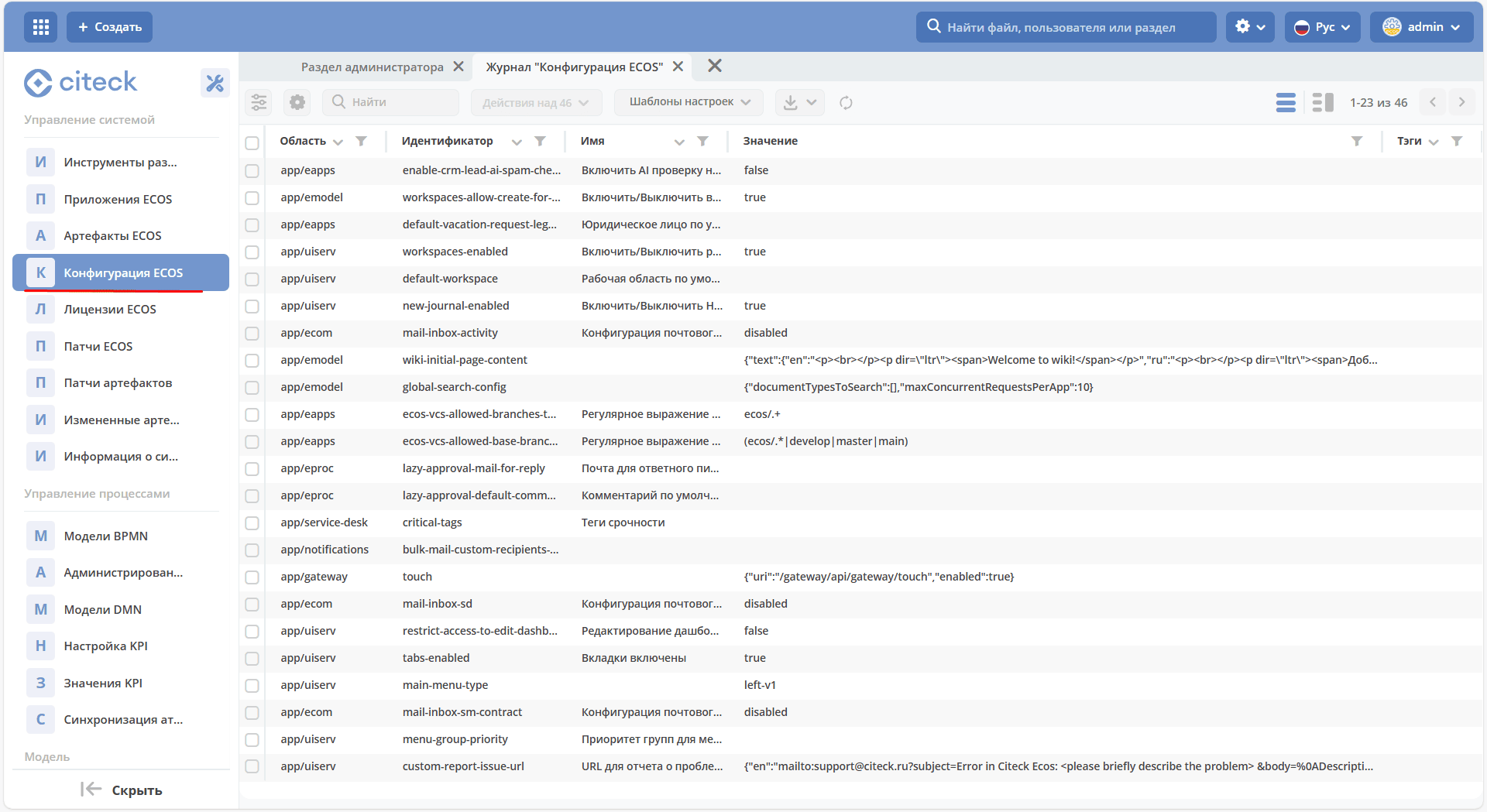
The journal is available at: v2/journals?journalId=ecos-configs&viewMode=table&ws=admin$workspace
Configuration examples:
---
id: active-theme
name:
  ru: Активная тема
  en: Active theme
value: ecos
---
id: custom-feedback-url
name:
  ru: URL для обратной связи
  en: URL for feedback
value: 'https://www.citeck.ru/feedback'
To use this configuration in code, we can set the annotation @EcosConfig("configuration_identifier") on a field or method where the configuration value should be placed.
Any configuration changes in the interface will lead to automatic updating of the field value or calling the method that was marked with the @EcosConfig annotation.
Example:
// kotlin
@Component
class CustomComponent {

    // Проставление через поле можно использовать
    // если нам не важно отлавливать событие изменения
    // Для полей можно использовать "var" и "lateinit var"
    @EcosConfig("some-config-id")
    private var configValue: String? = null

    // Проставление через метод можно использовать
    // если нам важно отлавливать событие изменения
    @EcosConfig("some-config-id")
    private fun setConfig(value: String) {
        println("New value: $value")
    }
}
// java
@Component
public class CustomComponent {

    // Проставление через поле можно использовать
    // если нам не важно отлавливать событие изменения
    @EcosConfig("some-config-id")
    private String configValue;

    // Проставление через метод можно использовать
    // если нам важно отлавливать событие изменения
    @EcosConfig("some-config-id")
    private void setConfig(String value) {
        System.out.println("New value: " + value);
    }
}
If it’s necessary to manually apply configuration based on annotations to some bean (may be required where there is no Spring context), then you can use the BeanConsumerService service.
Test example:
import org.assertj.core.api.Assertions.assertThat
import org.junit.jupiter.api.Test
import ru.citeck.ecos.config.lib.consumer.bean.EcosConfig
import ru.citeck.ecos.config.lib.service.EcosConfigServiceFactory

class CustomComponentTest {

    @Test
    fun test() {

        val services = EcosConfigServiceFactory()
        val instance = CustomClass()

        // проверяем, что сейчас в field ничего нет
        assertThat(instance.field).isNull()

        // регистрируем все поля и методы с аннотацией @EcosConfig
        services.beanConsumersService.registerConsumers(instance)

        // т.к. значения для "some-config-id" мы не проставляли, то ожидаем, что значение все еще null
        assertThat(instance.field).isNull()

        // проставляем значение конфига в in-memory провайдере
        services.inMemConfigProvider.setConfig("some-config-id", "123")

        // после проставления значения в одном из провайдеров ожидаем, что поле с аннотацией автоматически заполнилось
        assertThat(instance.field).isEqualTo("123")

        // получаем значение через EcosConfigService
        val value = services.ecosConfigService.getValue("some-config-id").asText()

        // проверяем, что значение, которое мы получили из EcosConfigService совпадает с тем, что мы проствляли в провайдере
        assertThat(value).isEqualTo("123")
    }

    class CustomClass {

        @EcosConfig("some-config-id")
        var field: String? = null
    }
}
Creating a new config
To create a new config, you need to create a yaml file at the path src/main/resources/eapps/artifacts/app/config
For example, telegram-authtoken.yml
With the following content:
id: telegram-authtoken
name:
  ru: Авторизационный токен для Телеграм бота
  en: Telegram bot authorization token
value: disabled
Project-Id-Version: Citeck Report-Msgid-Bugs-To: POT-Creation-Date: 2025-12-19 00:02+0300 PO-Revision-Date: 2025-08-28 23:55+0300 Last-Translator: Your Name <your.email@example.com> Language: en Language-Team: en <LL@li.org> Plural-Forms: nplurals=2; plural=(n != 1); MIME-Version: 1.0 Content-Type: text/plain; charset=utf-8 Content-Transfer-Encoding: 8bit Generated-By: Babel 2.17.0
This parameter can be read:
By placing an annotation on a field:
@EcosConfig("telegram-authtoken")
private String telegramAuthorizationToken;
Instead of a field, you can create a method
setAuthToken(String telegramAuthorizationToken)with the same annotation, and it will be called when the config changes (if you need to track config changes without restart).
General configuration architecture
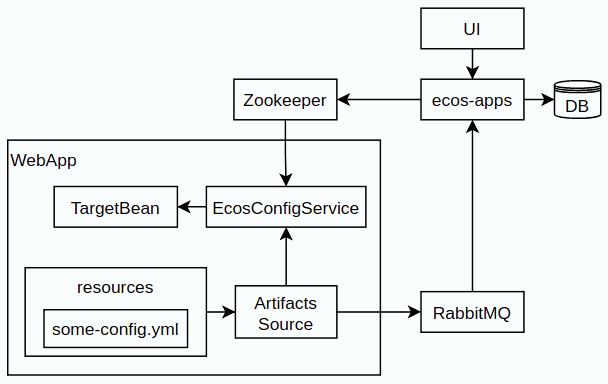
TargetBean - target bean with
@EcosConfigannotations;resources - resources folder in the application;
some-config.yml - some config in the directory
resources/eapps/artifacts/app/config;Artifacts Source - artifact source that loads artifacts from the
resources/eapps/artifactsfolder;EcosConfigService - configuration service;
Getting configuration at system startup:
Connect to Zookeeper and check the current configuration value there.
If the value in Zookeeper is missing, load the value from Artifacts Source (i.e., directly from classpath);
If the value is found, load it;
All configurations in app/config are sent to the ecos-apps microservice via RabbitMQ (standard artifact deployment mechanism);
The ecos-apps microservice stores configurations in its table so that they can be worked with through the interface (UI) in the future;
If the table already has a configuration with the same scope and id, then the config version is compared. If the new version matches or is less than the current one, the value field in the table does not change;
After the value field of the configuration in ecos-apps is updated, the microservice sends the new value to Zookeeper;
Our application is subscribed to data change events in Zookeeper and when a value changes there, we immediately apply it to all configuration listeners.
When a user changes a configuration value in the interface, the logic is similar to points 3-5, but without version checking.
Forms for configurations [rc5+]
For configurations, there is auto-generation of forms based on the valueDef value:
The configuration entity has an attribute
_formRefthat returns a reference to a form of the following type -uiserv/form@config${{config-scope}}${{config-id}}, where
{{config-scope}} - configuration scope
{{config-id}} - configuration identifier
With this form reference, the UI sends a form request to ecos-uiserv and it in turn understands by the
config$prefix that the form needs to be computed. The computation happens in ConfigFormsProvider
If the configuration needs a form with its own set of fields and logic, then you can use the valueDef.formRef field to specify a reference to any real form.
Scope
All configuration has a scope that describes different areas to exclude the influence of configuration in different microservices on each other.
By default, the scope is app/{{webapp_name}}, where {{webapp_name}} is the system application name.
Thus, the unique identifier of a configuration in the system can only be considered the combination of scope + config_id (i.e., the same config_id can be used in different scopes).
Model
id: String // идентификатор конфигурации
name: MLText // имя конфигурации
scope: String // область действия конфигурации. По умолчанию "app/{{appName_приложения_в_котором_находится_артефакт}}"
value: Any // значение конфигурации
version: Integer // версия конфигурации. Подробнее ниже.
valueDef: // описание значения в поле value
  type: ConfigValueType // тип конфигурации. Если не задан, то будет вычислен автоматически [rc5+] на основе значения в value
  multiple: Boolean // флаг "множественное значение"
  formRef: RecordRef // форма для редактирования значения
ConfigValueType - one of the following values:
ASSOC,
PERSON,
AUTHORITY_GROUP,
AUTHORITY,
TEXT,
MLTEXT,
NUMBER,
BOOLEAN,
DATE,
DATETIME,
JSON
Configuration version
Citeck configuration has a version field that is needed for:
Protection against accidental overwriting of values that are configured in the system manually;
To be able to change the default value for newly deployed systems;
To be able to forcibly change values that were changed in the system manually.
Updating the value field in an already deployed configuration when loading a new version of the artifact only happens if the version field of the new config is greater than what is stored in the database.
When using patches for configuration artifacts, you should also consider the impact of the version field (i.e., if we only change value, but leave version old, then the config value in the system will remain the same).
Config Provider
All configuration in the EcosConfigService is obtained from providers, which have the following interface:
interface EcosConfigProvider {
    fun getConfig(key: String): ConfigValue?
    fun getConfig(key: ConfigKey): ConfigValue?
    fun watch(action: (ConfigEvent) -> Unit)
    fun getOrder(): Float
}
All providers are sorted by the getOrder() value and ultimately EcosConfigService returns a non-null value from the provider with the smallest getOrder() value
Standard providers:
ArtifactsConfigProvider - configuration is loaded from classpath;
InMemConfigProvider - in-memory provider. Mainly used for tests;
ZkConfigProvider - provider based on Zookeeper.
Updating values via Citeck patch
You need to place a similar some-patch.yml in the directory resources/eapps/artifacts/app/patch:
---
  id: some-patch
  date: '2022-01-01T00:00:00Z'
  targetApp: uiserv
  type: mutate
  config:
    record:
      id: cfg@active-theme
      attributes:
        value: customTheme