Semantic Search and Document Indexing Configuration
A microservice for semantic search and document indexing for the Citeck platform based on RAG (Retrieval-Augmented Generation).
The service indexes data from Citeck records and GitLab repositories, builds vector representations using OpenAI Embeddings, and provides semantic search via Qdrant.
Features:
Semantic search across Citeck document content and GitLab source code:
Search across Citeck records and GitLab repository content using embeddings (OpenAI text-embedding-3-small) and the Qdrant vector database.
Results are filtered by user permissions and workspace, deduplicated, and ranked by relevance.
Workspace Indexing:
A separate Qdrant collection is created for each workspace, ensuring data isolation.
Incremental indexing based on CRUD events with debouncing of repeated changes.
Parallel full reindexing with skipping of unchanged documents by SHA-256.
GitLab Repository Indexing:
Repositories are configured via a dedicated rag-gitlab-repo type with a token secret, file extension list, and maximum file size.
Incremental synchronization via GitLab Commits API — on schedule or manually.
A repository can be linked to one or more workspaces: it then participates in search only within them; without a link — it is available in all workspaces.
When a repository is deleted, the corresponding vector collection is removed automatically.
Search API:
REST endpoint POST /api/rag/search and ECOS Records DAO (source ID rag-search).
Filtering by repository identifiers (includeRepoIds / excludeRepoIds).
A base documentation URL is published together with the document — search results can reference public documentation pages.
Pre-configured Record Deployment:
ECOS artifacts for the rag-gitlab-repo and rag-workspace-config types allow deploying ready-made configurations (e.g., Citeck ECOS documentation) on application startup.
Changes to such records are synchronized back via EventsService.
MCP server — integration with Claude Code and other AI models via Model Context Protocol.
Architecture
The service consists of two modules:
Module |
Port |
Description |
|---|---|---|
|
8614 |
Main service: indexing, search, REST API, Records DAO |
|
8615 |
MCP server with tools for AI models (search, reindexing, status, document retrieval) |
Stack:
Java 17
Spring Boot 3.x
Spring AI 1.1.3
OpenAI
text-embedding-3-small(1536 dimensions)Qdrant
GitLab4J
ECOS Records API
Requirements
Citeck components required for the service:
zookeeper
rabbitmq
ecos-registry
ecos-model (workspace configuration)
ecos-apps (Records API)
External dependencies:
Qdrant — vector database, gRPC port
6334OpenAI API — embeddings service, the key is passed via the
CTK_OPENAI_API_KEYvariable
Server Parameters
Parameter |
Default |
Description |
|---|---|---|
|
— |
OpenAI API key for embeddings |
|
|
Qdrant host |
|
|
Qdrant gRPC port |
|
|
Number of search results |
|
|
Similarity threshold (cosine similarity) |
|
|
Chunk size in tokens |
|
|
Chunk size for code files |
MCP Server
citeck-rag-mcp (port 8615) provides tools for AI models via Model Context Protocol:
search— semantic search over indexed datareindex— trigger reindexing of a workspace or repositorystatus— indexing and Qdrant collection statusdocument— retrieve document content by identifier
Records API
The service provides Records DAO for integration with the Citeck platform:
rag-search— semantic search via ECOS Records Queryrag-index— indexing managementgitlab-sync— GitLab repository synchronization managementworkspace-reindex— workspace reindexing
REST API
Method |
Endpoint |
Description |
|---|---|---|
|
|
Semantic search |
|
|
Full reindexing |
|
|
Incremental synchronization |
|
|
Single document indexing |
|
|
Remove document from index |
|
|
Indexing and collection status |
|
|
Get document content |
Configuration Journals
The administrator workspace contains RAG section journals for managing:
Workspaces — which workspaces participate in semantic search and which record types are indexed.
GitLab repositories — which GitLab repositories are connected to search.
Workspaces
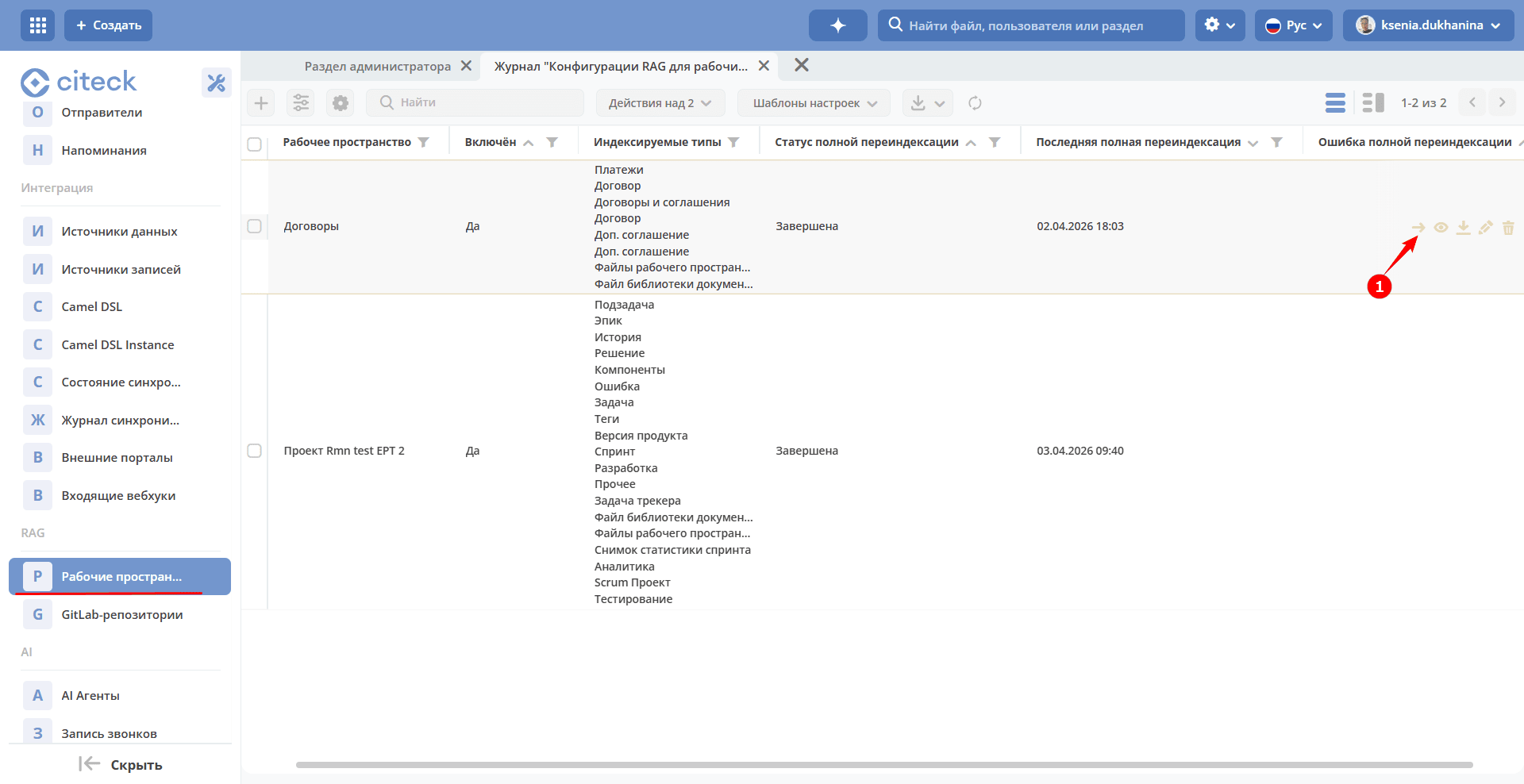
Actions in addition to standard ones:
(1) Force Reindexing — full reindexing of all workspace records regardless of schedule. Use this if the index data has gone out of sync with the actual records, or after changing the settings of indexed types.
Creating a new configuration:
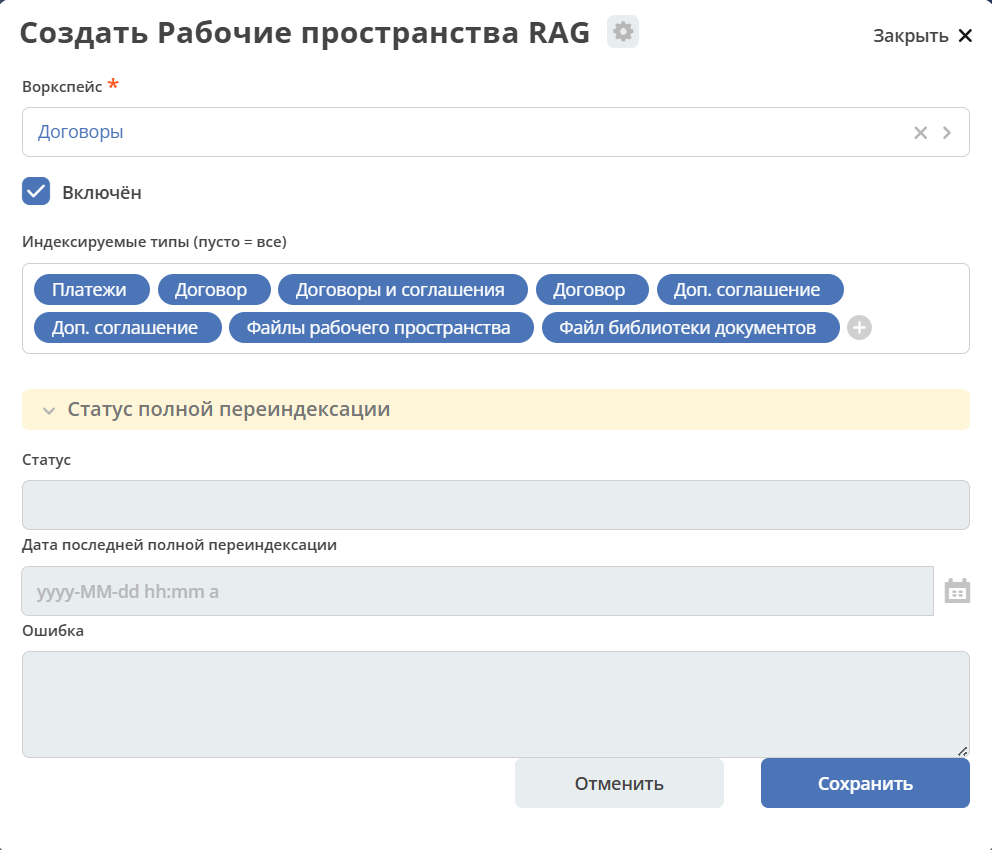
Workspace — restricts which workspaces participate in search. Leave empty — the record is available in search across ALL workspaces (global documentation). Specify a list — the record is connected to search only within the selected workspaces. Does not affect indexing: records are always indexed into their own separate collection.
Enabled — when disabled, scheduled synchronization is not performed. Already indexed vectors are not deleted — when re-enabled, search will continue working without reindexing.
Indexed Types (empty = all) — record types that are indexed for this workspace. If empty — all types are indexed. If specified — only records of these types are indexed.
Status — synchronization status.
Last Full Reindexing Date — the date of the last full reindexing of all data in this workspace. Informational field, filled in automatically.
Error — errors that occurred during the last synchronization attempt.
GitLab Repositories
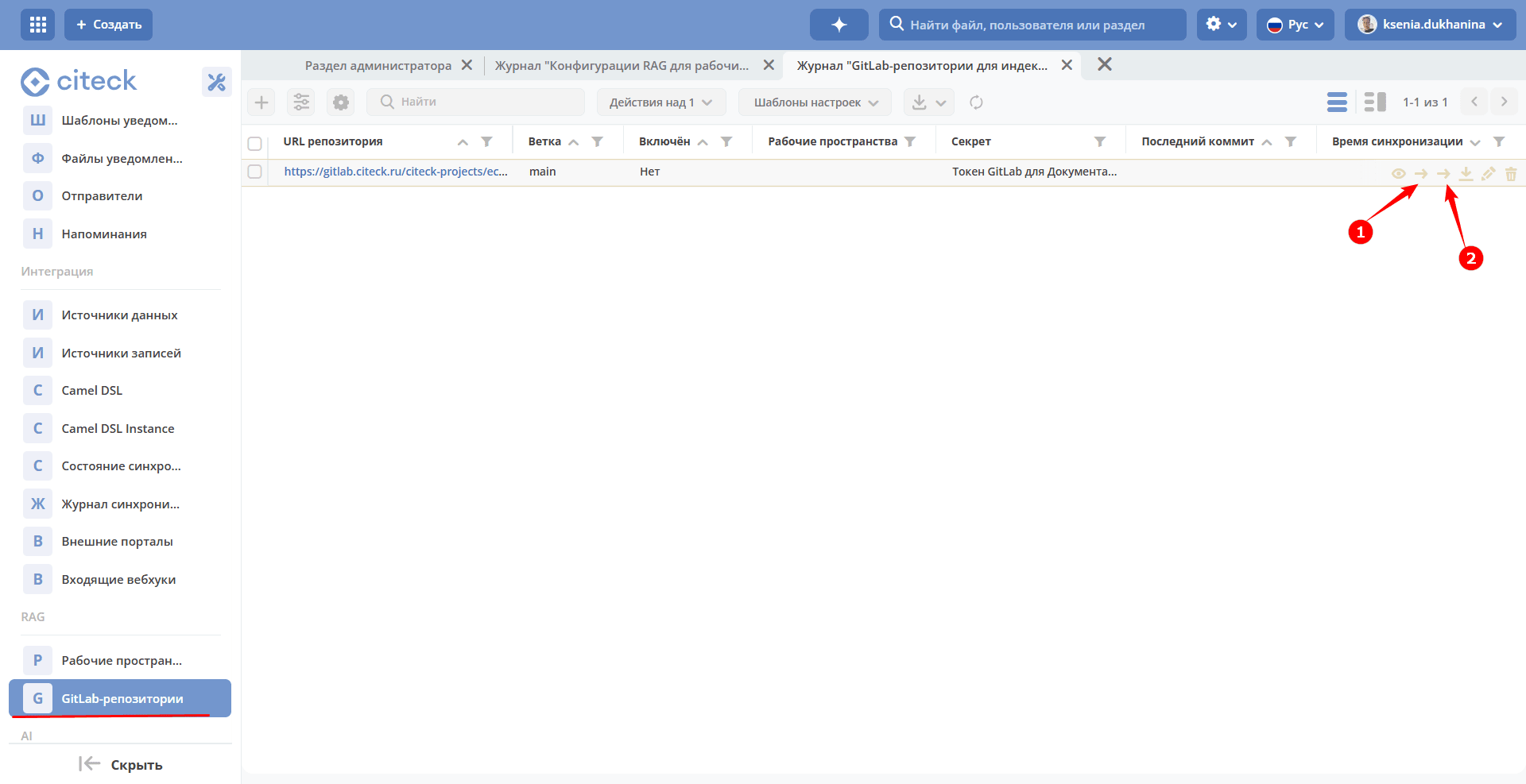
Actions in addition to standard ones:
(1) Force Synchronization — incremental synchronization: only changes since the last recorded commit (by SHA) are processed. The result is identical to a scheduled run, but executed immediately.
(2) Force Reindexing — full reindexing: the entire repository is scanned from scratch, SHA is reset. Use this if the index is corrupted or after changing parameters (file extensions, maximum file size).
Creating a new configuration:
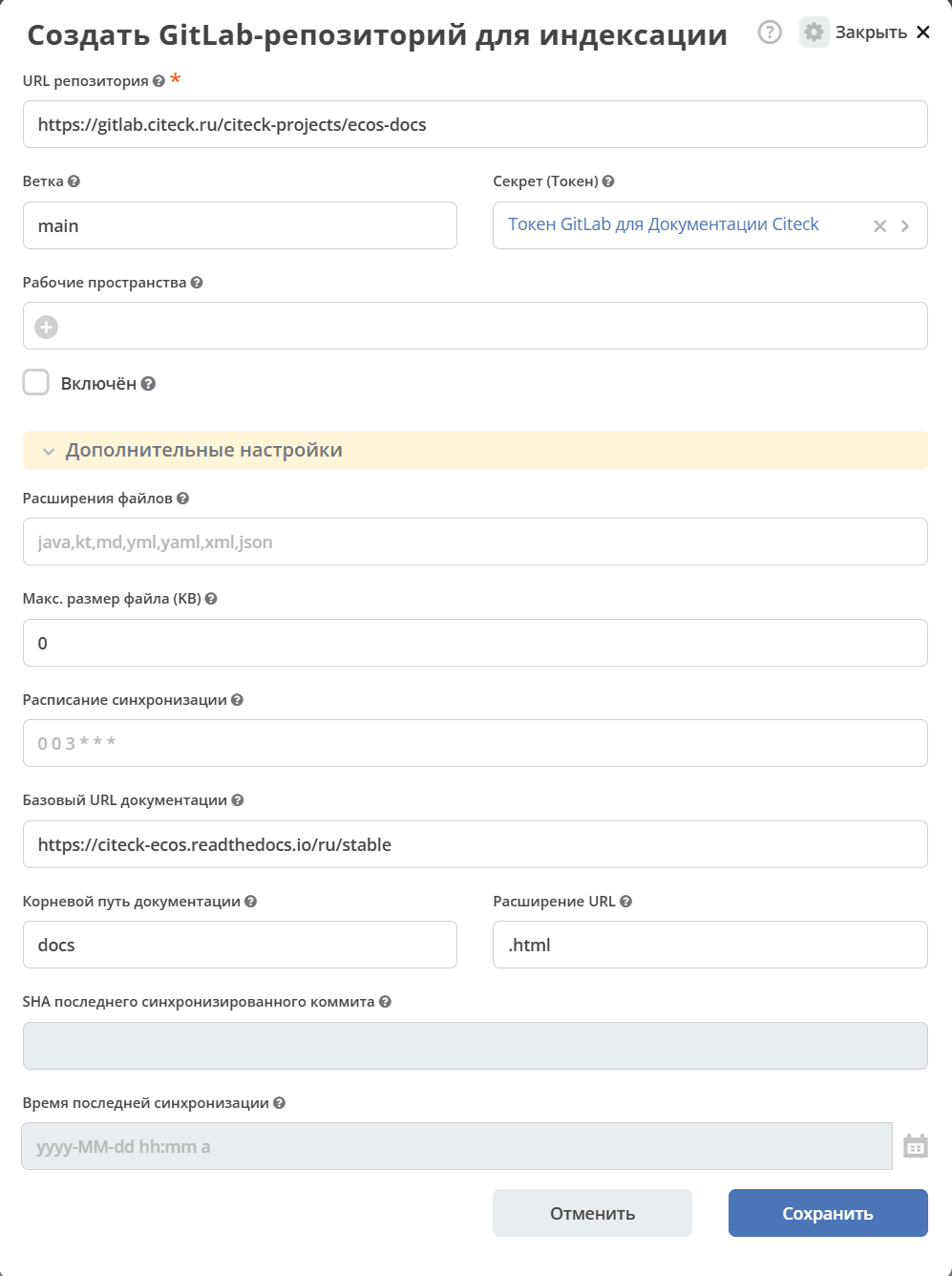
Repository URL — full URL of the GitLab repository to index. Must include the scheme, host, and project path (Group/Project).
Branch — Git branch to index. Data is loaded only from this branch.
Secret (Token) — ECOS secret containing a GitLab Personal/Project Access Token (
read_apiandread_repositorypermissions). The token owner must have at least a Reporter role in the project. Required for private repositories.Workspaces — restricts in which workspaces this repository participates in search. Leave empty — the repository is available in search across ALL workspaces (global documentation). Specify a list — the repository is connected to search only within the selected workspaces. Does not affect indexing: the repository is always indexed into its own separate collection.
Enabled — when disabled, scheduled synchronization is not performed and the repository is excluded from search. Already indexed vectors are not deleted — when re-enabled, search will continue working without reindexing.
File Extensions — comma-separated list of file extensions to index (without dot). Files with other extensions are skipped. If empty — the default value from server settings is applied.
Max. file size (KB) — files larger than the specified size are skipped to avoid memory issues and unnecessary embedding costs. Leave empty or
0to use the default value from server settings.Synchronization Schedule — Spring cron expression (6 fields: seconds minutes hours day month day_of_week) for incremental synchronization of this repository. If empty — the common schedule from server settings is used.
Documentation Base URL — base URL of the published documentation site. Used together with “Documentation Root Path” and “URL Extension” to build a public link to the source page in search results. Leave empty if the repository is not published to a site.
Documentation Root Path — path inside the repository that corresponds to the root of the published site. For example, with
docsRootPath=docs, the filedocs/guide/intro.mdmaps to/guide/intro.URL Extension — extension appended at the end of the URL on the published site instead of the source file extension. For example,
.htmlfor static sites (ReadTheDocs, MkDocs), or an empty string if the site uses “clean” URLs without extensions.Last Synchronized Commit SHA — SHA of the last commit processed by incremental synchronization. Filled in automatically and used to compute changes on the next run. Clear the field to force a full branch rescan.
Last Synchronization Time — the time of the last successful synchronization of this repository. Informational field, filled in automatically.