Meeting Recording Module (callrecording)
The callrecording module captures audio from a browser tab and microphone via a Chrome extension, streams it over WebSocket, transcribes it using GigaAM, and generates a summary via LLM. The result is saved as a Citeck activity of type meeting-activity or call-activity.
This article describes the module architecture, REST API, configuration, artifacts, and key files. The feature is available starting from version 1.11.0 (April 30, 2026).
How It Works
The extension handles the entire end-to-end flow: from detecting an active call to creating a structured meeting record in the CRM/project — without any manual user involvement in the processing pipeline.
Call Detection
content/call-detector.js monitors open Chrome tabs. As soon as the user navigates to a Yandex Telemost page, the script sends a call-detected event to the Service Worker. The user only needs to open the meeting tab — no manual action is required.
Audio Capture and Transmission
The Service Worker creates a hidden recorder window (recorder/recorder.js) that runs alongside the meeting:
Participant audio capture — obtains the Telemost tab audio stream via
tabCapture.getMediaStreamId(what the user hears).Microphone capture — captures the user’s local microphone via
getUserMedia({audio: true}).tabCapturedoes not include the microphone on its own, so a separate stream is used.Mixing — both streams are combined in an
AudioContextvia aGainNode, producing a single audio output.Encoding —
MediaRecorderwrites the compressed stream inaudio/webm;codecs=opusformat in 5-second chunks, enabling immediate transmission without waiting for the meeting to end.Streaming — each chunk is sent over WebSocket using a binary protocol: 4-byte sequence number (big-endian) + audio data. On disconnect,
lib/ws-client.jsautomatically reconnects with exponential backoff (up to 5 attempts, maximum 30 seconds).
The recording state is mirrored to chrome.storage.session to preserve context when the MV3 Service Worker is unloaded after ~30 seconds of inactivity.
Transcription and Summary Generation
The audio stream is delivered to the citeck-ai backend via the WebSocket endpoint /gateway/ai/ws/ (proxied through nginx, bypassing the main gateway which does not support WebSocket). The backend runs the following pipeline:
STT — Microservice for Audio Transcription and Diarization transcribes audio using GigaAM (Russian speech recognition).
LLM summary — based on the transcript, the language model generates a structured meeting summary.
The session is terminated by a text WebSocket message { type: "end" }. While processing is underway, the Service Worker polls /session/{id}/status every 3 seconds (for up to 15 minutes) and stores the result in chrome.storage.local.
Saving to Citeck
The result — transcript and summary — is saved as a meeting-activity object in the Citeck platform and automatically linked to the relevant entity (deal or project). The user selects the entity in the extension popup via a searchable combobox before recording starts.
User Notification
When processing is complete, the Service Worker sends a Chrome Notification. The extension popup may be closed at that point — the notification ensures the user is informed that the result is ready regardless of the UI state.
Architecture
Chrome Extension (захват аудио)
    → WebSocket /ws/call-recording
        → CallRecordingWebSocketHandler
            → CallRecordingService
                → GigaAmSttProvider (транскрибация)
                → CallSummaryService (LLM-резюме)
                → CallActivityService (сохранение в Citeck)
Dependencies (External Services)
citeck-ai — WebSocket handler + pipeline: STT → LLM summary → activity save
citeck-stt-sidecar — GigaAM-based transcription service
nginx — WebSocket proxy (
/gateway/ai/ws/) bypassing the main gateway, which does not proxy WS
REST API
Method |
URL |
Description |
|---|---|---|
|
|
Platforms, recording types, STT provider (Speech-to-Text — a speech recognition service that converts audio to text) |
|
|
Search records by type |
|
|
Start session — returns |
|
|
End session and post-processing |
|
|
Session status |
|
|
Audio streaming (4-byte sequence + audio data) |
Configuration
Settings are defined in application.yml:
citeck.ai.call-recording:
  enabled: true
  stt:
    provider: gigaam
    sidecar-url: http://localhost:8090
    language: ru
    enable-diarization: false
  session:
    max-duration-minutes: 180
    chunk-size-seconds: 30
  summary:
    model: ${citeck.ai.base.model}
    temperature: 0.3
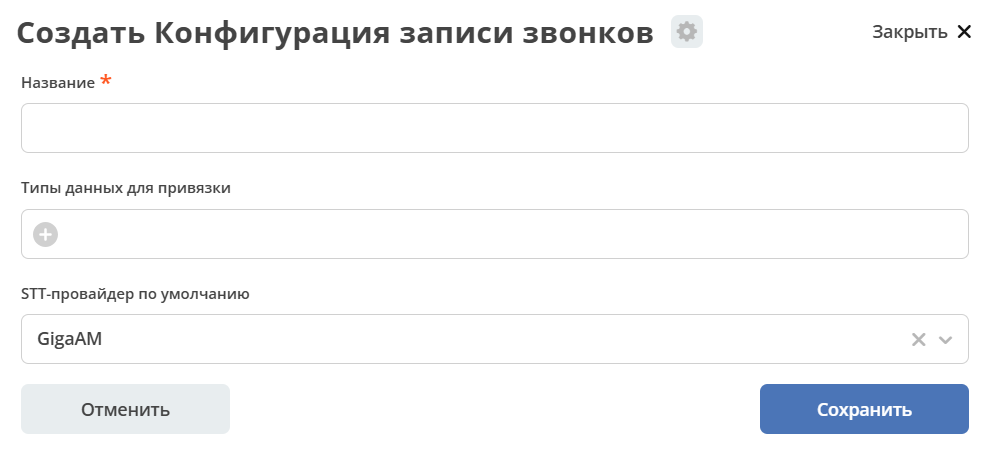
Via UI
In the administrator workspace, go to the AI section and open the Call Recording journal:
Fill in the Name.
Select Data types for binding.
Specify the Default STT provider for the platform (e.g., GigaAM for Telemost).
Save.
Citeck Artifacts
The module adds a recording-aspect with attributes recording (audio file), transcription, transcriptionDiarized, summary, recordingDuration, recordingStatus, callPlatform, meetingUrl. The aspect is attached to the meeting-activity and call-activity types via artifact-patch.
Path |
Purpose |
|---|---|
|
Aspect with recording attributes |
|
Attaches the aspect to |
|
Attaches the aspect to |
|
Form with audio, summary, and transcript fields |
|
Action for binding a meeting to a deal or project |
|
Recording configuration type (types, platforms, STT provider) |
|
Configuration administration form |
|
Configuration journal |
|
Meeting dashboard |
LLM Prompt
src/main/resources/prompts/call_summary_prompt.xml — instruction for generating a summary in Russian. The prompt produces an adaptively sized text with sections: key topics, decisions, action items, open questions, participants.
Tests
File |
|---|
|
|
|
Key Files
Component |
File |
|---|---|
Session orchestration |
|
WebSocket handler |
|
REST controller |
|
STT via GigaAM |
|
LLM summary |
|
Upload to Citeck |
|
Telemost URL interception |
|
Configuration properties |
|
DTOs and statuses |
|
All paths are relative to src/main/java/ru/citeck/ecos/ai/.