Authentication
Terminology
IdP (Identity provider) - Authentication provider responsible for authenticating users and external systems. In Citeck, OpenID Connect is used as the authentication protocol. The standard IdP is Keycloak.
OIDC (OpenID Connect) - An open standard for a decentralized authentication system.
Access Token - Access token. Used when accessing protected resources. Typically has a short lifespan (about five minutes) and is regularly refreshed using a refresh token (Refresh Token).
Refresh Token - Refresh token. Used by the OIDC client when contacting the IdP to obtain a new access token (Access Token).
IdP Realm - An independent space with its own authentication settings for a specific server. Using a database analogy, the IdP is the DBMS, and the realm is the database.
General Information
Citeck supports two authentication methods:
Authentication via built-in OIDC client
Authentication via external OIDC client
Authentication via built-in OIDC client
Authentication logic is located in the ecos-proxy-app application and implemented via the lua-resty-openidc module
Module configuration is done through environment variables of the ecos-proxy-app container:
Variable |
Value |
Description |
EIS_TARGET |
String of the form
host[:port] |
Internal IdP host. Used to determine where to direct requests
with
http://{{SERVER_HOST}}/ecos-idp/auth/. This parameter is only needed when the IdPis deployed as part of Citeck. For using an external IdP, this setting
should be omitted.
|
ENABLE_OIDC_FULL_ACCESS |
true or false |
Enable integration with IdP. Typically, this should always be
true. |
CLIENT_ID |
String
|
Client identifier for working with the IdP. Default is
nginx. |
CLIENT_SECRET |
String
|
Secret for authenticating the OIDC client (ecos-proxy-app) with the IdP.
|
EIS_SCHEME |
http or https |
Scheme for requests from the OIDC client (ecos-proxy-app) to the IdP. Default is
https. |
EIS_ID |
String of the form
host[:port] |
Host for accessing the IdP from the OIDC client and from the user’s browser.
|
EIS_LOCATION |
String
|
Location where the IdP is accessible on the EIS_ID host. Default is
auth |
REALM_ID |
String
|
Realm identifier within which integration with the IdP is performed.
|
REDIRECT_LOGOUT_URI |
URI string
|
URI for redirection after successful login that occurred after logout.
|
ENABLE_LOGGING |
debug or warn |
Enable debugging for ecos-proxy-app. With the value
debug, all steps are written to the logsof interaction with the IdP. If this parameter is not set, all logs are sent to
/dev/null |
With IdP integration enabled, ecos-proxy-app sends a GET request for information needed for the OIDC protocol to:
EIS_SCHEME://EIS_ID/EIS_LOCATION/realms/REALM_ID/.well-known/openid-configuration
In response, the IdP returns parameters needed by our client to work with the OIDC protocol. For example:
Addresses for obtaining and refreshing tokens;
Address for validating user tokens;
Address for logout;
Supported encryption algorithms;
etc.
Authentication algorithm via built-in OIDC client
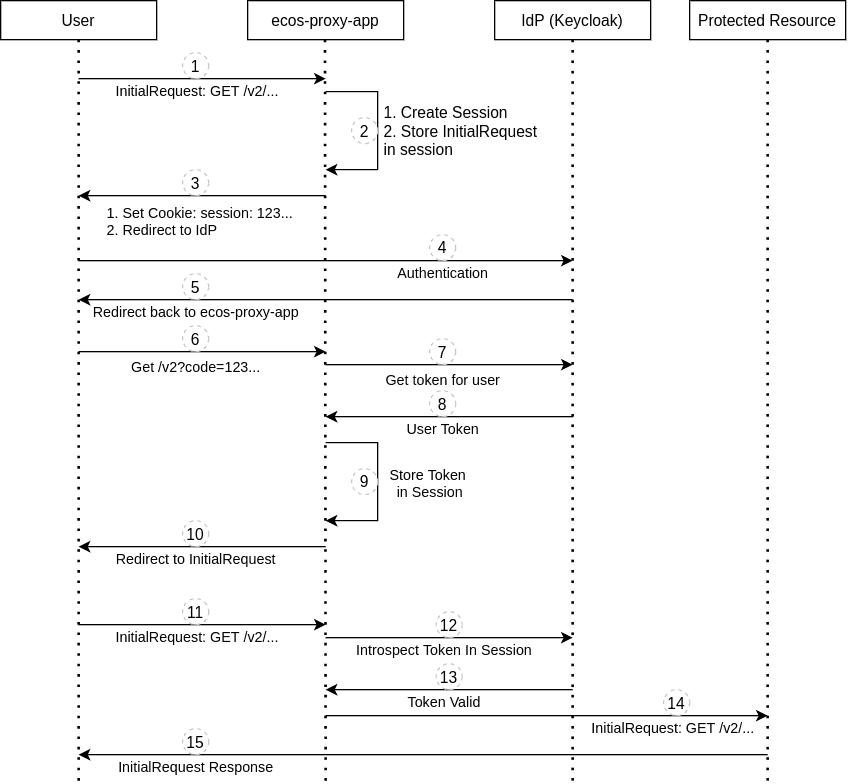
A request from a user for a protected resource arrives;
ecos-proxy-app creates a session for the user and stores the original request from item 1 there;
ecos-proxy-app sends a response to the user setting a cookie with the session identifier and redirecting to the IdP for login;
The user authenticates with the IdP by entering login/password or using alternative login methods;
After successful login, the IdP redirects the user to the URI that was specified in the redirect_uri parameter during the redirect in item 3, and adds a parameter to this URI with a code that ecos-proxy-app can use to request user tokens from the IdP;
The user opens the URI which is the authentication callback (by default in Citeck this is
/v2) and lands on ecos-proxy-app;ecos-proxy-app receives the code from the user and sends a request with it to the IdP to obtain Access and Refresh tokens for the user;
ecos-proxy-app receives the user tokens from the IdP;
ecos-proxy-app stores the user tokens in their session;
ecos-proxy-app sends the user a redirect to the original URI they requested in item 1;
The user sends a request to the original URI from item 1;
ecos-proxy-app retrieves the user’s Access token from the session and sends a request to the IdP to validate it;
The IdP responds to ecos-proxy-app that the token is valid;
ecos-proxy-app grants the user access to the protected resource and adds the
X-ECOS-Userheader to the request, which equals the user’s name;The user receives the expected response from the protected resource.
In the entire authentication process, the user is only required to take action in step 4 (authentication with the IdP). All other steps occur transparently and unnoticed by the user.
Steps 11-15 are performed with each subsequent request, with the caveat that the result of token validation is cached. The cache retention time depends on the IdP settings and is typically equal to the access token’s lifespan (Access Token).
Authentication via external OIDC client
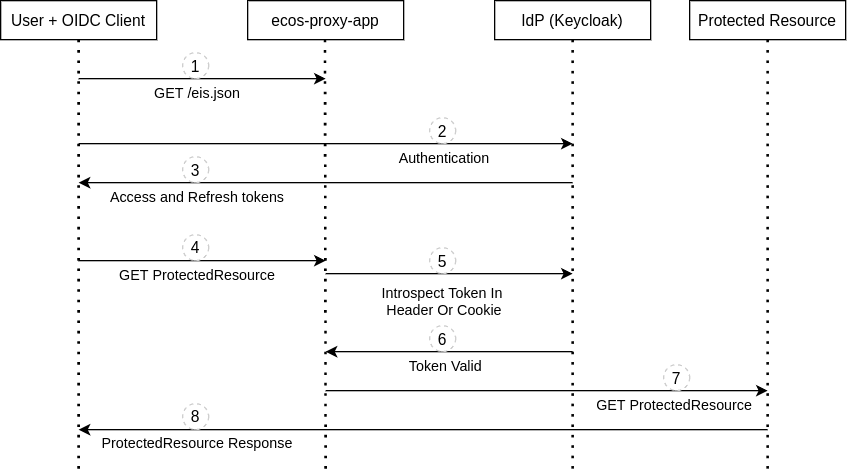
The client receives basic configuration for working with the IdP (realmId, eisId, logoutUrl) by sending a GET request to
{{SERVER_HOST}}/eis.json;The client prompts the user to authenticate with the IdP;
The client receives Access and Refresh tokens from the IdP;
The client sends a request to the protected resource with an Access Token;
ecos-proxy-app validates the Access token by sending a request to the IdP;
The IdP responds that the token is valid;
ecos-proxy-app sends the request to the protected resource needed by the client, adding the
X-ECOS-Userheader with the username to the request;The client receives a response from the protected resource.
In the entire authentication process, the user is only required to take action in step 2 (authentication with the IdP). All other steps occur transparently and unnoticed by the user.
The client can send the token in requests in the following ways:
In the Authentication header in the format
Bearer {{TOKEN}}.In the PA cookie
The /eis.json settings are populated with values from the ecos-proxy-app environment variables - REALM_ID and EIS_ID
Configuring session lifetimes in Keycloak
Settings at the realm level (apply to all clients in this realm by default):
Realm Settings -> Tokens
Settings at the client level (override realm settings):
Clients -> CLIENT_ID -> Settings -> Advanced Settings
Parameter |
Description |
SSO Session Idle |
User session lifetime during inactivity. If the user
has no activity during this time, the session is terminated.
|
SSO Session Max |
Maximum user session lifetime. The session is terminated if
the specified time has passed since authentication, regardless of user activity.
|
Client Session Idle |
OIDC client session lifetime during inactivity. If the OIDC client
has no activity during this time, the client session is terminated.
If the value is not set, the SSO Session Idle value is used by default.
|
Client Session Max |
Maximum client session lifetime. The session is terminated if
the specified time has passed since client authentication, regardless of client activity.
If the value is not set, the SSO Session Max value is used by default.
|
Access Token Lifespan |
Access token lifespan. This lifespan should be
short (5 minutes by default) for security reasons.
Access tokens are changed automatically and transparently to the user.
|
Notes:
If a user session is terminated, the Access and Refresh tokens issued in that session are revoked.
If an OIDC client session is terminated, the Access and Refresh tokens issued in that session for all users are revoked.
If a user works with the server through the built-in OIDC client in ecos-proxy-app, it should be noted that the OIDC client caches the result of requests to the IdP and not every request leads to the update of the conditional “activity timer” on the IdP. Activity is updated at least when the Access Token is refreshed.
From the peculiarity of the OIDC client’s work with cache, it also follows that if we terminate a session in the IdP, it does not guarantee that the user will immediately lose access to the server. The user will be able to send requests and receive data from the server as long as their Access Token is valid.
Touch requests
To prevent a user session from being unexpectedly terminated without explicit user actions that lead to server requests, logic for periodic sending of touch requests has been added to ecos-ui. The purpose of this request is to pass through the user token validation mechanism and update the conditional inactivity timer in the IdP. Touch requests are sent periodically as long as the user is doing something in the system (moving the mouse, pressing keys, etc.).
Touch request timings for ecos-ui version 2.9.0+:
Touch request sending period: 30s.
Inactivity time after which touch requests stop being sent: 1h.
In the Citeck configuration journal, you can configure touch request behavior:
Scope: app/gateway
Id: touch
Setting content:
{
  "enabled": Boolean //включить или отключить touch запросы
  "uri": String // URI для touch запросов
}
Integration with external IdPs
To organize authentication in Citeck using IdPs other than Keycloak or with Keycloak that is not supplied with Citeck, we recommend using the architecture:
[Citeck <-> Keycloak] <-> External IdP
Citeck continues to use its own Keycloak for authentication, while the external IdP is transparently connected using Keycloak’s extensive capabilities for integration with external IdPs. This architecture is time-tested and is optimal for use.
Username Mapping
If the username provided by the IdP needs to be modified before being used inside Citeck, the following Spring configuration can be used for the gateway microservice:
ecos:
  gateway:
    userNameExtractors:
      - matcher: '^(.+?)@.*$'
        regexGroup: 1
In this example, the username enters the system as an email and we use Regexp to take only the part before the @ symbol. If the username does not match the matcher, the transformation will not be applied.