Integration of Citeck with Keycloak Authentication Service
Starting from version 2.20.0 of the ecos-model microservice, the Citeck application has added the capability to integrate with the Keycloak authentication service. Integration configuration is done through properties in application.yml.
The integration allows synchronizing the creation, update, and deletion of users with the authentication service. Previously, for example, after creating a user in ECOS, it was necessary to log into the Keycloak web interface and add the same user manually.
To implement this functionality, the “Keycloak Admin Client“ library was added to the dependencies of the ecos-model microservice. The class responsible for synchronization is KeycloakUserService. Synchronization with Keycloak occurs through the RESTful API. Keycloak provides a RESTful interface that allows interaction with the Keycloak server for managing users, clients, roles, and other security aspects.
Enabling Integration
By default, the application.yml of the emodel microservice specifies that integration is disabled:
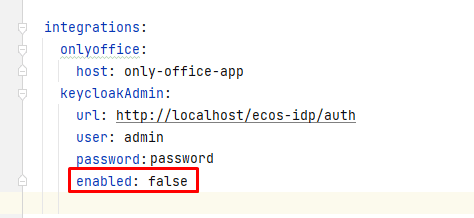
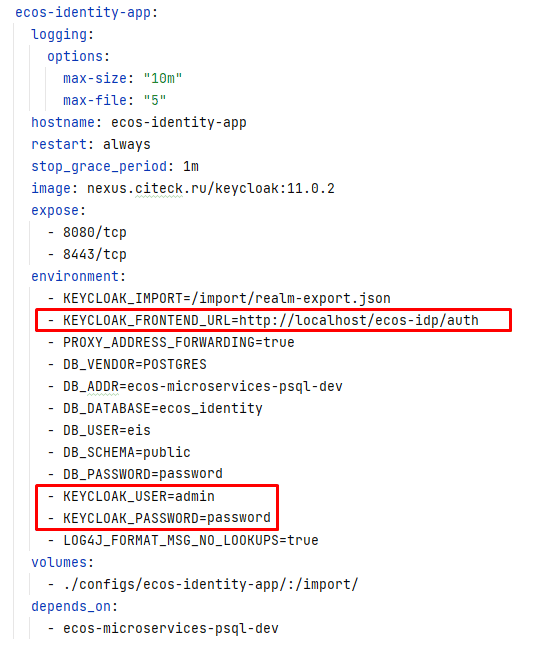
To enable integration, it is necessary to set integrations.keycloakAdmin.enabled=true, as well as specify the other properties (url, user, password) required to establish a connection with Keycloak and perform operations using the administrative API.
For clarity, the docker-compose file of the keycloak microservice used in local development is provided:
Creating a New User
When creating a new user in Citeck, synchronization with Keycloak occurs for the following fields:
id
firstName
lastName
personDisabled
The created user by default receives a password that matches their id. Upon first login to the application, they will be prompted to change the password.
Updating a User
When updating an existing user in Citeck, synchronization with Keycloak occurs for the following fields:
firstName
lastName
personDisabled (disabling the user profile in Citeck will also disable it in keycloak)
Changing the user password occurs through a separate action (see below)
Deleting a User
When a user is deleted from Citeck, they are also deleted from the Keycloak database
Changing User Password
Changing the user password is done by calling the change-user-password action, followed by calling the form:
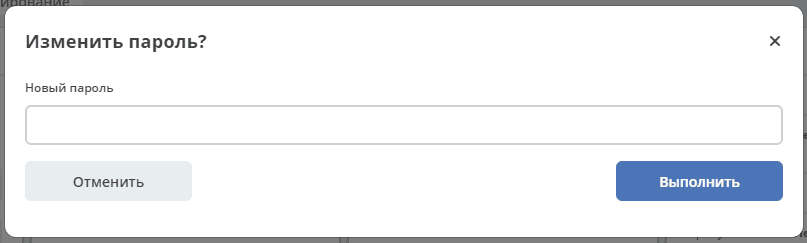
The action handler class ChangePasswordActionDto accepts the user id and new password, after which synchronization with Keycloak occurs.