Citeck Patches
Patch — a one-time operation executed after system startup. Used for automatic or manual data and configuration migration.
Citeck patches are implemented as artifacts of type app/patch and follow the general artifact deployment rules. The uniqueness of a patch within the system is determined by the combination of targetApp + id.
Model
id: String // идентификатор патча
name: MLText // имя патча
targetApp: String // целевое приложение где патч будет выполнен. По умолчанию - текущее приложение.
date: Instant // дата патча. Подробнее ниже.
manual: Boolean // ручной запуск патча. Если флаг равен true, то патч не будет выполнен автоматически.
dependsOn: String[] // зависимость от других патчей
type: String // тип патча
config: ObjectData // конфигурация патча
Patch Types
Type |
Configuration |
Description |
|---|---|---|
bean |
beanId: String - identifier of the bean to execute |
Run a bean in the application context.
The following interfaces are supported:
|
delete |
records: RecordRef[] |
Delete the specified records |
mutate |
records: RecordAtts[]
record: RecordAtts
|
Mutate the specified records;
If records are specified in the configuration, they are used and the record field is ignored;
If records are not specified in the configuration, the record field is used.
|
Patch Date
Patch date — an ISO 8601 UTC date-time value (e.g. 2022-01-01T00:00:00Z). This value is set to the current date when a patch is created manually. An exact time match is not required, but the date should be specified at least to the day. The patch date is used for several purposes:
For sorting patches. Patches with an earlier date will be executed first. This guarantee applies only to patches within the same application, i.e. when patches defined in an application are executed within that same application. For strict ordering, use the dependsOn field.
To control patch execution. The decision to execute a patch is based on the old and new date values:
If old_date is absent (new patch), the patch will be executed;
If old_date >= new_date, the patch is considered completed and will not be executed;
If old_date < new_date, the patch is considered updated and is queued for execution;
Thus, if we want an already-executed patch to re-execute on the next update, we simply increase the value in the date field.
Usage in Code
To define patches, you can use the @EcosPatch annotation
To specify dependencies, you can use the @EcosPatchDependsOn annotation
@Component
@EcosPatchDependsOn("other-patch")
@EcosPatch("test-patch", "2022-01-01T00:00:00Z")
class TestComponent : Callable<Any> {

    override fun call(): Any {
        println("Patch executed")
        // Результат будет записан в БД ecos-apps, чтобы его можно было потом посмотреть.
        // Из требований к результату - только возможность конвертации через Json.mapper.toString в json строку.
        return "custom-result"
    }
}
Warning
If a patch is expected to perform a large amount of work and may run for more than 30 seconds, StatefulEcosPatch should be used.
Stateful Patches
For performing large-volume work, Stateful patches (patches with state) can be used.
The idea is that instead of doing all the work at once, the patch performs a portion of the work and then returns an intermediate state of the process.
To implement a Stateful patch, you need to implement the StatefulEcosPatch<Config> interface,
where Config is an arbitrary type representing the execution state.
It is important that an instance of this class can be created from an empty object ({}) since this is the initial state for the patch.
Code example:
@EcosPatch("stateful-patch", "2022-01-01T00:00:00Z")
class TestWithState : StatefulEcosPatch<ObjectData> {

    override fun execute(state: ObjectData): PatchExecutionState<ObjectData> {
        val counter = state.get("counter", 0) + 1
        val completed = counter == 5
        log.info { "Execute stateful patch. Counter: $counter, Completed: $completed" }
        return PatchExecutionState(
            ObjectData.create()
                .set("counter", counter),
            completed
        )
    }
}
Architecture
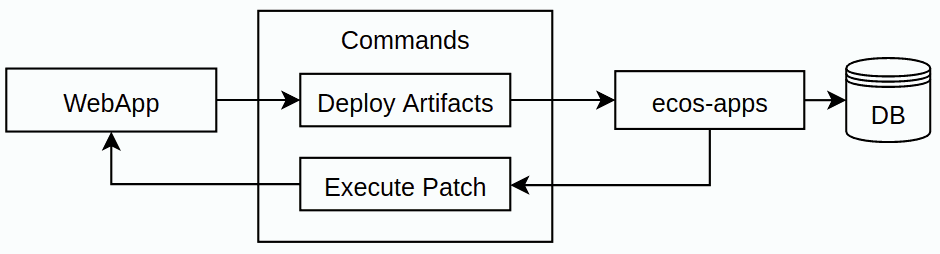
Patch artifacts are delivered from the application to ecos-apps via the standard artifact deployment mechanism and stored in the database.
ecos-apps then periodically polls the patches table for patches that can be applied (i.e. targetApp is available and the patch status allows it to be applied).
If a patch to apply is found, a command to execute the patch is sent to targetApp. The result of the command execution is stored in the database.
If an error occurs during patch execution, the error is saved to the database and the patch application is retried after some time.