Group Actions
Note
Available in the Enterprise version only.
Group actions allow processing a large number of items on the server.
Examples of group actions:
Export to Excel
Downloading a Zip archive with all selected items
License
The group actions feature is available if the features section of the license content contains the group-actions entry:
features:
  group-actions: {}
Describing New Group Actions in a Microservice
To enable describing group actions in a microservice, add the following dependency to pom.xml:
<!-- Подходящая версия подтянется из родительского pom файла -->
<dependency>
    <groupId>ru.citeck.ecos.ent.groupactions</groupId>
    <artifactId>ecos-group-actions</artifactId>
</dependency>
After that, you can implement the following interface as a Spring component (it will be registered automatically):
interface GroupActionExecutionFactory<in T : Any, in C : Any> {

    fun createExecution(config: C): GroupActionExecution<T>

    fun getType(): String
}
The getType method must return the type by which the implemented action can be invoked.
The createExecution method is called each time a new action is started.
The GroupActionExecution interface looks as follows:
interface GroupActionExecution<in T : Any> {

    fun getRequiredAttributes(): Map<String, *> {
        return emptyMap<String, String>()
    }

    @Throws(Exception::class)
    fun execute(context: GroupActionContext<T>): ActionResult

    @Throws(Exception::class)
    fun dispose()
}
The getRequiredAttributes method returns a map of attributes required for action execution. Attributes can also be requested during execution, but it is more efficient to return the list upfront to avoid unnecessary requests.
The dispose method is called when the action completes with any result. That is, in case of an error, the dispose method will also be called.
The execute method is called when the action starts. All main data manipulations are performed in this method.
The execute method receives an action context with the getValues(): Iterable<T> and getBatchedValues(batchSize: Int): Iterable<List<T>> methods. Either of these methods can be called to iterate over all values in a loop or manually.
If processing should not be interrupted on error, the action executor must handle this itself. If an exception is thrown from the execute method, the action execution terminates immediately.
Possible group action result types:
Class |
ID |
Data |
Description |
|---|---|---|---|
ActionResultLink |
LINK |
url: String |
Return a link to something for download.
The link must be relative (without protocol, host, or port).
For example:
To get a download link for a record’s content, use the getDownloadUrl method in the EcosContentApi service.
The same service also provides an API for creating a temporary file.
|
ActionResultMessage |
MESSAGE |
message: String |
Return a message |
ActionResultOk |
OK |
Return a simple result indicating that the action completed successfully |
|
ActionResultResults |
RESULTS |
results: List<Result>

Типы:

Result:
message: String,
status: ResultStatus,
recordRef: EntityRef

enum ResultStatus {
OK,
ERROR,
PERMISSION_DENIED,
SKIPPED
}
|
Return a list of results for each processed record |
Execution Threads
All group actions are executed within a pre-configured thread pool.
Configuring the number of execution threads via Spring properties:
ecos:
  webapp:
    task:
      executors:
        group-actions:
          corePoolSize: 5 # по умолчанию действия выполняют пять потоков
The action is executed in the context of the user who initiated it (access rights, time zone, locale, etc.)
Running a Group Action
To run a group action, prepare the following parameters:
GroupActionParams(
    values: GroupActionValuesParams, # параметры формирования списка значений для обработки
    execution: GroupActionExecutionParams # параметры обработки
)

GroupActionValuesParams(
    type: String, # тип источника значений для обработки
    config: ObjectData, # конфигурация для формирования списка значений для обработки
    limit: Long = -1 # ограничение на количество элементов в списке значений. -1 - без ограничений
)

GroupActionExecutionParams(
    type: String, # тип действия
    config: ObjectData = ObjectData.create(), # конфигурация действия
    timeout: Duration = Duration.ofHours(5) # ограничение на время выполнения
)
Value sources:
Type |
Configuration |
Description |
|---|---|---|
records-list |
records: List<EntityRef>
|
A list of specific entities |
records-query |
query: RecordsQuery
pageSize: Int
|
A list of specific entities |
Solution Architecture
The general principle of group actions is as follows:
When the ecos-group-actions dependency is added, Spring Boot autoconfiguration registers:
Group actions service
Group actions registrar
RecordsDAO for group actions with ID “group-action”
To run a group action, a record mutation is performed:
{appName_микросервиса}/group-action@
The attribute fields for GroupActionParams are filled in (i.e. values and execution)
RecordsDao launches the group operation via the service and immediately (without waiting for it to complete) returns a reference to the created action in the following format:
{appName_микросервиса}:{appInstance_микросервиса}/group-action@{actionId}
For example:
transformations:nrfdsvbocapo/group-action@7c269f9c-262b-4426-8865-7309dec07f2c
The action initiator can then load attributes using the returned ref to get information about the action status:
status: GroupActionStatus
initiator: EntityRef
processedCount: Long
totalCount: Long
result: GroupActionResult? # результат выполнения. В статусах WAITING и RUNNING всегда возвращает null. В остальных случаях всегда возвращается не-null значение.

Типы:

enum GroupActionStatus = {
    WAITING, // действие ожидает пока освободится поток для его выполнения
    RUNNING, // действие выполняется
    COMPLETED, // действие завершено успешно
    ERROR // ошибка при выполнении действия
}

GroupActionResult(
    type: String, # Тип результата. Может быть одним из штатных типов результата (LINK, OK, и т.д.) или ошибочным - "ERROR"
    data: ObjectData # Данные по результату. Например, для LINK здесь будет ссылка, для OK пустой объект.
)
The action initiator can periodically check the action status by loading the required attributes and can take action as soon as a status other than WAITING/RUNNING or a non-null result is received.
UI Action
Action type — server-group-action-v2
Action configuration:
targetApp: String # целевое приложение где описана реализация групповой операции
valuesParams:
  limit: Number # Лимит обрабатываемых элементов
executionParams:
  type: String # Тип действия
  timeout: Duration # Максимальное время, которое действие может выполняться
  config: Map<String, *> # Конфигурация действия. Содержимое зависит от типа действия
outputParams:
  type: String # Тип способа возвращения результата действия
  config: Map<String, *> # Конфигурация, описывающая дополнительные свойства для возвращения результата действия
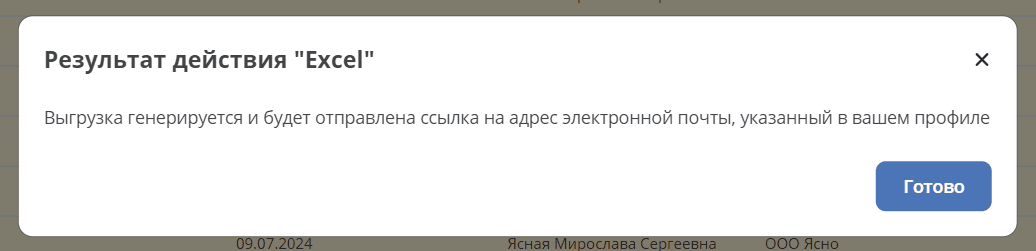
outputParams is an optional parameter and is specified only when the default action response behavior needs to be overridden.
Configuration example:
id: group-action-export-csv
type: server-group-action-v2
name:
  ru: Скачать CSV-файл
  en: Download Excel-file

config:
  targetApp: transformations
  valuesParams:
    limit: 1000000
  executionParams:
    type: export-xlsx
    timeout: T1H
    config:
      fileName: "report"
      columns: [{name: Column, attribute: "?disp"}]

features:
  execForRecords: true
  execForQuery: true
  execForRecord: false
While the group operation is running, a progress window (% completion) is displayed:

Configuration example with outputParams:
id: group-action-export-xlsx
type: server-group-action-v2
name:
  ru: Скачать Excel-файл
  en: Download Excel-file

config:
  targetApp: transformations
  valuesParams:
    limit: 1000000
  executionParams:
    type: export-xlsx
    timeout: T1H
    config:
      fileName: "${$context.journalName}_${$now|fmt('yyyy-MM-dd_HH-mm-ss')}"
      columns: "${$context.reportColumns[]?json}"
  outputParams:
    type: EMAIL
    config:
      notificationRef: notifications/template@default-link-for-export-file-notification

features:
  execForQuery: true
  execForRecord: false
  execForRecords: true
After the export completes, a message is displayed: