Working Schedule
Note
Using the working schedule requires the “features.working-schedule” license
Without a license, the working schedule will only account for regular weekends in calculations, without considering the production calendar.
Working schedule and production calendar are two interrelated tools for managing working time in the system.
Production calendar records non-working days, public holidays, and shortened days — anything that deviates from the standard schedule.
Working schedule defines the standard working day routine: working days of the week, start and end times, time zone, and the associated production calendar.
Together they enable flexible configuration of employee work schedules and are used across various system modules — for example, to calculate SLA in the Service Desk module.
The working schedule is used for four types of operations:
Add working time to a specific date and time.
Add working days to a specific date.
Calculate the number of working days between two dates.
Calculate the number of working days between two dates with time.
Linking a Working Schedule to a User or Group
To link a working schedule to a user or group, create the has-working-schedule:schedule association
Time Zones
The following logic is used when handling time zones in working schedule calculations:
When performing calculations that account for working hours, the following cases apply:
No time zone specified in the date — the time zone from the working schedule is used, and the result will not contain a time zone.
Time zone specified in the date — the service converts the received date/time to the working schedule’s time zone. After all operations are performed, the result is converted back to the original time zone.
Working Schedule Configuration
The system provides 2 entities for configuring the working schedule.
Production Calendar
This entity is used to form a list of dates that modify the standard working day routine.
The “Production Calendar” journal (Workspace “Admin Section” - Model) is available at: v2/journals?journalId=working-calendar&viewMode=table&ws=admin$workspace
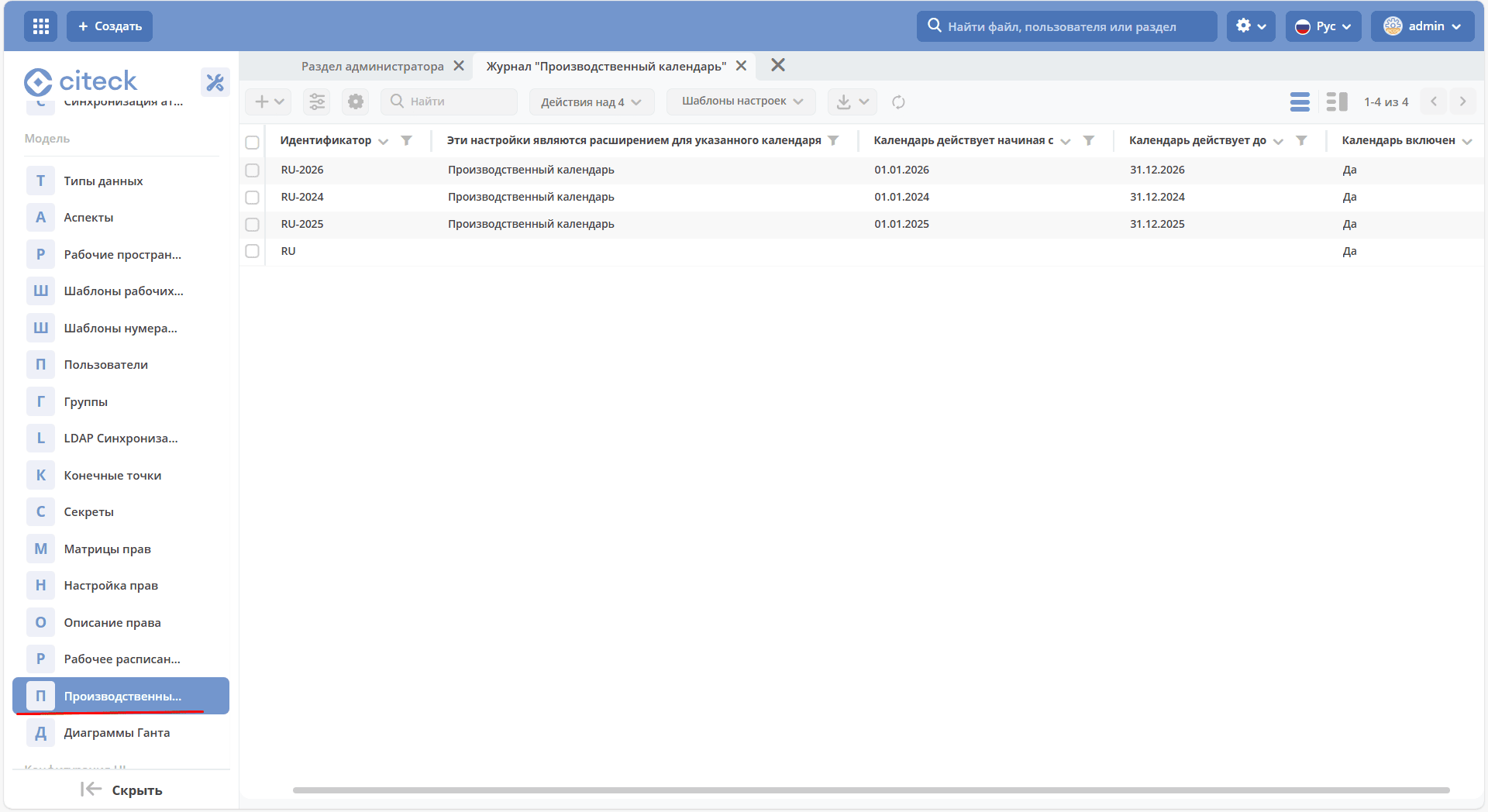
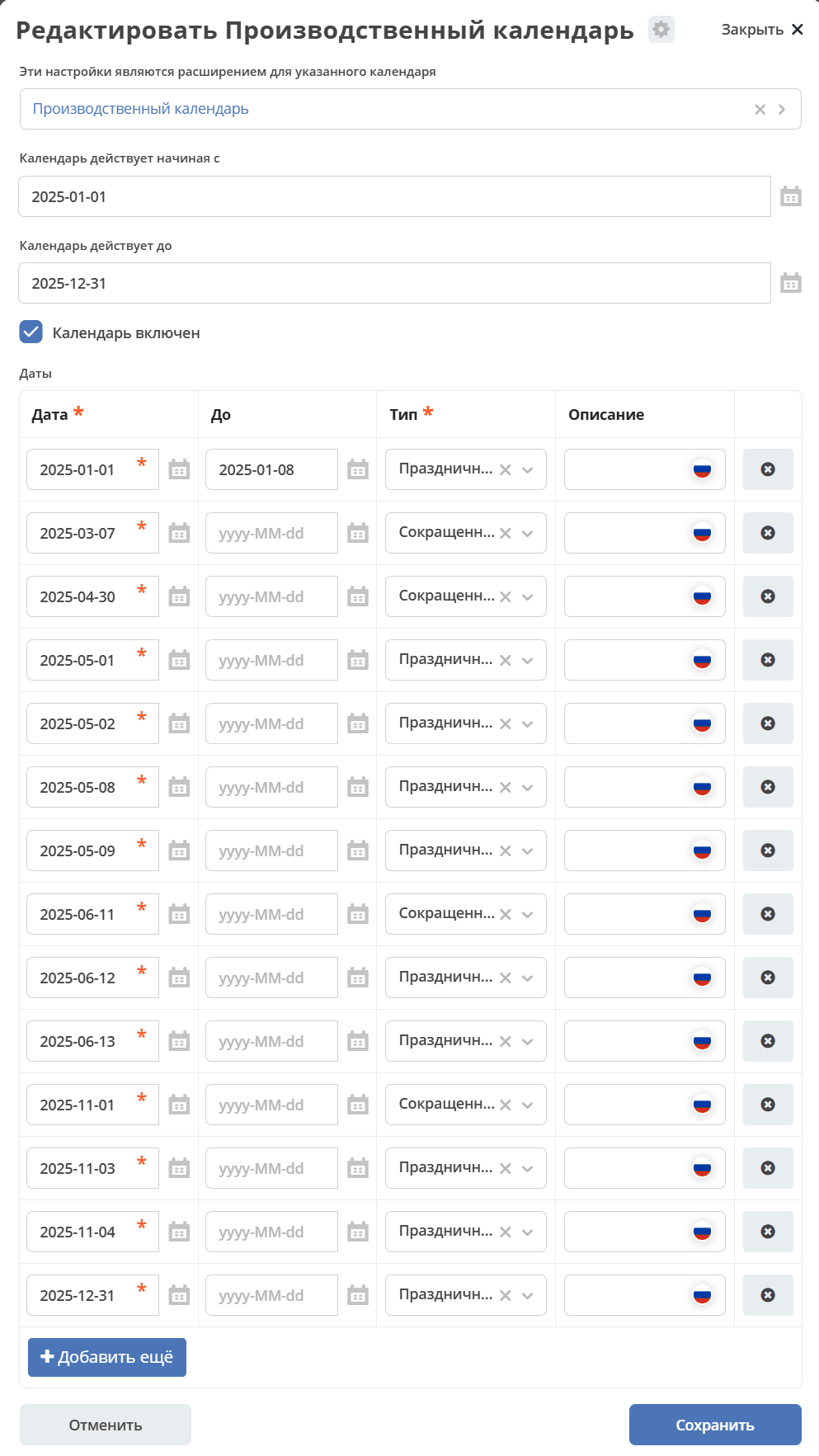
Attributes:
ID |
Type |
Description |
|---|---|---|
id |
String |
Identifier |
extensionFor |
EntityRef |
Reference to the calendar that is extended by this configuration |
from |
LocalDate |
Calendar start date |
until |
LocalDate |
Calendar end date |
enabled |
Boolean |
Whether the calendar is active |
dates |
List<WorkingCalendarDay> |
List of calendar days |
WorkingCalendarDay contains the following fields:
ID |
Type |
Description |
|---|---|---|
date |
LocalDate |
A specific date or the start date of a range if the until value is set |
until |
LocalDate |
End date of the range (inclusive) |
type |
String |
Type of the date or all dates in the range
Allowed types:
WORKING — working day. Applicable when a day off becomes a working day
HOLIDAY — public holiday
SHORTDAY — working day shortened by 1 hour
WEEKEND — day off
NON_WORKING — non-working day
|
description |
MLText |
Description of the day or range |
Working Schedule
Defines the standard working day routine.
The “Working Schedule” journal (Workspace “Admin Section” - Model) is available at: v2/journals?journalId=type$working-schedule&viewMode=table&ws=admin$workspace
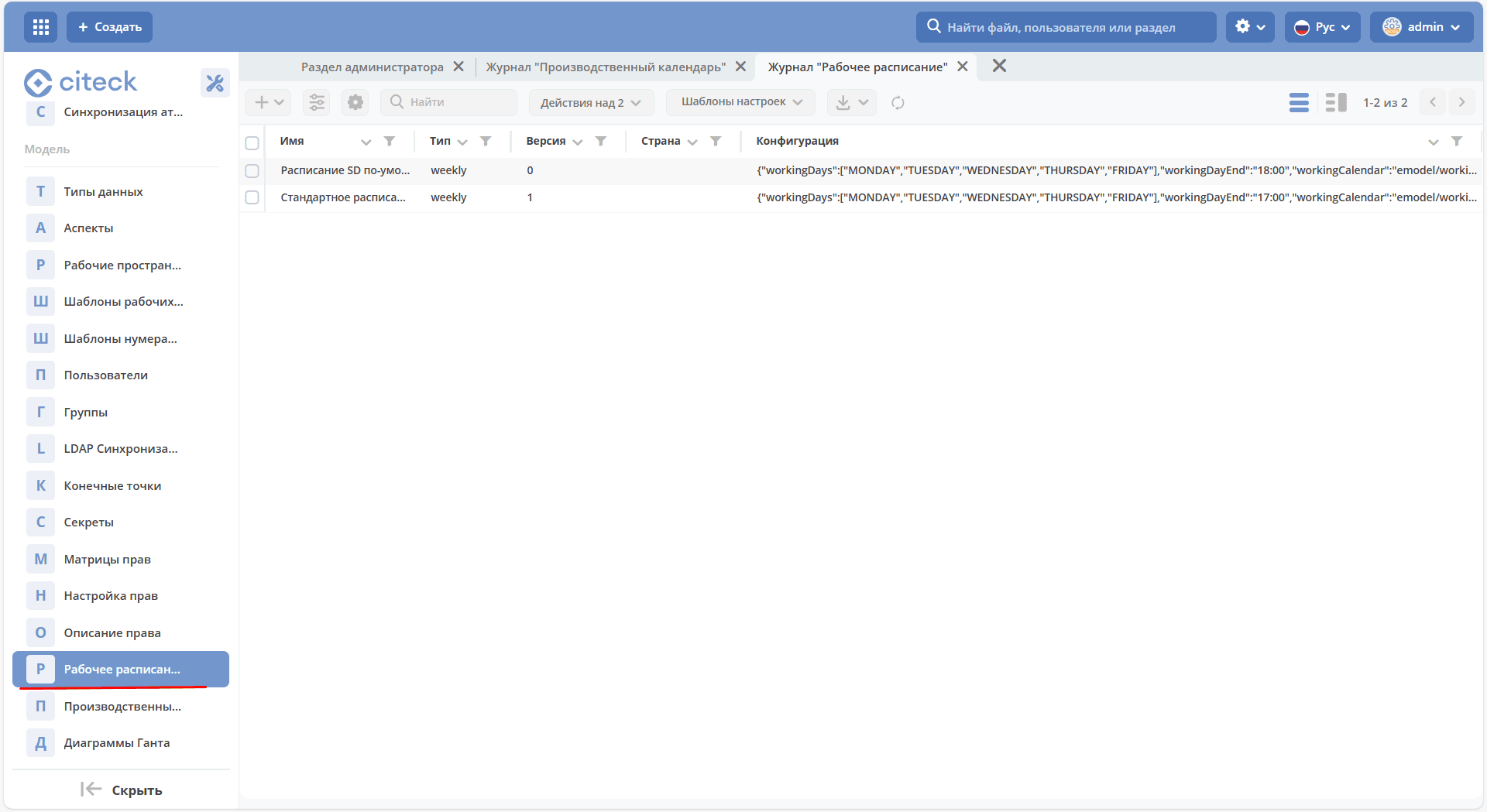
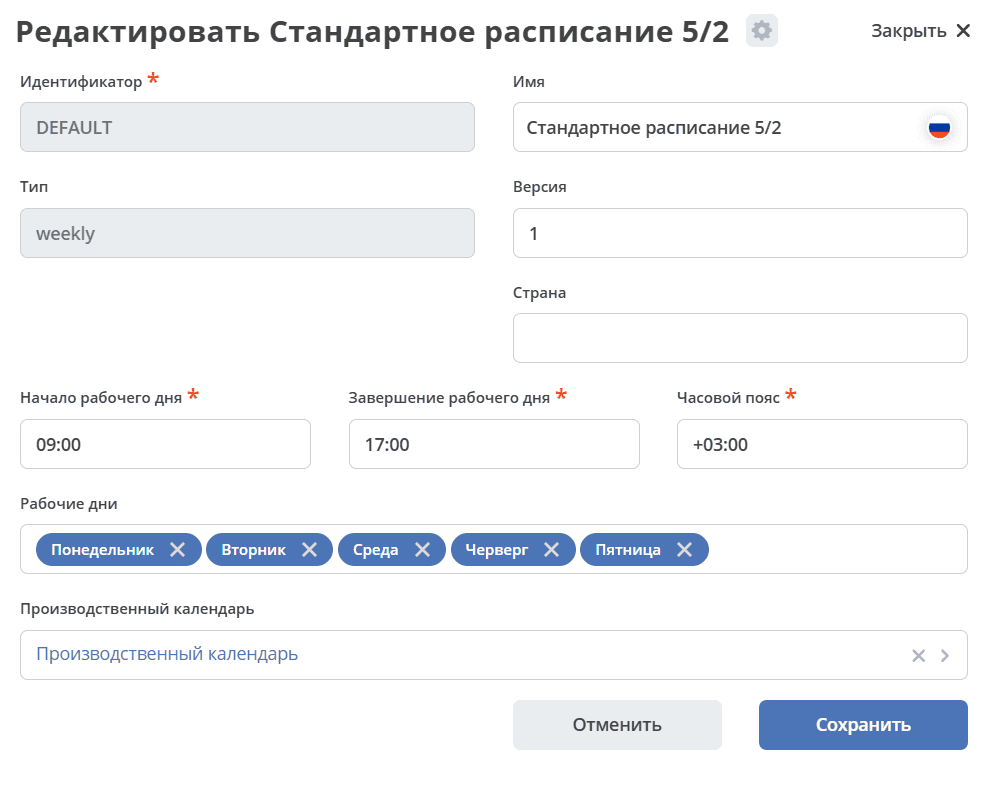
Attributes:
ID |
Type |
Description |
|---|---|---|
id |
String |
Identifier |
name |
MLText |
Schedule name |
type |
String |
Schedule type. Currently only weekly is supported |
config |
ObjectData |
Configuration for the schedule type |
Schedule configuration for the weekly type:
ID |
Type |
Description |
|---|---|---|
workingDayStart |
LocalTime |
Start of the working day |
workingDayEnd |
LocalTime |
End of the working day |
workingDayTimeZone |
ZoneId |
Working day time zone |
workingDays |
List<DayOfWeek> |
List of working days |
workingCalendar |
EntityRef |
Reference to the production calendar |
Using WorkingScheduleService in Java/Kotlin Code
Add the
ru.citeck.ecos.wkgsch.lib.schedule.WorkingScheduleServiceservice as a Spring bean.Retrieve the working schedule using one of the lookup methods:
fun getScheduleById(id: String)
fun getScheduleForGroup(groupId: String)
fun getScheduleForUser(userName: String)
fun querySchedule(query: WorkingScheduleQuery)
Using the methods of the
ru.citeck.ecos.wkgsch.lib.schedule.WorkingScheduleinterface, perform date and/or time calculations based on the working schedule:
/**
* This interface stands as a contract for defining working schedules.
* It provides a range of functions that manipulate and interpret dates
* with respect to a working calendar/week - which may vary depending on the locale
* or the specific needs of a business.
*/
interface WorkingSchedule {

    /**
    * Adjusts a given date to its nearest following working day.
    * If the specified date is already a working day, no changes will be made.
    * Note: If the date has time and/or timeZone components, these will be preserved in the returned date.
    *
    * @param date any of date or datetime values Instant, LocalDate, LocalDateTime, OffsetDateTime, ZonedDateTime
    */
    fun <T : Temporal> correctDate(date: T): T

    /**
    * Adjusts a given date to its nearest following working day and then adds specified working days to it.
    * Note: If the date has time and/or timeZone components, these will be preserved in the returned date.
    *
    * @param date any of date or datetime values Instant, LocalDate, LocalDateTime, OffsetDateTime, ZonedDateTime
    */
    fun <T : Temporal> addWorkingDays(date: T, days: Int): T

    /**
    * Computes the number of working days between two dates.
    *
    * @param from the start date from which working days are counted. Accepted values: Instant, LocalDate, LocalDateTime, OffsetDateTime, ZonedDateTime
    * @param to the end date up to which working days are counted. Accepted values: Instant, LocalDate, LocalDateTime, OffsetDateTime, ZonedDateTime
    */
    fun getWorkingDays(from: Temporal, to: Temporal): Int

    /**
    * Adds a specified working time to a certain date.
    *
    * @param date any of date or datetime values Instant, LocalDate, LocalDateTime, OffsetDateTime, ZonedDateTime
    */
    fun <T : Temporal> addWorkingTime(date: T, time: Duration): T

    /**
    * Get working time between two dates.
    *
    * @param from the start time from which working time are counted. Accepted values: Instant, LocalDateTime, OffsetDateTime, ZonedDateTime
    * @param to the end time up to which working time are counted. Accepted values: Instant, LocalDateTime, OffsetDateTime, ZonedDateTime
    */
    fun getWorkingTime(from: Temporal, to: Temporal): Duration
}
Records API in the Browser and in BPMN Processes
Add Working Time
await Records.queryOne({
    sourceId: 'emodel/working-schedule-action',
    query: {
        type: 'add-working-time',
        config: {date: '2023-03-05T14:00:00', time: '10h'},
        query: {scheduleId: 'DEFAULT'}
    }
}, "data")
Records.query({
    sourceId: 'emodel/working-schedule-action',
    query: {
        type: 'add-working-time',
        config: {date: dl.toISOString(), time: '32h'},
        query: {scheduleId: 'DEFAULT'}
    }
}, 'data').records[0].data
Result:
'2023-03-07T11:00'
Add Working Days
await Records.queryOne({
    sourceId: 'emodel/working-schedule-action',
    query: {
        type: 'add-working-days',
        config: {date: '2023-03-05', days: 10},
        query: {scheduleId: 'DEFAULT'}
    }
}, "data")
Records.query({
    sourceId: 'emodel/working-schedule-action',
    query: {
        type: 'add-working-days',
        config: {date: '2023-03-05', days: 10},
        query: {scheduleId: 'DEFAULT'}
    }
}, 'data').records[0].data
Result:
'2023-03-21'
Calculate the Number of Working Days Between Two Dates
await Records.queryOne({
    sourceId: 'emodel/working-schedule-action',
    query: {
        type: 'get-working-days',
        config: {from: '2023-03-05', to: '2023-03-21'},
        query: {scheduleId: 'DEFAULT'}
    }
}, "data")
Records.query({
    sourceId: 'emodel/working-schedule-action',
    query: {
        type: 'get-working-days',
        config: {from: '2023-03-05', to: '2023-03-21'},
        query: {scheduleId: 'DEFAULT'}
    }
}, 'data').records[0].data
Result:
'11'
Calculate the Number of Working Days Between Two Dates with Time
await Records.queryOne({
    sourceId: 'emodel/working-schedule-action',
    query: {
        type: 'get-working-time',
        config: {from: '2023-03-05', to: '2023-03-21'},
        query: {}
    }
}, "data")
Records.query({
    sourceId: 'emodel/working-schedule-action',
    query: {
        type: 'get-working-time',
        config: {from: '2023-03-05', to: '2023-03-21'},
        query: {}
    }
}, 'data').records[0].data
Result:
'PT80H'
All requests have a query field that may contain the following fields:
ID |
Type |
Description |
|---|---|---|
user |
String |
The user for whom the working schedule needs to be found.
If no schedule is found for the user, DEFAULT is used.
|
group |
String |
The group for which the working schedule needs to be found.
If no schedule is found for the group, DEFAULT is used.
|
scheduleId |
String |
The identifier of a specific working schedule.
If set, user and group are ignored.
Identifier examples: ‘DEFAULT’, “some-id”
|