Barcode
Note
Available in the Enterprise version only.
Citeck allows automatically generating a PDF document with an embedded barcode — this simplifies document identification and tracking within business processes. The feature is implemented using the ecos-transformations microservice and the PDFStamp tool.
A barcode image is generated based on a record attribute, which can be:
Displayed in the record card;
Opened for printing;
Stamped onto a PDF document.
The process of generating a PDF document with a barcode:
Conversion to PDF from doc and docx files attached to the record card.
The content is populated by a user-attached document or generated from a template (FreeMarkerTemplate).
After generation, the PDF file is attached to the card’s document widget or to the content of a child entity.
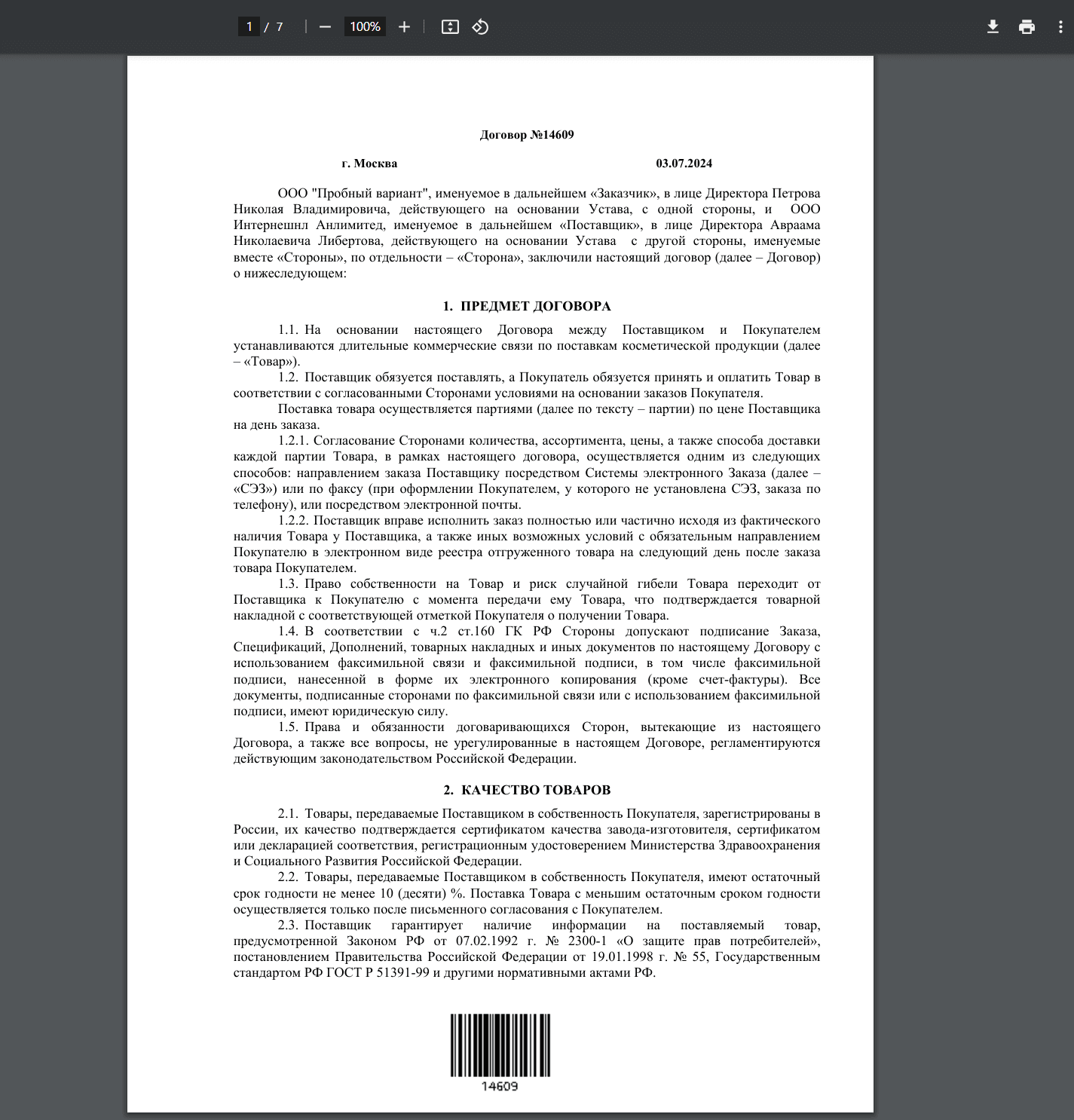
The barcode is placed at the bottom of the document:
Barcode Configuration
Configuration is done via an aspect added to the required type:
Aspect: Has barcode (barcode)
The aspect settings for the type contain 2 fields:
Barcode format (format)
Attribute containing the barcode content (attribute)
Adding a Barcode to a PDF Document
To add a barcode to a PDF, use the content transformation capabilities.
Action configuration (stamping a barcode onto an existing PDF):
---
id: download-with-barcode
name: Скачать с штрих-кодом
type: transform
config:
  transformations:
    - type: barcode
If the document content needs to be converted to PDF first (e.g. from doc/docx), add the convert transformer before barcode:
---
id: download-with-barcode-converted
name: Скачать PDF со штрих-кодом
type: transform
config:
  transformations:
    - type: convert
      config:
        toMimeType: application/pdf
    - type: barcode
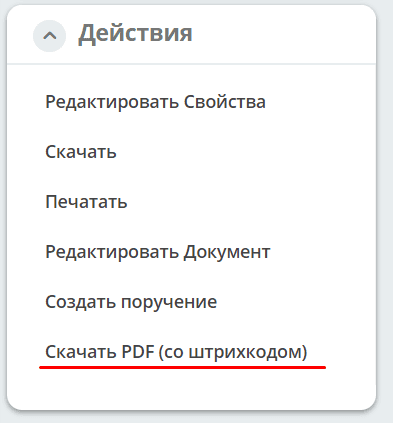
To download the document with the stamped barcode, use the Download PDF (with barcode) action in the record card:
For more details on transformations, see content transformation.
Rest API
To retrieve a barcode as an image, use the following API:
GET /gateway/transformations/api/barcode/image?content=123
Parameters:
barcodeFormat: String? // формат штрих-кода. По умолчанию CODE_128
imageFormat: String?   // формат изображения. По умолчанию PNG
width: Int?            // ширина изображения
height: Int?           // высота изображения
margin: Int?           // отступ от краёв
altText: Boolean?      // рендерить текстовое содержимое штрих-кода. По умолчанию — Да
content: String?       // содержимое штрих-кода. Если задано, то entityRef и attribute игнорируются
entityRef: String?     // сущность, из которой нужно загрузить содержимое для штрих-кода
attribute: String?     // атрибут сущности, из которого нужно загрузить содержимое для штрих-кода
download: Boolean?     // если true — изображение скачивается; если false — открывается в браузере
print: Boolean?        // если true — пользователю отправляется PDF со штрих-кодом для печати
outputType: String?    // формат результата. По умолчанию PDF (если print=true) или изображение.
                       // Значение "json" — содержимое возвращается в виде JSON с полем data (base64)
Supported barcode formats:
AZTEC
CODABAR
CODE_39
CODE_93
CODE_128
DATA_MATRIX
EAN_8
EAN_13
ITF
PDF_417
QR_CODE
UPC_A
UPC_E