Communication between two or more Citeck instances via commands and events
Requirements
Citeck instances must be self-sufficient. I.e., each Citeck must have a full set of necessary microservices deployed for full operation.
The integration microservice in each Citeck instance must have network access to the RabbitMQ and Zookeeper of the remote Citeck.
Each Citeck instance must have the integration microservice version 1.15.0+ (currently SNAPSHOT)
Note
access to Zookeeper is needed for events, but they are currently TODO, while for commands, access to RabbitMQ is sufficient.
Configuration
Connection diagram for two Citeck instances:
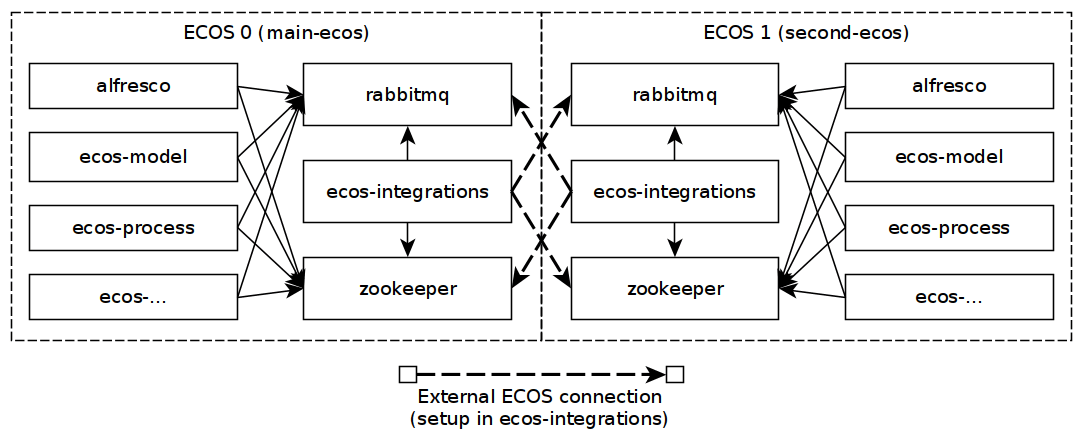
Connections indicated by dotted lines are configured in central-config for the integration microservice (in the future, the connection to Zookeeper will be under the key zookeeper in connections):
# Пример конфигурации для main-ecos. Для second-ecos изменится this-app-name и возможно host/user/pass у rabbitmq
ecos-integrations:
extecos:
    - this-app-name: main-ecos
    connections:
        rabbitmq:
        host: localhost
        username: admin
        password: admin
    commands:
        apps:
        - alfresco
extecos - an array of connections to various Citeck instances (an unlimited number of connections is supported).
extecos[].this-app-name - the name of the current Citeck instance. It will be used when sending commands and events from an external system to the current one.
extecos[].connections - section with connections to RabbitMQ and Zookeeper
extecos[].commands - commands configuration;
extecos[].commands.apps - local applications that will be able to send commands from the external system.
Registering a Command Executor
Inject CommandsService and call:
commandsService.addExecutor(new SomeExecutor());
Example of a command executor:
public class SomeExecutor implements CommandExecutor<SomeBody> { // SomeBody - любой DTO тип, который будет передаваться в Body команды. DTO тип должен иметь аннотацию CommandType для определения типа команды

    @Nullable
    @Override
    public Object execute(SomeBody someBody) {
        //выполняем необходимые действи
        return "OK";
    }
}

@Data
@CommandType("some-command-type") // тип команды. С отправляющей стороны задается как builder.setType("some-command-type") или так же через аннотацию на типе тела команды, которое передается как builder.setBody(...)
public class SomeBody {
    private String strField = "str-field";
    private byte[] bytesField;
}
SomeExecutor - is the receiving side, while the sending side will be where commandsService.execute is called (example in the “sending commands” section)
The SomeBody class must be described on both the sending and receiving sides (It is sufficient that the field names and field types match. The packages are not important. Jackson will handle the data conversion).
Sending a command to an external system (from ECOS 1 (second-ecos) to ECOS 0 (main-ecos))
From Java code
Inject CommandsService and call the command sending:
commandsService.executeSync(builder -> { // вместо executeSync можно вызвать просто execute, чтобы не дожидаться ответа.
    builder.setTargetApp("main-ecos/alfresco"); // целевое приложение. Является значением this-app-name из конфигурации целевого контура Citeck + "/" + индентификатор целевого приложения
    builder.setType("some-command-type"); // тип события. по нему будет выбран CommandExecutor для выполнения. Вместо данной строки тип можно указать через аннотацию @CommandType
    builder.setBody(new SomeBody()); // любой инстанс DTO класса. Преобразуется в байты и обратно с помощью библиотеки Jackson
    builder.setTtl(Duration.of(1, ChronoUnit.MINUTES)); //время жизни сообщения в RabbitMQ. Если за это время сообщение никто не обработает, то оно удалится из очередей.
    return Unit.INSTANCE;
})
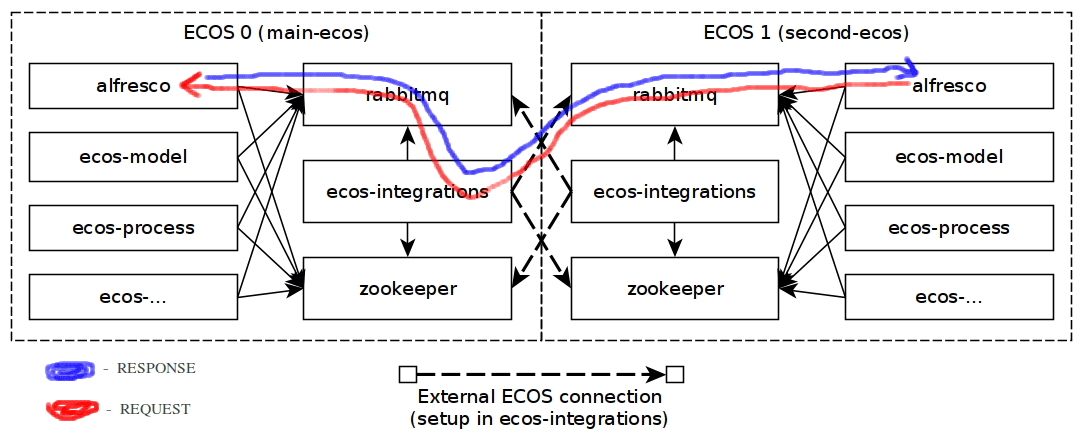
If we assume that the sending is done from alfresco (ECOS 1 - second-ecos) to alfresco (ECOS 0 - main-ecos), then the command flow will be as follows:
Testing Command Sending
Sending commands to a remote Citeck and a local one differs only in the argument for setTargetApp. Thus, the mechanism can be debugged without considering multiple ECOS instances.
Sending a command to the local RabbitMQ via a Java test (can be placed in ecos-integrations):
public class CommandsTest {

    @Test
    public void test() {

        // подключаемся к нужному RabbitMQ
        RabbitMqConnProps props = new RabbitMqConnProps();
        props.setUsername("admin");
        props.setPassword("admin");
        props.setHost("localhost");

        RabbitMqConnFactory factory = new RabbitMqConnFactory();
        RabbitMqConn conn = factory.createConnection(props, 0);

        conn.waitUntilReady(5000);

        CommandsServiceFactory commFactory = new CommandsServiceFactory() {

            @NotNull
            @Override
            protected CommandsProperties createProperties() {
                CommandsProperties props = new CommandsProperties();
                props.setAppName("alfresco1"); // "представляемся" в системе как приложение с именем "alfresco1"
                props.setAppInstanceId("alfresco1-123"); // идентификатор инстанса приложения
                props.setListenBroadcast(false); // указываем, что широковещательные команды нам исполнять не нужно
                return props;
            }

            @NotNull
            @Override
            protected RemoteCommandsService createRemoteCommandsService() {
                return new RabbitCommandsService(this, conn);
            }
        };

        commFactory.getRemoteCommandsService();
        CommandsService commandsService = commFactory.getCommandsService();

        System.out.println(commandsService.executeSync(builder -> { // выполняем команду синхронно и выводим результат в консоль
            builder.setTargetApp("alfresco"); // отправляем команду в alfresco
            builder.setType("some-command-type"); // тип команды
            builder.setBody(new SomeBody()); // тело команды
            builder.setTtl(Duration.of(1, ChronoUnit.MINUTES));
            return Unit.INSTANCE;
        }));

        conn.close();
    }

    @Data
    @CommandType("some-command-type")
    public static class SomeBody {
        private String strField = "str-field";
        private byte[] bytesField;
    }
}
Local testing of sending commands to a remote instance (makes sense after debugging via regular command sending):
Add the configuration for the remote ECOS instance as described in the Configuration section. Use localhost as the target RabbitMQ. This way, you can locally test interaction with remote instances by running only one RabbitMQ instance. No conflicts will arise.
Slightly change the argument in the setTargetApp method when sending the command in the test:
... здесь все аналогично предыдущему блоку кода, который описывает класс CommandsTest ...
        System.out.println(commandsService.executeSync(builder -> {
            builder.setTargetApp("main-ecos/alfresco"); // единственное отличие при отправке команд - добавляется идентификатор контура Citeck со слэшем
            builder.setType("some-command-type");
            builder.setBody(new SomeBody());
            builder.setTtl(Duration.of(1, ChronoUnit.MINUTES));
            return Unit.INSTANCE;
        }));
... здесь все аналогично предыдущему блоку кода, который описывает класс CommandsTest ...
If desired, you can also connect to a real remote Citeck, but this requires external access to its RabbitMQ. In this case, it will be sufficient to correct the parameters in RabbitMqConnProps
Sending Files in Commands and Events
To send files in commands and events, fields of type byte[] should be used (messages are compressed before sending. I.e., additional optimization is not needed).
For convenient work with files, there are utility classes EcosMemFile, EcosMemDir, and ru.citeck.ecos.commons.utils.ZipUtils, which can easily pack multiple files into a single byte stream and back.
Example:
SomeBody body = new SomeBody();

EcosMemDir dir = new EcosMemDir();
dir.createFile("firstFile.txt", "content");
dir.createFile("secondFile.docx", new byte[10]);
body.setBytesField(ZipUtils.writeZipAsBytes(dir));

commandsService.executeSync(builder -> {
    builder.setTargetApp("main-ecos/alfresco");
    builder.setType("some-command-type");
    builder.setBody(body);
    builder.setTtl(Duration.of(1, ChronoUnit.MINUTES));
    return Unit.INSTANCE;
});