Synchronization of Counterparty Data and Their Mailboxes with Kontur.Diadoc
This synchronization is designed to automate the filling of counterparty data, including EDI mailboxes.
Logic of Operation:
When creating a synchronization, Citeck’s standard tools create a FutureTask, linked to a specific trigger based on a cron expression or a periodic timer.
When the previously created FutureTask is invoked, the
executemethod runs, initiating the synchronization.In the
executemethod, theexecuteImplmethod is called, in which:
A search is performed for the registered CounterpartiesSyncService, whose interface is defined in ecos-edi-commons, and the implementation is described in a separate bundle for each EDI provider. For example ecos-edi-kontur-lib
If the CounterpartiesSyncService is not found, an exception is thrown.
Synchronization of counterparties is launched, based on the configuration described in the synchronization.
Logic of the KonturDiadocCounterpartiesSyncService synchronization service:
Parameters from the synchronization configuration are validated and extracted.
A request is sent to Kontur.Diadoc to retrieve all counterparties for the specified mailbox. In this case, the difference between this synchronization and document synchronization is visible. Here, we get all counterparties because Kontur does not have an event system for them.
Data received from Kontur is mapped to the Counterparty DTO described in ecos-edi-commons.
The received and processed data is passed to the Camel route described in the synchronization settings.
Structure of the Bundle for Processing Counterparties
The bundle is structured quite simply:
An Activator, where the ApplicationCamelContextFactory is initialized when the bundle is loaded. It is destroyed when the bundle is unloaded.
A factory class for initializing Camel routes and all necessary services.
The route classes themselves, where filtering, data transfer to other routes, and delegation of processing to processor classes occur.
Processor classes that process data according to the required algorithm.
The route classes are quite similar in structure, and their logic will not change unless there is a need to exclude certain statuses from processing.
Processor classes process data according to the algorithm embedded in them.
Example of a handler for counterparties in the statuses IsMyCounteragent, RejectsMe, IsRejectedByMe:
A search for the counterparty is performed based on the received data. For example, by INN:
If the counterparty is not found, information about this is written to the log, and the processor stops processing the received data.
The mutation request is filled with the received data. Filling of mailbox data is done separately, as it is an association.
The mutation request is sent.
The processor finishes processing the received data.
Example of a handler for counterparties in the status InvitesMe:
Using the example of filling out EDI Applications:
A search for the counterparty is performed based on the received data. For example, by INN.
If the counterparty is found, its data is updated for subsequent attachment to the card.
A search for the EDI Application card is performed based on the received data.
If such an application is found, its data is updated, and the processor finishes processing the received data.
The mutation request for the EDI Application card is filled out. Accompanying invitation documents are created separately if they exist (a process is attached to the card, and if the user accepts the application, they must be signed if present), after which they are attached to the card.
The mutation request is sent.
The processor finishes processing the received data.
Configuring Counterparty Synchronization with Kontur.Diadoc
Configuration Steps:
Open the “Synchronizations” journal (Workspace “Administrator Section” - Model).
Click the + button
In the dropdown list, find “Counterparty Synchronization (EDI)”, and click on this dropdown item:
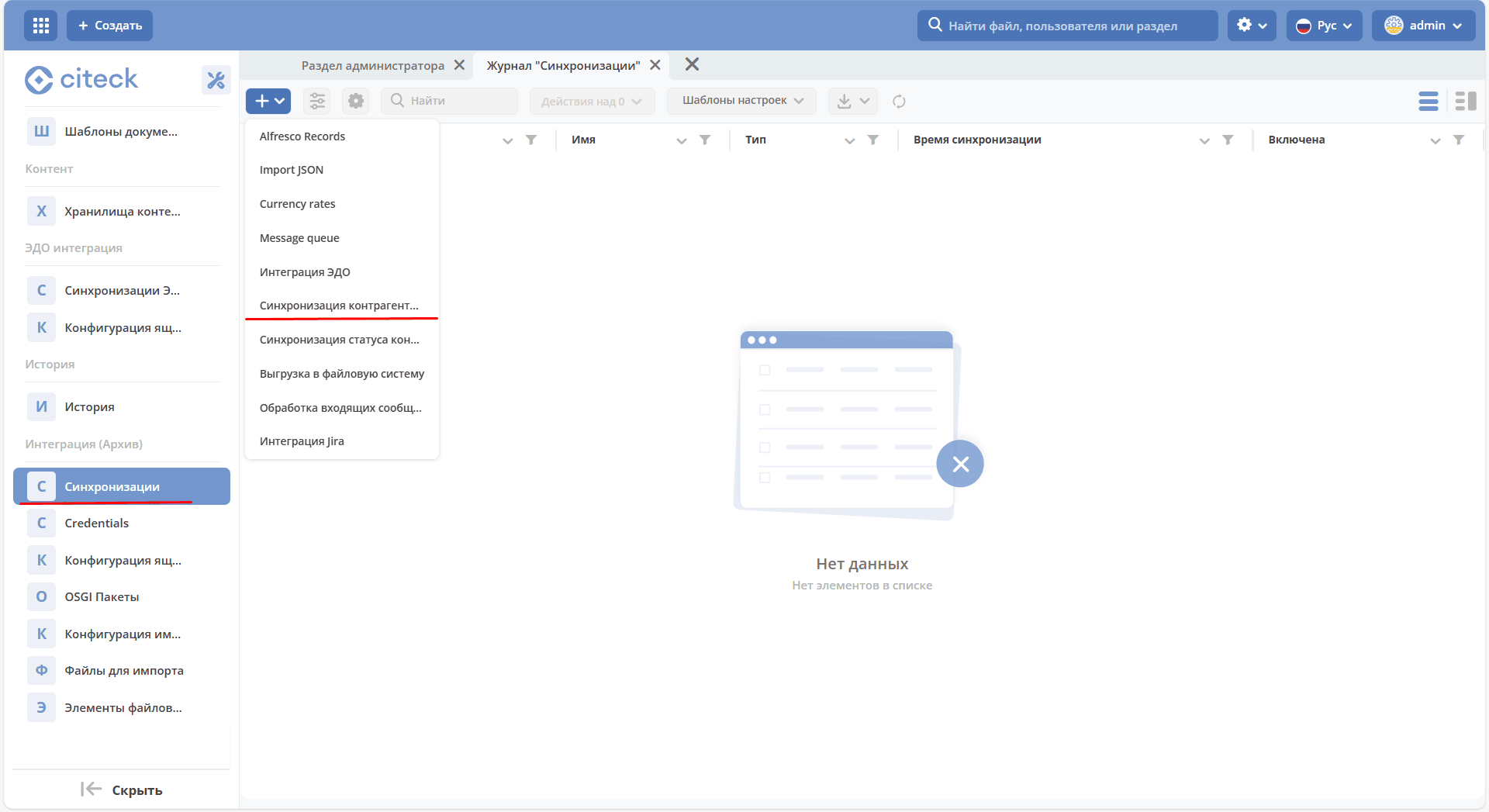
Fill out the opened form:
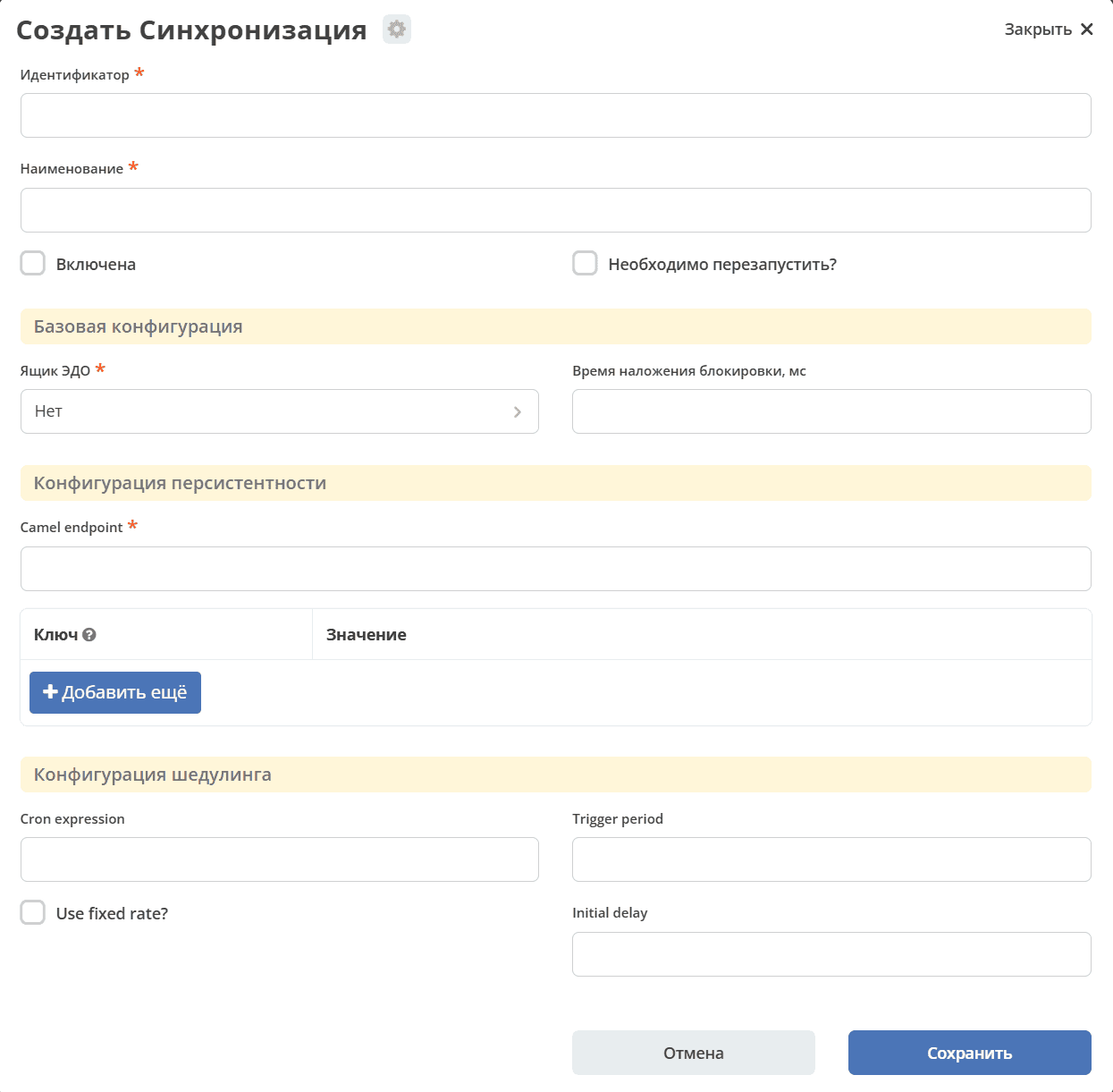
Parameters:
Identifier – synchronization identifier. Does not affect the synchronization itself, only needed to understand what this integration is responsible for. If processing is for a specific counterparty status, it’s better to specify
status identifier + sync. If all counterparties are processed in one route, you can specifydiadoc-counterparties-sync.Name – synchronization name. Also does not affect the integration itself, needed for understanding. Usually matches the identifier.
Enabled – whether the synchronization is enabled.
Needs reload – restart the integration immediately after saving.
EDI Mailbox – determines for which mailbox the synchronization will be performed, similar to the Kontur.Diadoc document flow.
Lock Time – should be set to prevent more than 2 integrations from running simultaneously for the same mailbox. If no value is set, the lock will be applied for 2 hours.
Camel endpoint – the previously described route for processing counterparties.
Cron expression – More details here: org.springframework.scheduling.support.CronTrigger
Trigger period – Used if Cron expression is not set. Must be set if Cron expression is not set, otherwise there may be problems with synchronization operation.
Use fixed rate – the countdown to the next triggering will only start after the work from the previous triggering has completed. More details here: org.springframework.scheduling.support.PeriodicTrigger
Initial delay – the job will not trigger for the first N milliseconds
DTO for the Counterparty Synchronization Mechanism
For synchronizing counterparty data with Kontur.Diadoc, Diadoc’s Protobuf is used when receiving data.
Description of counterparty data: Counteragent — Diadoc Documentation 1.87.0
To convert the received data, the following DTOs are used in Citeck:
Counterparty:
Field Type |
Field Name |
Note |
|---|---|---|
OrgId |
myOrgId |
Identifier of the organization on whose behalf the request for the counterparty was made. |
OurId |
ourId |
Identifier of the mailbox from which the request for the counterparty was made. |
OrgId |
orgId |
Identifier of the counterparty organization. |
String |
fullName |
Full name of the counterparty organization. |
String |
shortName |
Short/alternative name of the counterparty organization. |
String |
inn |
INN of the counterparty organization. |
String |
kpp |
KPP of the counterparty organization. |
String |
ogrn |
OGRN of the counterparty organization. |
String |
address |
Postal address of the counterparty organization. |
String |
status |
Status of the counterparty organization. |
String |
fnsParticipantId |
Tax identifier of the counterparty organization. |
Long |
lastEventTimestamp |
Time of the last event that occurred between our organization and the counterparty organization (status change). |
InvitationDocument |
InvitationDocument |
Structure of the invitation document. Optional. |
List<EdiBoxDto> |
boxDtos |
Structure of the counterparty’s mailboxes in Kontur.Diadoc. Can be multiple. |
ObjectData |
data |
Additional parameters not defined in the main structure. Optional. |
InvitationDocument:
Field Type |
Field Name |
Note |
|---|---|---|
DocumentEdiIdentifier |
docId |
Identifier of the invitation document in Kontur.Diadoc |
SignedContent |
signedContent |
Content of the invitation document signed by the counterparty |
FileContent |
docContent |
Content of the invitation document |
boolean |
НsignatureRequested |
Flag indicating whether the counterparty requested us to sign the invitation document or not. Default value – false |
ObjectData |
data |
Additional parameters not defined in the main structure. Optional |
SignedContent:
Field Type |
Field Name |
Note |
|---|---|---|
Signature |
signature |
Signed content of the document. |
ObjectData |
data |
Additional parameters not defined in the main structure. Optional. |
EdiBoxDto:
Field Type |
Field Name |
Note |
|---|---|---|
String |
id |
Kontur.Diadoc mailbox identifier. |
String |
title |
Kontur.Diadoc mailbox title. |
OurId |
ourId |
Identifier of our organization. Optional. |
EdiProviderType |
ediProviderType |
EDI provider type. In our case — KONTUR. Cannot take any other value. |
RecordRef |
datasourceRef |
Reference to the source record for synchronization. Optional. |
RecordRef |
credentialsRef |
Reference to the account credentials for synchronization. Optional. |
ObjectData |
specialInfo |
Additional parameters not defined in the main structure. Optional. Usually stores the mailbox identifier of the counterparty organization. |