Server-Side Signing
Note
Available only in the Enterprise version.
Starting from version 2.3.5, the ecos-integrations microservice includes functionality for server-side signing of documents with an electronic signature without using the CryptoPro EDS Browser plug-in.
For this purpose, an additional service ecos-crypto-sign was developed (repository https://gitlab.citeck.ru/citeck-projects/ecos-crypto-sign)
General Operation Scheme:
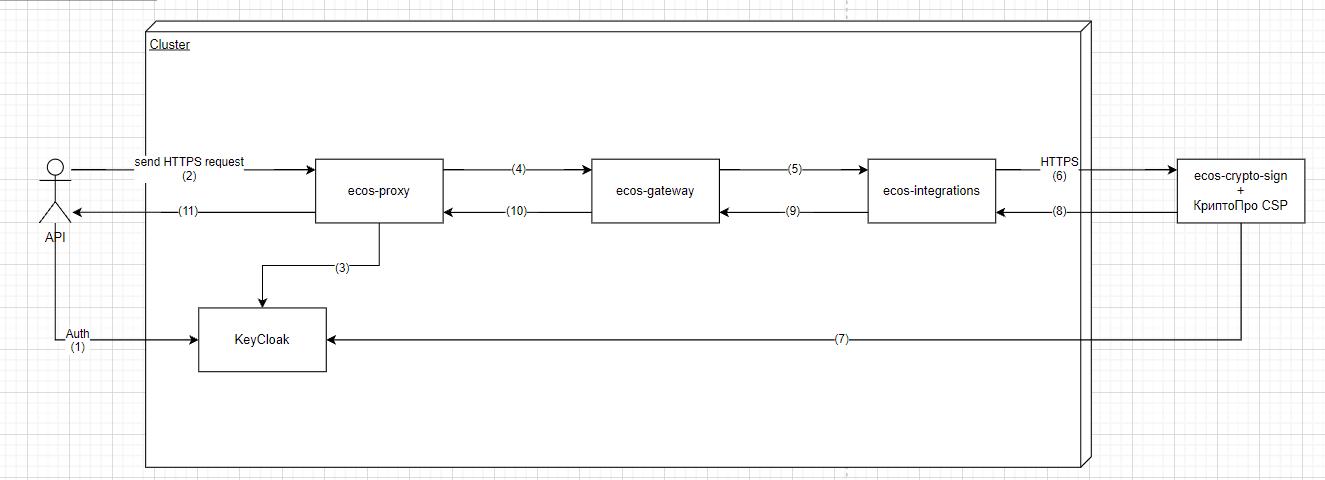
Description
The API client authenticates with KeyCloak. KeyCloak issues a token.
The API client sends its request to ecos-proxy, specifying the token in the header.
The ecos-proxy component checks the token with KeyCloak. If the token is valid, it forwards the request. Otherwise, an error occurs.
The ecos-proxy component routes the request to the target ecos-gateway microservice. The header with the token is transmitted.
This microservice routes the request to one of the available ecos-integrations microservices. The header with the token is transmitted.
The integrations microservice sends a request to the signing microservice. The header with the token is transmitted.
The signing microservice checks the token with KeyCloak. If the token is valid, signing occurs. Otherwise, an error occurs. Return response to the API client
The signing service is a standard Spring Boot application.
Currently, 2 REST requests are available:
Content Signing
{host:port}/ecos/crypto/sign
headers:
Authorization: Bearer access_token //keycloak bearer access token
body:
{
    "documentContent":"QQMTIzNDU2Nzg5",
    "keyStoreInfo":{
        "providerType":"JCSP",
        "keyStoreType":"FAT12_D"
    },
    "certificateInfo":{
        "pin":"1",
        "alias":"null",
        "serialNumber":"5927a700f7ac223d9548e8628fe9c2c302",
        "thumbprint":"A14BFD6503EFD7116AFCE95A6FAA2097E0883DEAD811",
        "signatureAlgorithm":""
    }
}
documentContent - Content to be signed (Base64 encoded byte[])
providerType - Provider type (By default, we use JCSP)
keyStoreType - Certificate store type (e.g., HDD on drive D, as in the current example, or registry, etc.)
pin - Container password for retrieving the private key
alias - Certificate alias for finding the correct certificate for signing
serialNumber - Certificate serial number? used if alias is unknown
thumbprint - Certificate thumbprint, used if alias and serialNumber are unknown
signatureAlgorithm - Signature algorithm (currently, the passed algorithm is not used; it is taken from the found certificate)
In the current implementation, the certificate is searched for:
First by alias (if it is not empty; if empty, skip this step)
If not found, then by serial number (if it is not empty; if empty, skip this step)
If still not found, then by thumbprint (if empty and the certificate is not found, return a signing error)
Expected response:
{
    "success": true,
    "error": "",
    "signatureContent": "MIIMoQYJKoZIhv23cNAQcCoIIMkjCCDI4CAQExDjAMBggqhQMHAQECAgUAMAsGCSqGSIb3DQEHAaCCCgMwggn/MIIJrKADAgECAhBZJ6cA96wtlUjoYo/pwsMCMAoGCCqFAwcBAQMCMIIBeTEeMBwGCSqGSIb3DQEJARYPY2FAc2tia29udHVyLnJ1MRgwFgYFKoUDZAESDTAwMDAwMDAwMDAwMDAxGjAYBggqhQMDgQMBARIMMDAwMDAwMDAwMDAwMQswCQYDVQQGEwJSVTEzMDEGA1UECAwqNjYg0KHQstC10YDQtNC70L7QstGB0LrQsNGPINC+0LHQu9Cw0YHRgtGMMSEwHwYDVQQHDBjQldC60LDRgtC10YDQuNC90LHRg9GA0LMxLTArBgNVBAkMJNCf0YAuINCa0L7RgdC80L7QvdCw0LLRgtC+0LIsINC0LiA1NjEwMC4GA1UECwwn0KPQtNC+0YHRgtC+0LLQtdGA0Y/RjtGJ0LjQuSDRhtC10L3RgtGAMSkwJwYDVQQKDCDQkNCeICLQn9CkICLQodCa0JEg0JrQvtC90YLRg9GAIjEwMC4GA1UEAwwn0JDQniAi0J/QpCAi0KHQmtCRINCa0L7QvdGC0YPRgCIgKFRlc3QpMB4XDTIxMDMyNjA5NTgzNloXDTIyMDYyNjEwMDczMVowggHrMTAwLgYJKoZIhvcNAQkCDCE5NjQ5Mzk3MDEwLTk2NDkwMTAwMC0wMDAwMDAwMDAwMDAxGjAYBggqhQMDgQMBARIMMDA5NjQ5Mzk3MDEwMRYwFAYFKoUDZAMSCzAwMDAwMDAwMDAwMRgwFgYFKoUDZAESDTQ1NzQ1ODQxNTQ2NDYxLDAqBgNVBAwMI9Ch0LjRgdGC0LXQvNC90YvQuSDQsNC90LDQu9C40YLQuNC6MU4wTAYDVQQKDEXQotC10YHRgtC+0LLQsNGPINCQ0J4gwqvQodC10LLQtdGA0YHRgtCw0LvRjCDQlNC40YHRgtGA0LjQsdGD0YbQuNGPwrsxEDAOBgNVBAkMB9GD0LsuIDExFTATBgNVBAcMDNCc0L7RgdC60LLQsDEYMBYGA1UECAwPNzcg0JzQvtGB0LrQstCwMQswCQYDVQQGEwJSVTEuMCwGA1UEKgwl0JzQsNGA0LjQvdCwINCS0LvQsNC00LjQvNC40YDQvtCy0L3QsDEbMBkGA1UEBAwS0JHQvtC90LTQsNGA0LXQstCwMU4wTAYDVQQDDEXQotC10YHRgtC+0LLQsNGPINCQ0J4gwqvQodC10LLQtdGA0YHRgtCw0LvRjCDQlNC40YHRgtGA0LjQsdGD0YbQuNGPwrswZjAfBggqhQMHAQEBATATBgcqhQMCAiQABggqhQMHAQECAgNDAARA3TWyHeBF7p/6swF+zMZkFRRhSj3i97GiQnPMRBZruN9TUeyxAUQfCgMyPsxRZOPmakjpLOtksEblczy1G5SdNqOCBZEwggWNMAwGBSqFA2RyBAMCAQAwDgYDVR0PAQH/BAQDAgTwMBMGA1UdIAQMMAowCAYGKoUDZHEBMDcGA1UdJQQwMC4GCCsGAQUFBwMCBgcqhQMCAiIGBgcqhQMDBwgBBggqhQMDBwEBAQYGKoUDAwcBMIHaBggrBgEFBQcBAQSBzTCByjA9BggrBgEFBQcwAYYxaHR0cDovL2lkZW1vLmtvbnR1ci1jYS5ydTo4MDgwL29jc3BfdGVzdC9vY3NwLnNyZjBDBggrBgEFBQcwAoY3aHR0cDovL2NkcC5za2Jrb250dXIucnUvY2VydGlmaWNhdGVzL3VjLXRlc3QtZ29zdDEyLmNydDBEBggrBgEFBQcwAoY4aHR0cDovL2NkcDIuc2tia29udHVyLnJ1L2NlcnRpZmljYXRlcy91Yy10ZXN0LWdvc3QxMi5jcnQwKwYDVR0QBCQwIoAPMjAyMTAzMjYwOTU4MzVagQ8yMDIyMDYyNjEwMDczMVowggExBgUqhQNkcASCASYwggEiDCsi0JrRgNC40L/RgtC+0J/RgNC+IENTUCIgKNCy0LXRgNGB0LjRjyA0LjApDFMi0KPQtNC+0YHRgtC+0LLQtdGA0Y/RjtGJ0LjQuSDRhtC10L3RgtGAICLQmtGA0LjQv9GC0L7Qn9GA0L4g0KPQpiIg0LLQtdGA0YHQuNC4IDIuMAxOQ9C10YDRgtC40YTQuNC60LDRgiDRgdC+0L7RgtCy0LXRgtGB0YLQstC40Y8g4oSWINCh0KQvMTI0LTMwMTAg0L7RgiAzMC4xMi4yMDE2DE5D0LXRgNGC0LjRhNC40LrQsNGCINGB0L7QvtGC0LLQtdGC0YHRgtCy0LjRjyDihJYg0KHQpC8xMjgtMjk4MyDQvtGCIDE4LjExLjIwMTYwNgYFKoUDZG8ELQwrItCa0YDQuNC/0YLQvtCf0YDQviBDU1AiICjQstC10YDRgdC40Y8gNC4wKTB2BgNVHR8EbzBtMDSgMqAwhi5odHRwOi8vY2RwLnNrYmtvbnR1ci5ydS9jZHAvdWMtdGVzdC1nb3N0MTIuY3JsMDWgM6Axhi9odHRwOi8vY2RwMi5za2Jrb250dXIucnUvY2RwL3VjLXRlc3QtZ29zdDEyLmNybDBTBgcqhQMCAjECBEgwRjA2Fg9odHRwOi8vdGVzdC51cmkMH9Ci0LXRgdGC0L7QstCw0Y8g0YHQuNGB0YLQtdC80LADAgXgBAyOfAuDoipM6Cvmc7swggG6BgNVHSMEggGxMIIBrYAUS1rd7FG0bMQuGnQVVAaKAeJlZa2hggGBpIIBfTCCAXkxHjAcBgkqhkiG9w0BCQEWD2NhQHNrYmtvbnR1ci5ydTEYMBYGBSqFA2QBEg0wMDAwMDAwMDAwMDAwMRowGAYIKoUDA4EDAQESDDAwMDAwMDAwMDAwMDELMAkGA1UEBhMCUlUxMzAxBgNVBAgMKjY2INCh0LLQtdGA0LTQu9C+0LLRgdC60LDRjyDQvtCx0LvQsNGB0YLRjDEhMB8GA1UEBwwY0JXQutCw0YLQtdGA0LjQvdCx0YPRgNCzMS0wKwYDVQQJDCTQn9GALiDQmtC+0YHQvNC+0L3QsNCy0YLQvtCyLCDQtC4gNTYxMDAuBgNVBAsMJ9Cj0LTQvtGB0YLQvtCy0LXRgNGP0Y7RidC40Lkg0YbQtdC90YLRgDEpMCcGA1UECgwg0JDQniAi0J/QpCAi0KHQmtCRINCa0L7QvdGC0YPRgCIxMDAuBgNVBAMMJ9CQ0J4gItCf0KQgItCh0JrQkSDQmtC+0L3RgtGD0YAiIChUZXN0KYIQQktBXRUAuoDoESEsVqkAYDAdBgNVHQ4EFgQUrCD4hRxcWYX3wwVZj+Uk7FFF6CEwCgYIKoUDBwEBAwIDQQDvXmT9XO5lPSfN0fTTMk9pB3rDNtJMyiNTRerUKQrOSOtPsvrggazQKFtE6TaTxcXkWbuSnzVkxkaGOg2KtBPIMYICYzCCAl8CAQEwggGPMIIBeTEeMBwGCSqGSIb3DQEJARYPY2FAc2tia29udHVyLnJ1MRgwFgYFKoUDZAESDTAwMDAwMDAwMDAwMDAxGjAYBggqhQMDgQMBARIMMDAwMDAwMDAwMDAwMQswCQYDVQQGEwJSVTEzMDEGA1UECAwqNjYg0KHQstC10YDQtNC70L7QstGB0LrQsNGPINC+0LHQu9Cw0YHRgtGMMSEwHwYDVQQHDBjQldC60LDRgtC10YDQuNC90LHRg9GA0LMxLTArBgNVBAkMJNCf0YAuINCa0L7RgdC80L7QvdCw0LLRgtC+0LIsINC0LiA1NjEwMC4GA1UECwwn0KPQtNC+0YHRgtC+0LLQtdGA0Y/RjtGJ0LjQuSDRhtC10L3RgtGAMSkwJwYDVQQKDCDQkNCeICLQn9CkICLQodCa0JEg0JrQvtC90YLRg9GAIjEwMC4GA1UEAwwn0JDQniAi0J/QpCAi0KHQmtCRINCa0L7QvdGC0YPRgCIgKFRlc3QpAhBZJ6cA96wtlUjoYo/pwsMCMAwGCCqFAwcBAQICBQCgaTAYBgkqhkiG9w0BCQMxCwYJKoZIhvcNAQcBMBwGCSqGSIb3DQEJBTEPFw0yMTEwMDUwNzA1MjNaMC8GCSqGSIb3DQEJBDEiBCCVqzoeb/n87kr18kIRxp1T1zg/y0/67oYOhH3OnOmqqjAMBggqhQMHAQEBAQUABEAfDQFeVHOiZF+YOxD4yGuDc8RQkLdsDo+hXr1aptxD6TQCTFmXNrftQCiToIPFP31DOaukLQoHlBnjMzyicnV5"
}
success - Result of the REST request execution (successful/unsuccessful)
error - Error string (in case of a signing error)
signatureContent - Content of the obtained signature (Base64 encoded byte[])
During signing, a signature in CMS format is created. A Base64-encoded signature string is returned (similar to signing via the plugin).
Signature Validation
{host:port}/ecos/crypto/signVerify
headers:
Authorization: Bearer access_token //keycloak bearer access token
body:
{
    "documentContent":"QQMTIzNDU2Nzg5",
    "signatureContent":"MIIMoQYJKoZIh",
    "keyStoreInfo":{
        "providerType":"JCSP",
        "keyStoreType":"FAT12_D"
    },
    "certificateInfo":{
        "pin":"1",
        "alias":null,
        "serialNumber":"5927a700f713a4c2d9548e8628fe559c2c302",
        "thumbprint":"A14BFD6503E123FD76AFCE95A6FAA2097E0883DEAD811"
        "signatureAlgorithm":"GOST3411_2012_256withGOST3410DH_2012_256"
    }
}
documentContent - Content that was signed (Base64 encoded byte[])
signatureContent - The signature itself (Base64 encoded byte[])
providerType - Provider type (By default, we use JCSP)
keyStoreType - Certificate store type (e.g., HDD on drive D, as in the current example, or registry, etc.)
pin - Container password for retrieving the private key
alias - Certificate alias for finding the correct certificate for signing
serialNumber - Certificate serial number if alias is unknown
thumbprint - Certificate thumbprint, used if alias and serialNumber are unknown
signatureAlgorithm - Signature algorithm (currently, the passed algorithm is not used; it is taken from the found certificate)
In the current implementation, the certificate is searched for:
First by alias (if it is not empty; if empty, skip this step)
If not found, then by serial number (if it is not empty; if empty, skip this step)
If still not found, then by thumbprint (if empty and the certificate is not found, return a signing error)
Expected response:
{
    "success": true,
    "error": "",
    "result": true
}
success - Result of the REST request execution (successful/unsuccessful)
error - Error string (in case of a validation error)
result - Result of the signature validation
Token verification can be disabled by setting the appropriate properties:
In the integrations microservice: ecos-integrations.server-sign.keycloak.isTokenCheckEnabled
In the signing service: keycloak.enabled
Full Keycloak configuration for the signing service:
keycloak:
    enabled: true
    auth-server-url: http://localhost:8484/auth
    realm: "master"
    resource: "service_client"
    bearer-only: true
    security-constraints:
      - authRoles:
          - uma_authorization
      securityCollections:
          - patterns:
              - /ecos/*
enabled - Enable/disable token verification before signing/validation
auth-server-url - Auth endpoint URL for Keycloak
realm - Realm for which the token is verified.
resource - Client ID requiring access (Not relevant in this service; any valid client in the specified realm can be added)
bearer-only - If set to true, the application can only verify tokens, and login within the application will not be possible
security-constraints - For describing the role-based policy
authRoles - List of Keycloak roles (uma_authorization by default, as it is issued to all clients)
securityCollections
patterns - URL patterns for REST API methods that need to be secured with appropriate roles (in this case, two methods /ecos/’*’)
Configuration of additional settings for the integrations microservice:
ecos-integrations:
server-sign:
    root-uri: http://localhost:8083
    keycloak:
        host: http://localhost
        port: 8484
        client-id: service_client
        client-secret: 5307e923-570b-4fed-ad18-cc6320056bf9
        realm: master
        isTokenCheckEnabled: false
        isTrustAllEnabled: false
root-uri - Address of the signing service
keycloak.host - Keycloak host
keycloak.port - Keycloak port
keycloak.client-id - Keycloak service client ID
keycloak.client-secret - Keycloak service client secret
keycloak.realm - Realm for which the token is verified.
keycloak.isTokenCheckEnabled - When the flag is enabled, the service client’s access token is passed to the signing service
keycloak.isTrustAllEnabled - Enable/disable TrustAll policy when requesting a token from Keycloak (set to true if an access error occurs, but note that this introduces a vulnerability)
Creating a Keycloak service client
The service client must be created in the corresponding Keycloak realm. It is necessary for obtaining an access token.
Log in to the admin console directly on the Keycloak server
Switch to the required realm
Go to Clients → Add new (Client name - any) → Create
Set Access Type = confidential
Set flag Service Accounts Enabled = true
Valid Redirect URIs - Add any redirect URI to the main server, although in this case it’s not strictly necessary, as we only need the token from the client, not resources
Save
After this, on the Credentials tab of this client, you can find its secret; the ID is the name we specified.
Request from ECOS
In order to be able to request signature validation and signing of any content in the integrations microservice, corresponding RecordsDao were implemented
Signing - ServerSignRecords
ID - “server-sign“
Dto - SignRequest
public class SignRequest {
    private String documentContent;
    private KeyStoreInfo keyStoreInfo;
    private CertificateInfo certificateInfo;
}
CertificateInfo:
public class CertificateInfo {
    private String pin;
    private String alias;
    private String serialNumber;
    private String thumbprint;
    private String signatureAlgorithm;
}
KeyStoreInfo:
public class KeyStoreInfo {
    private String providerType;
    private String keyStoreType;
}
Example request from browser console:
Records.query(
    {
        sourceId: "integrations/server-sign",
        query: {
            "documentContent":"MTIzNDU2Nzg5",
            "keyStoreInfo":{
                "providerType":"JCSP",
                "keyStoreType":"FAT12_D"
            },
            "certificateInfo":{
                "pin":"1",
                "alias":null,
                "serialNumber":"",
                "thumbprint":"A1424BFD6503EFD7236AFCE95A1236FAA2097E0883DEAD8123",
                "signatureAlgorithm":""
            }
        }
    },{
    signatureContent: "signatureContent",
    error: "error"
    }
).then(res => console.log(res));
Validation - ServerSignVerificationRecords
ID - “server-sign-verify“
Dto - SignVerifyRequest
public class SignVerifyRequest {
    private String documentContent;
    private String signatureContent;
    private KeyStoreInfo keyStoreInfo;
    private CertificateInfo certificateInfo;
}
CertificateInfo:
public class CertificateInfo {
    private String pin;
    private String alias;
    private String serialNumber;
    private String thumbprint;
    private String signatureAlgorithm;
}
KeyStoreInfo:
public class KeyStoreInfo {
    private String providerType;
    private String keyStoreType;
}
Example request from browser console:
Records.query(
    {
        sourceId: "integrations/server-sign-verify",
        query: {
            "documentContent":"MTIzNDU2Nzg5",
            "signatureContent":"asdasdfbvhadsfbdhasbfks",
            "keyStoreInfo":{
                "providerType":"JCSP",
                "keyStoreType":"FAT12_D"
            },
            "certificateInfo":{
                "pin":"1",
                "alias":null,
                "serialNumber":"",
                "thumbprint":"A14BFD6503EFD1276AFCE952A6FAA205197E0883DEAD813",
                "signatureAlgorithm":""
            }
        }
    },{
    result: "result",
    error: "error"
    }
).then(res => console.log(res));
To run the functionality locally, you need to clone the ecos-crypto-sign repository and run the CryptoSignApp application
Missing libraries (in case of compilation errors and NoClassDefFoundException) can be taken from the official CryptoPro website
It is necessary to install JCP + JCSP functionality into the required JRE