Endpoints
Endpoints are used for reading or writing data in a specific source.
More details - https://camel.apache.org/manual/endpoint.html
FileFromCamelDslEndpoint
This component allows working with a file added to the Camel DSL configuration form:
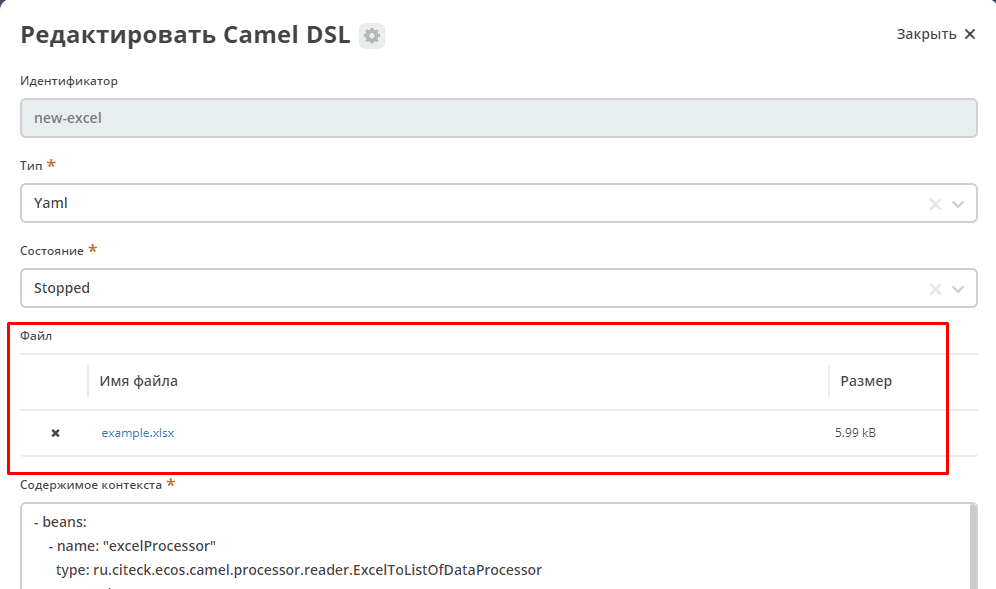
Key for using the component in a Camel context: file-from-camel-dsl
FileFromCamelDslConsumer reads data from the file as a ByteArray and places it in the exchange for further processing
Example:
- route:
    from:
      uri: "file-from-camel-dsl:randomName"
      steps:
        - process:
            ref: csvToListOfDataProcessor
        - split:
            simple: "${body}"
            steps:
              - to: ecos-records-mutate:?sourceId=emodel/camel-example-employee
EcosRecordsSyncConsumer
Endpoint for sequential extraction of any number of records from the specified data source.
URI
ecos-records-sync-consumer:syncName
ecos-records-sync-consumer - constant
syncName - synchronization name. Can be any and is used for saving and accessing the state. I.e., if you change syncName, the consumer will work “from scratch”.
Output Data
Data Type: List<DataValue>
Description: A list of DataValue objects with attributes that were loaded for the records. The global record identifier is not included in the attributes. If needed, it should be explicitly specified in the attributes:
attributes:
  ?id: ?id
Parameters
Parameter |
Type |
Default Value |
Mandatory |
Description |
|---|---|---|---|---|
sourceId |
String? |
null |
No |
Identifier of the data source from which we will load records.
Can be omitted if ecosType is specified.
Examples: emodel/source0, emodel/source1
|
ecosType |
String? |
null |
No |
Local type identifier.
If sourceId is not specified, it is taken from the type.
Examples: contract, attorney
|
predicate |
Predicate? |
Always True |
No |
Record search criteria.
Examples: {“t”: “eq”, “a”: “_type”, “v”: “emodel/type@case”}
|
batchSize |
Int |
100 |
No |
Size of the batch of records processed simultaneously |
attributes |
Map<String, String> |
Yes |
Attributes to load for records |
|
addAuditAttributes |
Boolean |
true |
No |
Add audit attributes (_created,_creator,_modified,_modifier) to the list of attributes for loading |
delay |
Long |
500 |
No |
Number of milliseconds between processing batches of records |
greedy |
Boolean |
false |
No |
If true and the number of processed records is greater than zero, do not wait for delay before the next processing, but immediately call the next poll |
initialDelay |
Long |
1000 |
No |
Delay before the first record processing |
Note
Additional parameters can be viewed in the source code of the org.apache.camel.support.ScheduledPollEndpoint class
Usage Example
- route:
    from:
      uri: ecos-records-sync-consumer:legalEntity-mgr-from
      parameters:
        delay: 30000
        sourceId: emodel/source1
        predicate:
          t: eq
          a: type
          v: legalEntity
        addAuditAttributes: true
        attributes:
          ?id: ?id
          id: ?localId
          title: title
          name: name
      steps:
        - to: log:ecos-records-sync
Operating Principle
Every {delay} milliseconds, a request is made to the data source {sourceId}, which is either explicitly set or loaded from {ecosType}. A batch of records of size <= {batchSize} is loaded from the data source. The loaded batch is sent for processing to the steps specified in the route.
The state is updated only if the batch of records is processed successfully. In case of an error, the state remains old and upon the next trigger, loading will continue from the previous state.
Individual Record Processing
If individual record processing is required, you can split the list elements and process each one separately:
- route:
    from:
      uri: ecos-records-sync-consumer:routeStage-mgr-from
      parameters:
        initialDelay: 10000
        delay: 15000
        sourceId: emodel/source1
        predicate:
          t: eq
          a: type
          v: routeStage
        batchSize: 30
        addAuditAttributes: true
        attributes:
          id: ?localId
          title: title
          name: name
      steps:
        - split:
            simple: "${body}"
            steps:
              - to: log:result # в этих шагах каждый элемент будет обработан отдельно
If you need to process records individually in some way and then collect them back into a single batch, you can use the aggregation strategy:
- beans:
    - name: customJsonPatch
      type: ru.citeck.ecos.camel.processor.data.JsonPatchOperationsProcessor

    - name: collectToListStrategy
      type: org.apache.camel.processor.aggregate.GroupedBodyAggregationStrategy
- route:
    from:
      uri: ecos-records-sync-consumer:routeStage-mgr-from
      parameters:
        initialDelay: 10000
        delay: 15000
        sourceId: emodel/source1
        predicate:
          t: eq
          a: type
          v: routeStage
        batchSize: 30
        addAuditAttributes: true
        attributes:
          id: ?localId
          title: title
          name: name
      steps:
        - split:
            simple: "${body}"
            aggregationStrategy: collectToListStrategy # это ключевое отличие
            steps:
              - setHeader:
                  name: JsonPatchOperations
                  constant:
                    - op: set
                      path: "_parentAtt"
                      value: templateRouteApprovingStages
              - process:
                  ref: customJsonPatch
        - to: log:result # после split мы будем обрабатывать лист, который собрался после индивидуальной обработки записей
Strategies
Iteration is performed by several strategies. Each time a poll is triggered (processing the next batch of records), a request for the next batch of records is made through one of the strategies described below. The first non-empty result is used, and further strategy iteration is not performed. Each strategy has a state that stores data to continue iteration from the last processed point.
1. By Creation Date
Iteration is performed by the _created attribute from the start of the epoch (1970-01-01T00:00:00Z)
State:
Property |
Type |
Default |
Description |
|---|---|---|---|
totalCount |
Long |
-1 |
Expected total number of all records for synchronization.
Filled at the beginning and not updated during iteration
|
lastCreated |
Instant |
Instant.EPOCH |
Date of the last created node we processed |
lastRef |
EntityRef |
EntityRef.EMPTY |
Reference to the last processed record |
skipCount |
Int |
0 |
Number of elements to skip in the next request.
Used for processing records that have the same creation date.
|
processedCount |
Long |
0 |
Number of processed records |
lastCreatedCounter |
Int |
0 |
Counter of records with the same creation date.
Used to adjust the creation date in the resulting data by adding lastCreatedCounter microseconds to it.
This is necessary so that after loading this data into another database, the order is preserved when sorting by the _created field.
|
Strategy Features:
Order preservation - if the exported data has records with the same creation date, the first one will have the original date, and all subsequent ones will have a creation date increased by N microseconds. The number of microseconds increases with each new record having the same creation date.
2. By Modification Date
Iteration is performed by the _modified attribute from the synchronization start date.
State:
Property |
Type |
Default |
Description |
|---|---|---|---|
lastModified |
Instant |
Synchronization start date |
Date of the last modified record we processed |
lastRef |
EntityRef |
EntityRef.EMPTY |
Reference to the last processed record |
skipCount |
Int |
0 |
Number of elements to skip in the next request.
Used for processing records that have the same modification date.
|
processedCount |
Long |
0 |
Number of processed records |
Strategy Features:
Synchronization is performed only for those records that were created before the creation date of the last synchronized record from the first strategy.
EcosRecordsMutateEndpoint
Endpoint for performing mutation via RecordsAPI
URI
ecos-records-mutate:?sourceId={sourceId}
ecos-records-mutate - constant
sourceId - identifier of the data source where the mutation request should be sent. For example: ‘emodel/contract’, ‘emodel/custom-type’
Input Data
The endpoint accepts either a single map-like value, or a list.
A map-like value is Map<String, Any?>, DataValue, ObjectData, and others that can be converted to Map<String, Any?>.
A map-like value structurally contains a list of attributes that will be used for mutation.
If among the attributes there is “?id” with the full ref of the mutated entity, then the mutation will be performed specifically for that entity.
If among the attributes there is “id” (local entity id), then the mutation will either update an existing entity or create a new one if it does not exist yet.