Citeck Artifacts
Artifacts are the basic units of extension and configuration of the ECOS platform. Any system element — data type, form, journal, process, notification template — is an artifact. Artifacts are stored in the ecos-apps microservice, which manages their versioning and delivery to target microservices.
This page describes:
what an artifact is and how its identification is structured;
how to manage artifacts through the “ECOS Artifacts” journal;
artifact sources and update policies;
artifact location in the project file structure;
full list of artifact types by microservice;
artifact overriding and patches;
YAML format for artifact descriptions;
creating a new artifact type.
Definitions
Artifact - an extension unit in Citeck. Artifacts include forms, journals, types, permission matrices, actions, process descriptions, and many other entities in the system.
Microservice ecos-apps manages artifacts, maintaining their versioning and delivering them to the target microservice. Artifact content in the system is immutable, and any change to an artifact always creates a new version, while the old one is preserved in the version list.
Examples of artifacts: Type, Form, Journal.
Data Type - the primary ECM artifact describing an object. The data type defines the metadata the object will contain, lifecycle statuses, and roles that can work with the object. The data type is linked to a form and a journal.
Form - a graphical representation of an object as a set of interface elements for manipulating the object’s data. Interface elements reference attributes defined in the data type.
Journal - a tabular form of representing objects with the ability to configure column display, filtering, and object manipulation. Columns correspond to object data or can be calculated based on it.
The artifact type typically consists of two parts separated by the / symbol.
The first part is the system area to which the artifact belongs. Usually, one microservice is responsible for one area.
The second part is the local type identifier
For example, in the type ui/form, ui is the area, and form is the local identifier.
Note
If the artifacts configured in the designer cover the required functionality, they can be exported as an application.
If the functionality is insufficient, you can create a separate microservice that will contain both artifacts configured in the designer and the necessary additional logic.
Journal “ECOS Artifacts”
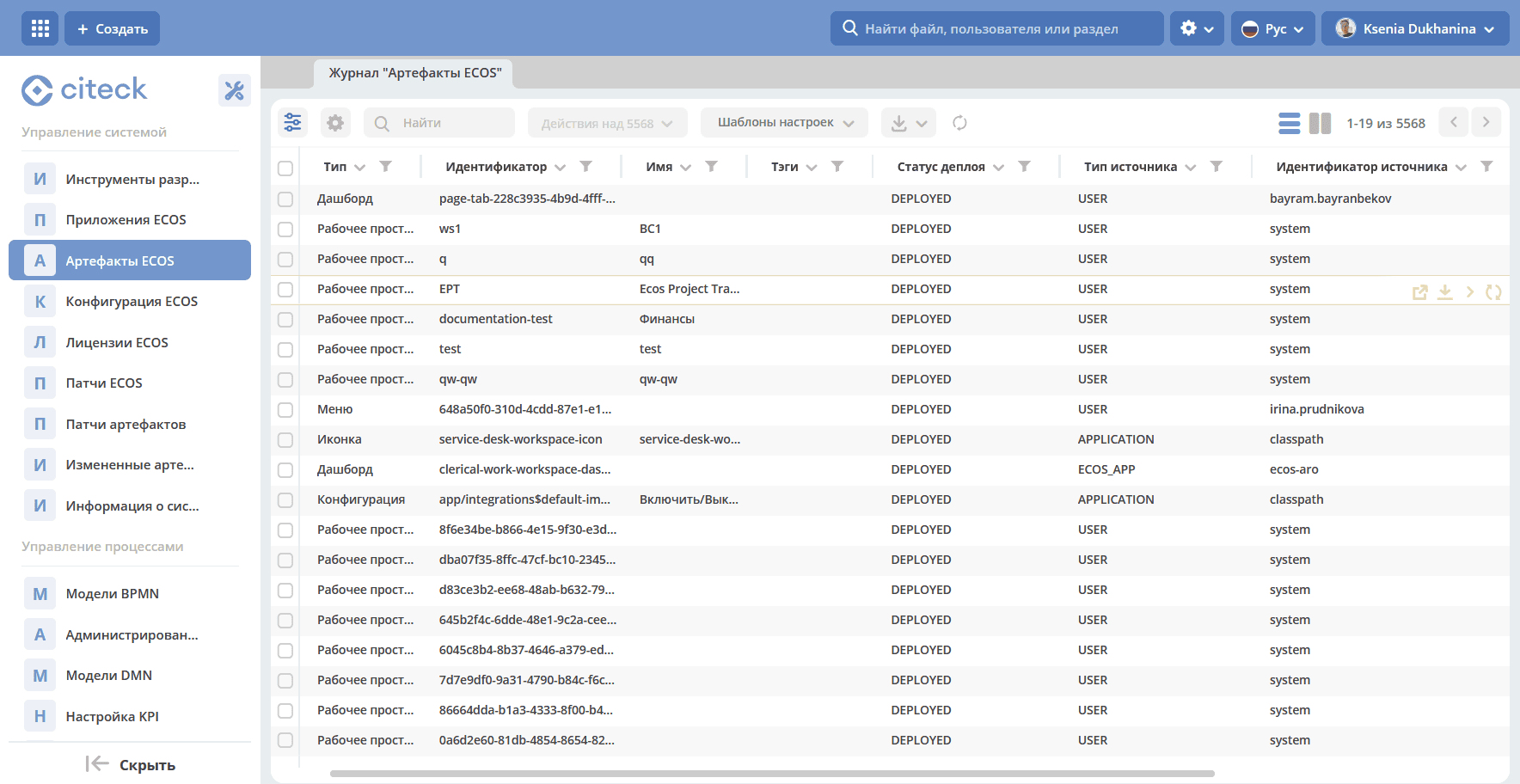
A journal ECOS Artifacts is provided for managing artifacts. This journal includes all artifacts that have reached the ecos-apps microservice.
Located in Workspace “Admin Section” - System Management:
Available Actions
1. Download Artifact History
When clicking the action, you can select the date from which to download the artifact’s history.
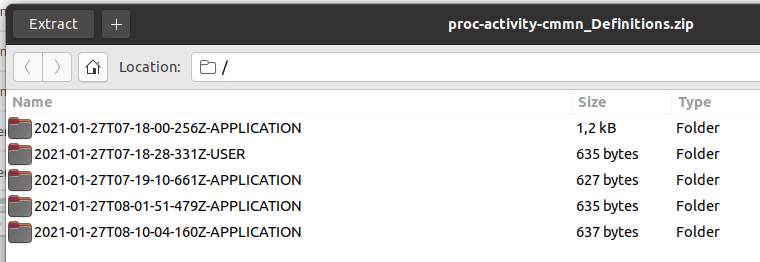
Upon form submission, a zip archive is downloaded containing all versions of the artifact from the specified date.
If the last artifact was uploaded earlier than the selected date, only it will be downloaded (i.e., there will always be at least 1 artifact).
The folder name format for the artifact version: creation_dateTcreation_timeZ-[USER | APPLICATION | ECOS_APP]. The creation date is specified in UTC timezone.
2. Download Artifact
Always downloads a zip archive with the selected artifact.
3. Redeploy Artifact Manually
Send the artifact from ecos-apps to the microservice. Can be useful during development or after a failure in the target microservice’s database, i.e., ecos-apps does not pass the artifact if it was previously successfully deployed.
4. Reset User Version of Artifact
The reset reverts to the version that was installed from the application (APPLICATION or ECOS_APP). Only artifacts that have USER in the Source Type column can be reset.
Artifact Sources
There are 3 possible artifact sources:
USER - the artifact is added or modified by a user;
APPLICATION - the artifact is loaded from applications connected to the command interface;
ECOS_APP - the artifact is loaded from the Citeck application;
Artifact Updates
All 3 sources have their own policy for updating artifacts:
USER - The artifact is updated unconditionally. Any change to the artifact leads to its change in the
ecos-appsmicroservice database.APPLICATION - The artifact is updated if it does not belong to any Citeck application and a version of the artifact has been loaded that differs from the previous one loaded from
APPLICATION. Example: If we have the following artifact revisions:
rev2 USER
rev1 USER
rev0 APPLICATION
Then rev0 is the very first version of the artifact, and rev2 is the latest version. We see that the first version came from an application and the other two from a user.
If in this situation version rev0 from APPLICATION arrives at the microservice, nothing will change even though rev2 != rev0.
If rev3 comes from the application, the new revision will be loaded and become current:
rev3 APPLICATION
rev2 USER
rev1 USER
rev0 APPLICATION
ECOS_APP - updated similarly to APPLICATION, but upon loading, the artifact is marked as belonging to an application. If an artifact belongs to an application, it is not updated from APPLICATION.
Artifact Location
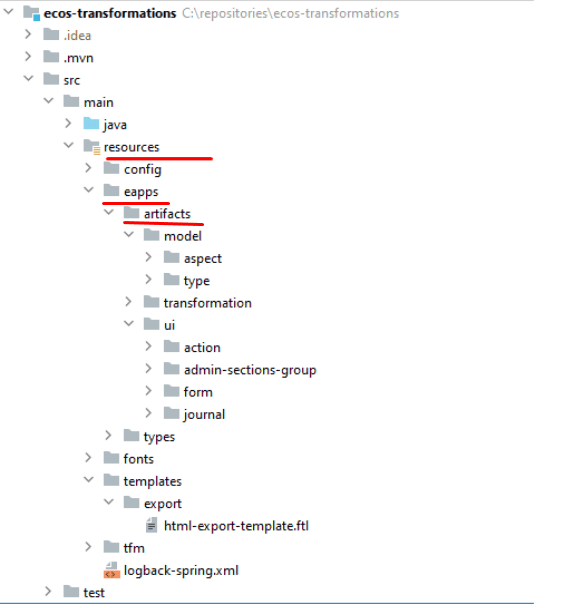
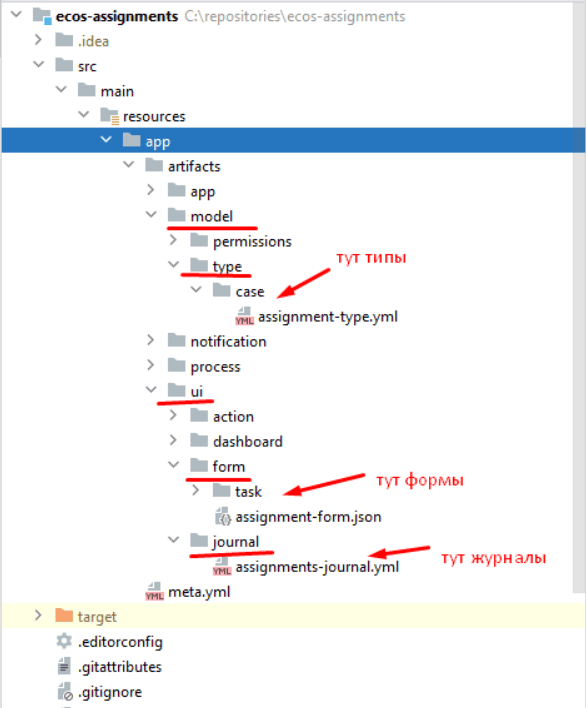
All artifacts are located in directories corresponding to their type.
The root folder for artifacts is configured in the application, and subfolders like ui/form, model/type, etc., can be created within it.
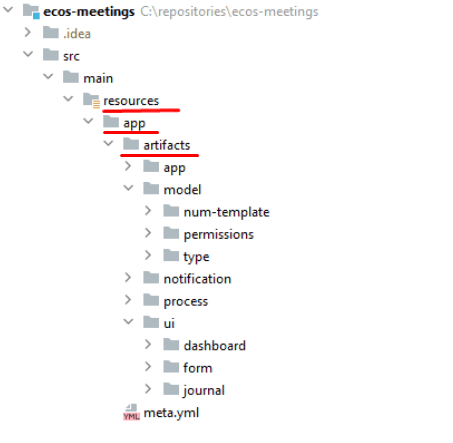
By default, the root artifact folder for the Citeck application is src/main/resources/app/artifacts, and for a microservice it is src/main/resources/eapps/artifacts
Citeck Application |
Citeck Microservice |
|---|---|
|
|
For example, for the ECOS Assignments application, the folder structure is as follows:
Artifact Types
Type |
Microservice |
Note |
|---|---|---|
model/aspect |
ecos-model |
Aspect |
model/authorities-sync |
ecos-model |
User and Group Synchronization |
model/endpoint |
ecos-model |
Endpoint |
model/num-template |
ecos-model |
Numbering Templates |
model/permission-def |
ecos-model |
Permission Description |
model/Permission settings |
ecos-model |
Permission Settings |
model/permissions |
ecos-model |
Access Rights |
model/secret |
ecos-model |
Secret |
model/type |
ecos-model |
Data Types |
model/working-calendar |
ecos-model |
Working Calendar |
model/working-schedule |
ecos-model |
Work Schedule |
model/workspace |
ecos-model |
Workspace |
model/workspace-template |
ecos-model |
Workspace Template |
model/workspace-member |
ecos-model |
Workspace Member |
ui/action |
ecos-uiserv |
Actions |
ui/admin-sections-group |
ecos-uiserv |
Admin Sections Group |
ui/board |
ecos-uiserv |
Kanban Board |
ui/dashboard |
ecos-uiserv |
Dashboards |
ui/form |
ecos-uiserv |
Forms |
ui/i18n |
ecos-uiserv |
Localization |
ui/icon |
ecos-uiserv |
Icon Set |
ui/journal-settings |
ecos-uiserv |
Journal Settings |
ui/journal |
ecos-uiserv |
Journals |
ui/menu |
ecos-uiserv |
Menu |
ui/theme |
ecos-uiserv |
Custom Themes |
app/artifact-patch |
ecos-apps |
Artifact Patch |
app/config |
ecos-apps |
Configuration |
app/dev-module |
ecos-apps |
Development Module |
app/ecosapp |
ecos-apps |
ECOS Application |
app/license |
ecos-apps |
ECOS License |
app/patch |
ecos-apps |
Patch |
app/system-info |
ecos-apps |
System Information |
integration/camel-dsl |
ecos-integrations |
Camel DSL Configurations |
integration/credentials |
ecos-integrations |
Credentials |
integration/datasource |
ecos-integrations |
Data Source |
integration/ext-portal |
ecos-integrations |
External Portal |
integration/file-import-config |
ecos-integrations |
File Import Configuration |
integration/in-webhook |
ecos-integrations |
Webhook |
integration/osgi-bundles |
ecos-integrations |
OSGi Bundle |
integration/recsrc |
ecos-integrations |
External Database Settings |
integration/sync |
ecos-integrations |
Synchronizations |
transformation/template |
ecos-transformations |
Document Template |
process/bpmn-kpi-settings |
ecos-process |
BPMN KPI Settings |
process/bpmn-section |
ecos-process |
BPMN Section |
process/bpmn-task-atts-sync |
ecos-process |
BPMN Task Attributes Synchronization |
process/bpmn |
ecos-process |
BPMN Process |
process/dmn-section |
ecos-process |
DMN Section |
process/dmn |
ecos-process |
DMN |
notification/file |
ecos-notifications |
Notification Files |
notification/template |
ecos-notifications |
Notification Templates |
notification/sender |
ecos-notifications |
Senders |
notification/reminder |
ecos-notifications |
Reminder |
Artifact Override
To override artifacts, you can create a folder named override in the root directory of the artifacts.
Example folder structure:
eapps:
  - artifacts:
      - ui:
          - form:
              - some-form.json
          - journal:
              - some-journal.yml
      - override:
          - ui:
              - form:
                  - some-form.json
For the form some-form.json, a patch with type override and order -100 (by default) will be created.
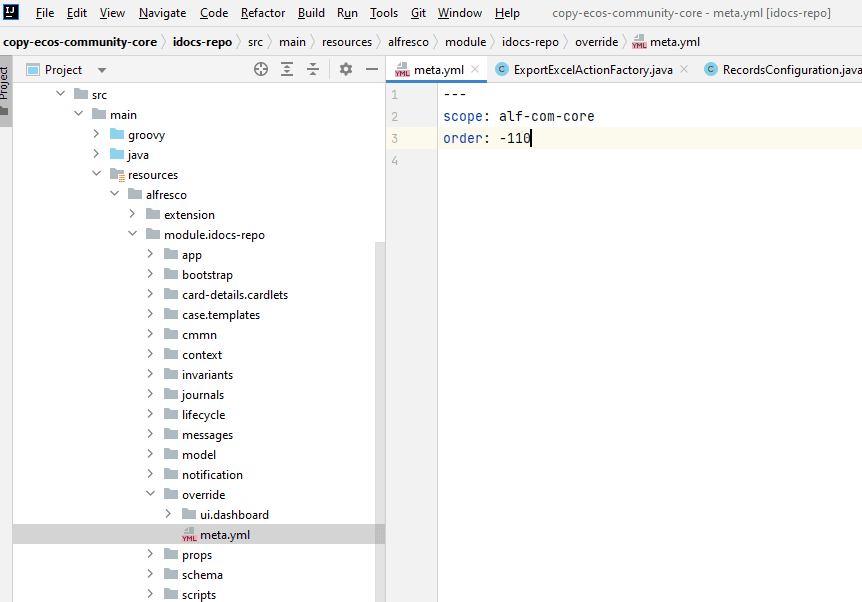
If you need to configure the order, you should create a meta.yml file in the root of the override folder. The following settings are possible:
Name |
Data Type |
Description |
|---|---|---|
order |
float |
Patch order for overriding the artifact. Patches with a lower order are applied first. |
scope |
string |
The parameter is used to prevent identifier collisions for override patches.
The patch identifier is formed according to the following pattern: override[_{{scope}}]$ui/form$some-form
|
Features
Artifact overriding works regardless of where the main artifact is deployed from
Creating a New Artifact Type
Determine which microservice the artifact should go to after deployment.
In the target application, find the eapps folder in the resources and create subfolders with the following content:
first level - the section to which the artifact belongs (usually 1 section == 1 microservice. For example, ui → ecos-uiserv, integration → ecos-integrations, model → ecos-model, etc.)
second level - local type identifier (action, form, menu, dashboard, type, section, etc.)
It is not necessary to create exactly 2 levels, but it is desirable. The mechanism supports levels of any nesting from 1 to file system limitations).
Note
Keep in mind that the created directory hierarchy will be used as the artifact type identifier. Therefore, it should be treated carefully.
Create a type.yml file in the resulting directory with approximately the following content:
modelVersion: "1.0"

source-id: "eform"

controller:
    type: json
modelVersion - model type. In the future, it will be used for migrating old artifacts.
sourceId - ID of the data source (RecordsDAO) through which access to the artifact data will be provided. This field is necessary if a dependency resolution mechanism is required on the ECOS Apps side. If the artifact has no dependencies, an empty string can be used.
controller.type - controller type for the artifact type. Defines the logic for loading artifacts from the directory and writing to the directory. json is the simplest and most understandable controller, which should be used when adding simple artifact types. For complex cases, there is a script controller that supports describing the logic for reading and writing artifacts in Groovy (other languages like Kotlin will be added in the future).
Describe the handler for our artifact:
@Slf4j
//все реализации интерфейса EcosModuleHandler в контексте будут зарегистрированы автоматически
@Component
@RequiredArgsConstructor
public class FormModuleHandler implements EcosModuleHandler<EcosFormModel> {

    private final EcosFormService formService;

    //При деплое артефакта он попадает в этот метод
    @Override
    public void deployModule(@NotNull EcosFormModel formModel) {
        log.info("Form module received: " + formModel.getId() + " " + formModel.getFormKey());
        formService.save(formModel);
    }

    // callback для отправки изменённого артефакта в ECOS Apps. Нужен для ведения истории всех ревизий
    @Override
    public void listenChanges(@NotNull Consumer<EcosFormModel> consumer) {
        formService.addChangeListener(consumer);
    }

    // метод, который вызывается перед деплоем. Если он вернет null, то деплой артефакта не произойдет
    @Nullable
    @Override
    public ModuleWithMeta<EcosFormModel> prepareToDeploy(@NotNull EcosFormModel formModule) {
        return getModuleMeta(formModule);
    }

    // Получение метаданных по артефакту (его ID и зависимости)
    @NotNull
    @Override
    public ModuleWithMeta<EcosFormModel> getModuleMeta(@NotNull EcosFormModel formModule) {
        return new ModuleWithMeta<>(formModule, new ModuleMeta(formModule.getId(), Collections.emptyList()));
    }

    // ID типа артефакта, для которого мы описали Handler. Должен соответствовать иерархии папок из п.2
    @NotNull
    @Override
    public String getModuleType() {
        return "ui/form";
    }
}
This completes the description of the artifact type. You can place .json files in eapps/artifacts/ui/form.
When adding a new type, only the microservice where we describe this type requires a restart.
YAML Artifact Format
Since version 3.25.0 of the community core, support for the yaml format for describing artifacts has been added. YAML format version 1.2
Any artifacts that are loaded in json format (types, journals, forms, etc.) can be described in yaml.
After reading, the yaml file will be converted to json and then delivered to the target microservice in that form.
When downloading an artifact from the journal, we will still receive json regardless of how the original configuration was described.
Example of a forms journal description:
id: ecos-forms
label: { ru: Формы, en: Forms }

typeRef: emodel/type@form
sourceId: uiserv/eform

attributes:
  actionFormatter: '' #include include/legacy-actions.js

actions:
  - uiserv/action@ecos-module-download
  - uiserv/action@delete
  - uiserv/action@edit

columns:

  - name: moduleId
    label: { ru: Идентификатор, en: Id }

  - name: formKey
    label: { ru: Ключ формы, en: Form key }

  - name: title
    label: { ru: Название, en: Name }

  - name: description
    label: { ru: Описание, en: Description }
Capabilities and features of the format (ст - standard capabilities, нм - our modification):
(ст) YAML 1.2 is a superset of the JSON format. This means that you can simply change the artifact extension from .json to .yaml and everything will work as before without additional changes.
(нм) Support for #include, which allows including the contents of external files into the current configuration.
General usage: somekey: '' #include filename
На месте ‘’ могут быть следующие значения: ‘’, ““ (для импорта содержимого файла как текста) и {} (для импорта внешней yaml конфигурации).
filename - relative path to the included file.
When reading the configuration, all places with #include will be replaced with the contents of the specified file (if there are two includes of the same file, it will be added twice to the config)
(ст) Support for reusing parts of the config ( https://confluence.atlassian.com/bitbucket/yaml-anchors-960154027.html ):
some-reusable-value: &my-anchor
  aa: bb
  cc: dd

other-key: *my-anchor
other2-key: *my-anchor
(нм) Support for reusing parts of the config with value overriding (a semi-standard mechanism, but the library used did not support it):
some-reusable-value: &my-anchor
  aa: bb
  cc: dd

other-key:
  <<: *my-anchor
  cc: ee
В other-key мы получим {“aa”: “bb“, “cc“: “ee“}
Patches for Artifacts
Since version ecos-apps 1.9.0, support for patches for artifacts has been added. Patches themselves are artifacts and can also be patched.
Patches serve as a replacement for the override mechanism, where we completely overwrote configuration files in the customer’s artifact. As practice has shown, this approach leads to many bugs when upgrading to a new version of the box because base configurations change over time.
Patches update the target artifact “on the fly” with every change to the artifact or the patch itself. For example, by deleting a patch in the journal, we will see within 3-7 seconds that the changes it applied have been rolled back and the artifact has acquired the standard configuration.
The list of patches in the system can be viewed in System Journals → Artifact Patches.
The capabilities described in the “YAML Artifact Format” section also apply to them.
If you change the record affected by the patch through the interface, the patch will not reapply itself. If you load a new version of the artifact through ecos-apps (by placing it in target or when restarting the server), the patch will be applied.
Patch format:
Field |
Type |
Mandatory |
Default Value |
Description |
|---|---|---|---|---|
order |
Float |
No |
0 |
Patch order.
If there are several patches for one artifact in the system, they are applied in this order from smallest to largest.
|
id |
String |
Yes |
- |
Identifier.
Unique among all patches for artifacts in the system.
|
target |
ModuleRef |
Yes |
- |
Target artifact that will be patched.
Written as
artifact_type$local_id. Example: ui/journal$ecos-journalsИдентификатор рабочего пространства в
target не указывается — он задаётся отдельным полем workspace. |
workspace |
String |
No |
“” |
Идентификатор рабочего пространства, в котором находится целевой артефакт.
Заполняется, если цель патча — артефакт внутри рабочего пространства. Пустая строка означает глобальный артефакт.
Один и тот же
target в разных рабочих пространствах патчится независимо — на каждое сочетание target + workspace нужен отдельный патч.Для обратной совместимости патчи к
ui/menu$admin-workspace-menu без указания workspace при сохранении автоматически привязываются к рабочему пространству admin$workspace. |
type |
String |
Yes |
- |
Patch type.
Currently, only the json type is supported.
|
config |
ObjectData |
Yes |
- |
Patch configuration
|
Patches are described in the eapps/artifacts/artifact-patch directory.
Journal “Artifact Patches”
Located in Workspace “Admin Section” - System Management - Artifact Patches:
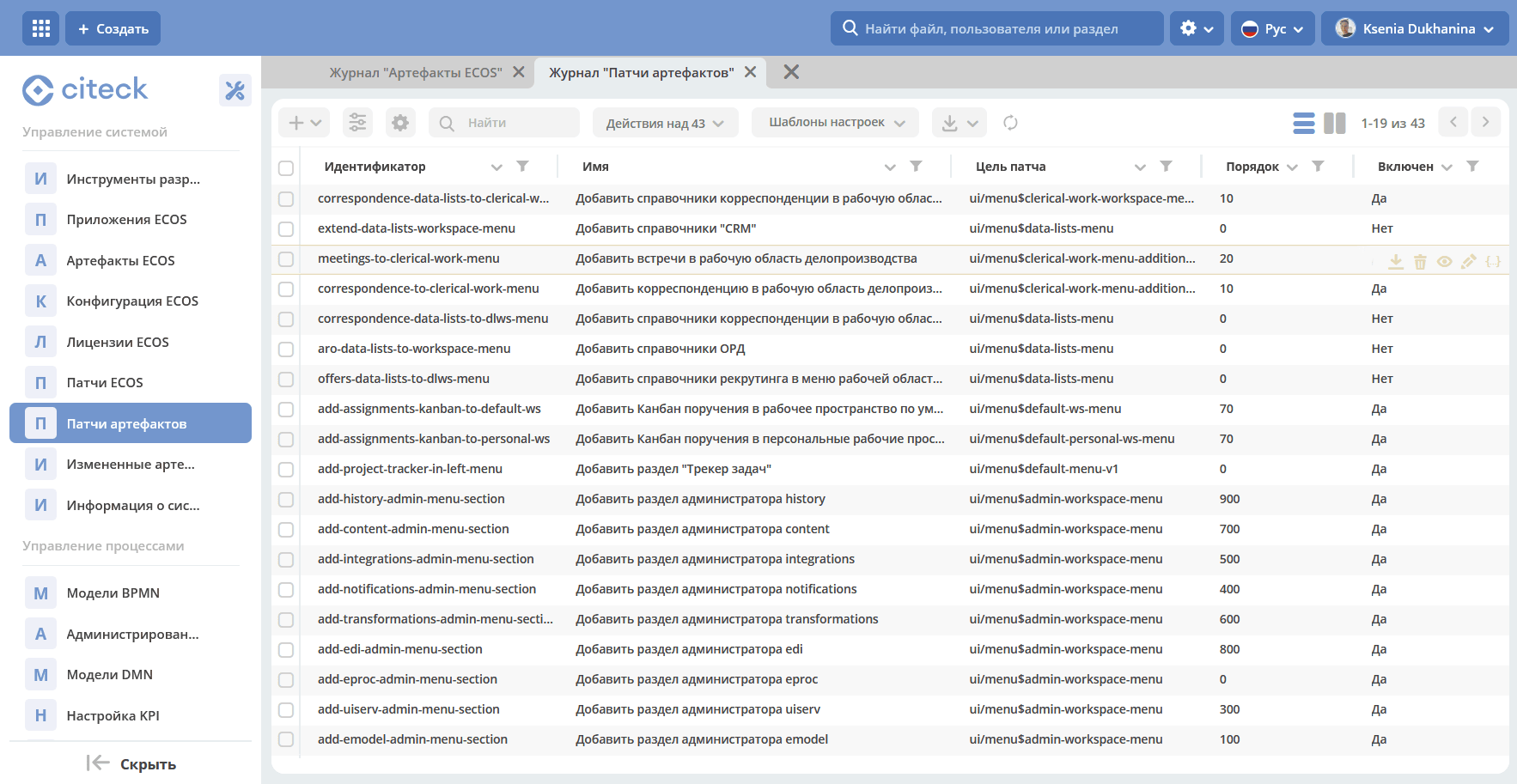
Available actions:
Download;
Delete;
View;
Edit properties;
JSON Editor.
Patch Types
Patch type “json”
The configuration specifies 1 parameter - operations with the type array of objects.
All operations from the operations array are applied sequentially to the result of the previous operation’s changes.
The operation type is determined by the op key and can be as follows:
op |
Description |
Parameters |
|---|---|---|
add |
Add an element or an array of elements to the array at the specified path. |
path - JsonPath to the array where the element should be added
value - value or array of values to be added
idx - index at which the value should be added. By default, the value is added to the end. Values outside the range of the existing array can be specified. In this case, elements will be added either to the beginning or to the end.
|
set |
Set an explicit value to any field. |
path - JsonPath to the element where the value should be placed
key - optional field that defines the key under which the value should be placed
value - value or array of values to be set
|
remove |
Remove an element from the configuration |
path - JsonPath to the element to be removed
|
rename-key |
Rename a key in an object within the configuration. |
path - JsonPath to the object in which the key should be renamed.
oldKey - old key name
newKey - new key name
|
Examples
Change an attribute for a form:
id: change-label-for-form-field

name:
  ru: Изменить название кнопки на форме
  en: Change button label on form

target: ui/form$ECOS_FORM

type: json
config:
  operations:
    - { op: set, path: '$..[?(@.key == "localization")].label', value: 'Свое название для кнопки локализации' }
Add an action for a type:
id: add-some-action-for-case

name:
  ru: Добавить действия для кейса
  en: Add actions for case

target: model/type$cat-doc-type-general-case

type: json
config:
  operations:
    - { op: add, path: 'actions', value: 'uiserv/action@pdf-content-with-barcode' }
Change localized text by key:
id: change-ui-admin-localization

name:
  ru: Изменить локализацию для раздела администратора
  en: Change localization for admin section

target: ui/i18n$menu-messages

type: json
config:
  operations:
    - { op: set, path: '$["messages"]["menu.header.admin-tools"][1]', value: 'Опциональный заголовок для меню администратора' }
Remove an action:
id: delete-action

name:
  ru: Удалить действие из типа
  en: Delete action from type

target: model/type$contracts-cat-doctype-contract

type: json
config:
  operations:
    - { op: remove, path: '$.actions[?(@==\"uiserv/action@edit-in-onlyoffice\")]'}
Change the value of the ECOS configuration parameter some-config-id to 123:
id: some-patch-id

name:
  ru: Изменение значения параметра конфигурации some-config-id
  en: Change some-config-id config value

target: app/config$app/notifications$some-config-id

type: json
config:
  operations:
    - { op: set, path: '$.value', value: [ 123 ] }
    - { op: set, path: '$.version', value: 1 }
Example patch for adding a menu section:
id: menu-change-test
name: {ru: Добавить раздел, en: Add section }
target: 'ui/menu$default-menu-v1'
type: json
config:
  operations:
    - op: add
      path: '$..[?(@.id == "sections")].items'
      value: {
        "id": "custom-meetings-section",
        "label": {
          "ru": "Совещания"
        },
        "icon": "ui/icon@i-leftmenu-meetings",
        "type": "SECTION",
        "items": [
          {
            "id": "123-123-123-123-123",
            "label": {
              "en": "Совещания"
            },
            "type": "JOURNAL",
            "config": {
              "recordRef": "uiserv/journal@meetings"
            },
            "items": [],
            "allowedFor": []
          }
        ]
      }
Пример патча для артефакта в рабочем пространстве:
id: hide-field-in-team-workspace-form

name:
  ru: Скрыть поле на форме в рабочем пространстве team-a
  en: Hide field on form in workspace team-a

target: ui/form$some-form
workspace: team-a

type: json
config:
  operations:
    - { op: set, path: '$..[?(@.key == "internalNote")]', key: hidden, value: true }
Example patch for boolean attributes of a form component:
{
  "operations": [
    {
      "op": "set",
      "path": "$..[?(@.key==\"meetDateTime\")]",
      "key": "hidden",
      "value": true
    }
  ]
}
Displaying artifacts of different categories
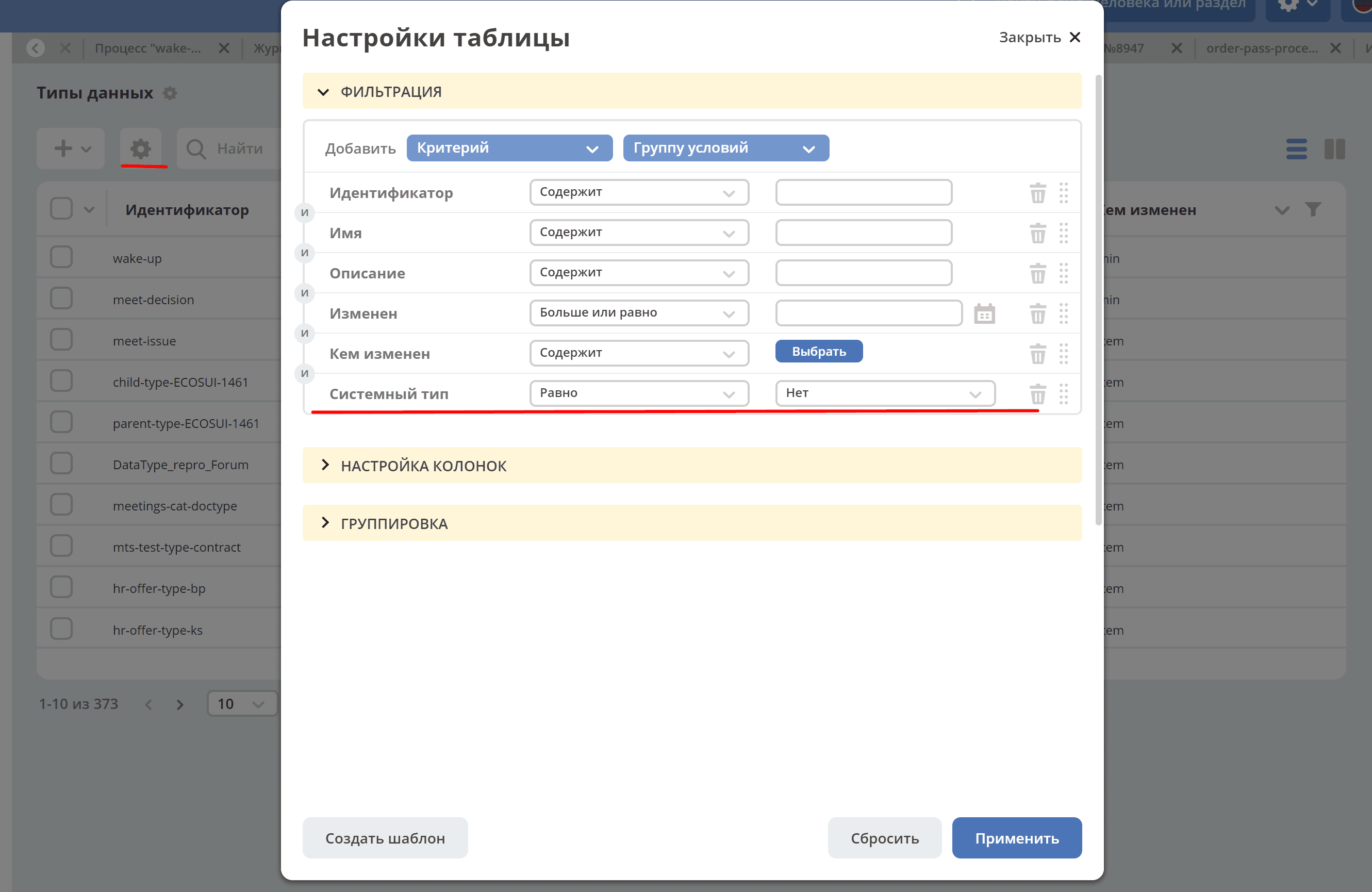
In the Data Types, Forms, and Journals journals, in the table settings filters, you can choose which artifact category to display — business data or system.
By default, the filter is set to System type (form|journal) = NO.
If set to YES, non-system records will be displayed in the list.
If set to Select, all records will be displayed.