Actions
Actions — a Citeck mechanism that allows users to perform operations on system records: edit and delete documents, download files, launch business processes, and perform other operations.
Actions are configured in the «Tools» → «Actions» section and are displayed in various parts of the interface — in journals opposite each row, on a document card in the actions widget, and in the dropdown above the table when working with multiple records.
This section contains a description of the format, types of actions, visibility settings, and action configuration in Citeck.
Actions are Citeck artifacts in json or yaml format with the type ui/action.
A single action can be reused multiple times in different parts of the system (e.g., in a journal and on a document card).
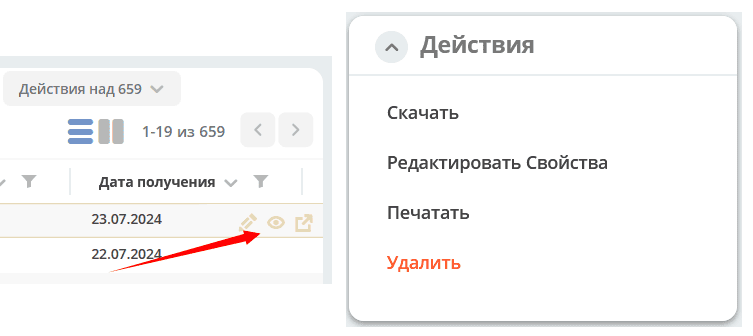
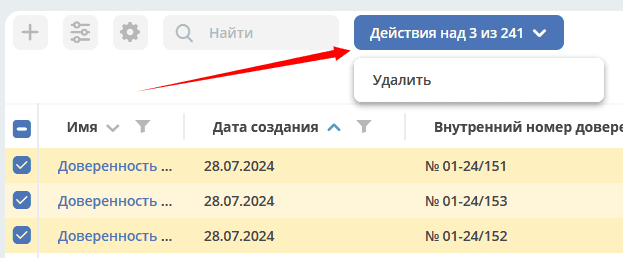
All actions are divided into 3 categories - “on a record”, “on selected records”, and “on filtered records”.
On a record |
1. Выполняются над конкретной записью
2. Отображаются либо напротив каждой строки в журнале в самой правой части таблицы, либо на карточке документа в виджете действий.
|
On selected |
1. Выполняются над записями, рядом с которыми пользователь поставил галки
2. Отображаются в дропдауне над таблицей, когда пользователь выбрал хотя бы одну запись
|
On filtered |
1. Выполняются над записями, которые подходят под фильтрацию
2. Отображаются в дропдауне над таблицей, когда пользователь ничего не выбрал в журнале
|
Format Description
Name |
Type |
Description |
|---|---|---|
id |
String |
Action identifier.
Unique among all actions in the system
|
key |
String |
Key for filtering.
Must be in the format word0.word1.word2 to allow filtering by mask.
|
name |
String |
Action name that the user will see |
type |
String |
Action type.
The type defines the logic that will be executed when the action is performed.
|
icon |
String |
Action icon. Example: “icon-delete”, “icon-on”.
All icons can be viewed in
citeck/ecos-ui/src/fonts/citeck/demo.html |
config |
JsonObject |
Action configuration.
Useful in cases where one action type can change its behavior based on configuration.
For example - for an action of type Download, you can set a URI template for downloading content.
|
predicate |
Predicate |
Used to dynamically determine the availability of an action for a user. Details about predicates
For example, users without write permissions cannot perform Edit and Delete actions, and these actions are hidden for them.
|
Getting Actions for a Record
The following request is sent to query actions:
{
   "query": {
       "records": [
           "emodel/someType@bb617ee9-e085-4a3a-8fbf-df2d9534eadb",
           "emodel/someType@74c11ef8-8c63-40c1-b119-94feefd7f885"
       ],
       "actions": [
           "ui/action$delete",
           "ui/action$edit"
       ]
   }
}
Response:
[
   {
       "record": "emodel/someType@bb617ee9-e085-4a3a-8fbf-df2d9534eadb",
       "actions": [
           {
               "icon": "edit",
               "key": "...",
               "type": "mutate",
               "config": {}
           },
           {
               "icon": "delete",
               "key": "...",
               "type": "delete",
               "config": {}
           }
       ]
   },
   {
       "record": "emodel/someType@74c11ef8-8c63-40c1-b119-94feefd7f885",
       "actions": [
           {
               "icon": "edit",
               "id": "...",
               "type": "mutate",
               "config": {}
           },
           {
               "icon": "delete",
               "id": "...",
               "type": "delete",
               "config": {}
           }
       ]
   }
]
An option for separately specifying actions for records is also available:
{
   "query": {
       "records": [
           {
               "record": "emodel/someType@3352b46d-ec44-465c-8673-086282d62b04",
               "actions": [
                   "ui/action$delete",
                   "ui/action$edit"
               ]
           },
           {
               "record": "emodel/someType@3dfff282-3ddf-45e1-886d-f5f2c94fe4e7",
               "actions": [
                   "ui/action$edit"
               ]
           }
       ]
   }
}
Frontend
On the frontend, actions are described as JavaScript entities with methods execForRecord, execForRecords, execForQuery, getDefaultModel, canBeExecuted, etc.
For example: src/components/Records/actions/handler/executor/CreateAction.js
When an action is executed, the execute method is called, which receives the record on which the action is performed and the action configuration.
The action registry is described in src/components/Records/actions/RecordActionExecutorsRegistry.js
Action registration in the registry: src/components/Records/actions/index.js
General Settings for Any Action
Configuration |
Description |
|---|---|
Standard Settings
|
id - action identifier;
name - action name;
type - type;
config - additional information;
icon - image code from the Citeck icon font;
theme - theme name.
features - use for record/Record, records/Records, search query/Query
|
Confirmation and Window Content
|
Action execution confirmation
- если не заданы значения в confirm , действие выполняется без подтверждения
- title - заголовок окна (строка или объект с локализацией)
- message - сообщение в окне
- если задано formRef - отображается соответствующая форма в окне подтверждения (message игнорируется)
- attributesMapping - маппинг атрибутов, данные с формы подтверждения (комментарии и т.д.) можно прокинуть в поля конфигурации действия;
key - путь для записи в body конфигурации действия, value - путь к значению с формы.The confirmation response, if any, and other data from the form are passed to the action.
For example, if a comment from the confirmation form needs to be sent in the request, configure
body.comment. Inside body, in the comment field, find and write the value from the comment field in the confirmation form. |
Attribute Value Substitution
|
Attributes from the record on which the action is performed can be substituted anywhere in the configuration.
There is one special case -
${recordRef}. It is always replaced with the recordRef of the current record.All other attributes are substituted as if they were loaded via
Records.load(...). For example: |
Disabling the Results Window
|
Default is
false |
Initial Processing by External Module
|
preActionModule specifies a reference to a module containing JS code.The module must export functions
execForRecord or execForRecords (depending on features), which are called before executing the main internal action.The module function is passed the values:
records, action, context.Expected response from the module function:
Key-value pairs are optional, but only they are processed.
config - merged with the config value from the action’s own configuration
results - relevant for
execForRecords; the external action can process some records and return results for them.If records are specified in results, they are excluded from the execution of the main internal action.
Results from the external and internal actions are combined for output information.
|
Action Types
view
type id: view
Description |
Configuration |
|---|---|
Open a record for viewing. |
Additional parameters for config:
background: Bool - open the record in a new application tab in the background;
reopen: Bool - open the record in the current application tab;
newBrowserTab: Bool - open the record in a new browser tab
reopenBrowserTab: Bool - open the record in the current browser tab (with page reload).
|
edit
type id: edit
Description |
Configuration |
|---|---|
Edit a record. |
attributes: Object<String, String> - attributes that will be passed to the creation form. Optional parameter |
open-in-background
type id: open-in-background
Description |
Configuration |
|---|---|
Open a record in a new background tab |
download
type id: download
Description |
Configuration |
|---|---|
Download some content related (or unrelated) to the record.
By default, the record content is downloaded
|
url - URL for download. You can add |
delete
type id: delete
Description |
Configuration |
|---|---|
Delete a record |
{
  "config" : {
      "isWaitResponse" : false,
      "withoutConfirm" : true
  },
  "type" : "delete"
}
isWaitResponse - wait for delete response (default
true)withoutConfirm - delete without confirmation (default
false) |
download-card-template
type id: download-card-template
Description |
Configuration |
|---|---|
Download a printable version of the document
|
templateType - template type
format - format (html, pdf, pdf2, docx)
|
download-by-template
type id: download-by-template
Description |
Configuration |
|---|---|
Download a document by template
|
templateRef - reference to the template
resultName - name of the file to be downloaded
requestParams - additional parameters to be sent to the server
|
view-card-template
type id: view-card-template
Description |
Configuration |
|---|---|
View the printable version of the document in a new browser tab
(the returned document is the same as for the
download-card-template event) |
templateType - template type
format - format (html, pdf, pdf2, docx)
includeTimezone (default -
true) |
upload-new-version
type id: upload-new-version
Description |
Configuration |
|---|---|
Upload a new version of the document |
create
type id: create
Description |
Configuration |
|---|---|
Action for creating a new document.
Typically used when a new document needs to be created, with some fields pre-filled from the data of the currently open document.
|
typeRef: String - data type to create. Required parameter;
createVariantId: String - Creation variant identifier for the type. If not specified, the first available variant is used
createVariant: Object - Creation variant for situations where no creation variant from the type is suitable and it needs to be fully defined in the action
attributes: Object - Predefined attributes for creating a new entity. To pass attributes from the current record (i.e., the one the action is performed on) to the creation form, you can use placeholders like
${attribute_name}options: Object - Form options
Example:
Creating an entity with type emodel/type@request-to-manager and setting the “incident” attribute to a reference to the current document
|
save-as-case-template
type id: save-as-case-template
Description |
Configuration |
|---|---|
A template is created, then based on configuration conditions - download or redirect to the dashboard.
|
download
By default, the record content is downloaded.
|
open-url
type id: open-url
Description |
Configuration |
|---|---|
Opens the specified URL relative to the current instance.
|
URL - you can add
${recordRef} to substitute the current record |
assoc-action
type id: assoc-action
Description |
Configuration |
|---|---|
Performs an action on the specified association.
|
assoc - association
action - action object
|
content-preview-modal
type id: content-preview-modal
Description |
Configuration |
|---|---|
Modal window with document preview.
The action configuration expects a scale field.
Possible values: | auto | 0…4 | page-fit | page-height | page-width
|
recordRef
|
fetch
type id: fetch
Description |
Configuration |
|---|---|
Sends a request to the specified URL
|
url
method
args - arguments to be passed in the URL
body - arguments to be passed in the request body
|
view-business-process
type id: view-business-process
Description |
Configuration |
|---|---|
View Business Process
(window with process preview and additional actions).
|
workflowFromRecord [true/ false]
|
cancel-business-process
type id: cancel-business-process
Description |
Configuration |
|---|---|
Cancel the business process.
|
mutate
type id: mutate
Description |
Configuration |
|---|---|
Making changes without user involvement by passing attributes.
Available for
execForRecord, execForRecords |
config: {
  implSourceId: "ARTIFACTID_ПРОЕКТА/id_действия@"
  record: {
      id: "${recordRef}",
        attributes: { "key": "value" }
      }
    }
implSourceId - ability to get a download link for a file from the card and a specific record in the journal
record.id - optional parameter
record.attributes - fields to change and their values
|
Example: Configuring the Bulk Action Change Initiator
In the journal, go to the «Actions» tab:
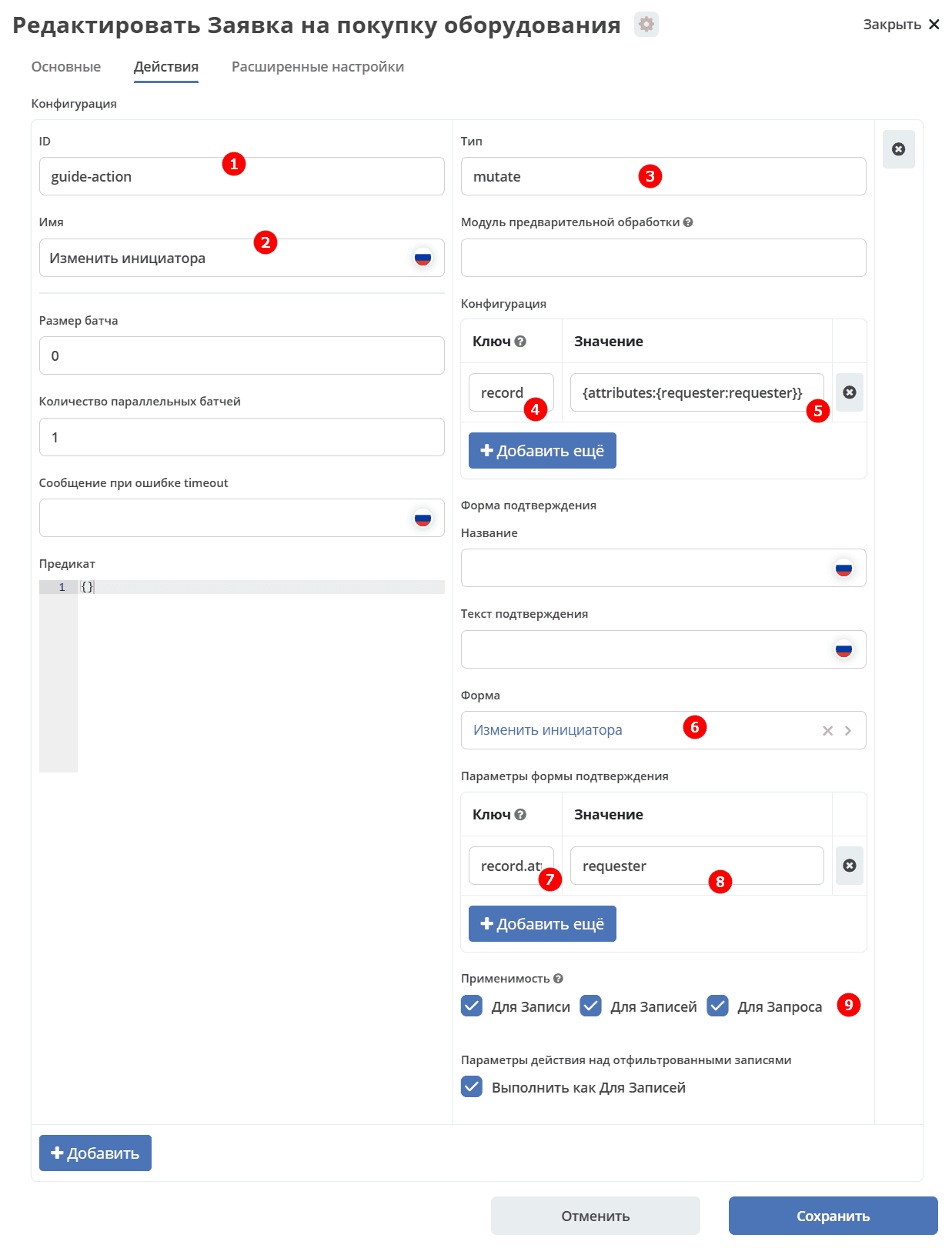
No. |
Name |
Description |
Example Fill |
|---|---|---|---|
1 |
Id |
unique identifier |
guide-action |
2 |
Name |
action name |
Change Initiator |
3 |
Type |
action type |
mutate |
4 |
Key |
configuration key |
|
5 |
Value |
configuration value |
|
6 |
Form |
select data input form |
Change Initiator (form-action-guide) |
7 |
Key |
confirmation form parameter key |
|
8 |
Value |
confirmation form parameter value |
|
9 |
Applicability |
Apply for record, records, search query. See details |
all set to true |
The user selects some rows in the journal and chooses the action from the dropdown menu above the journal:
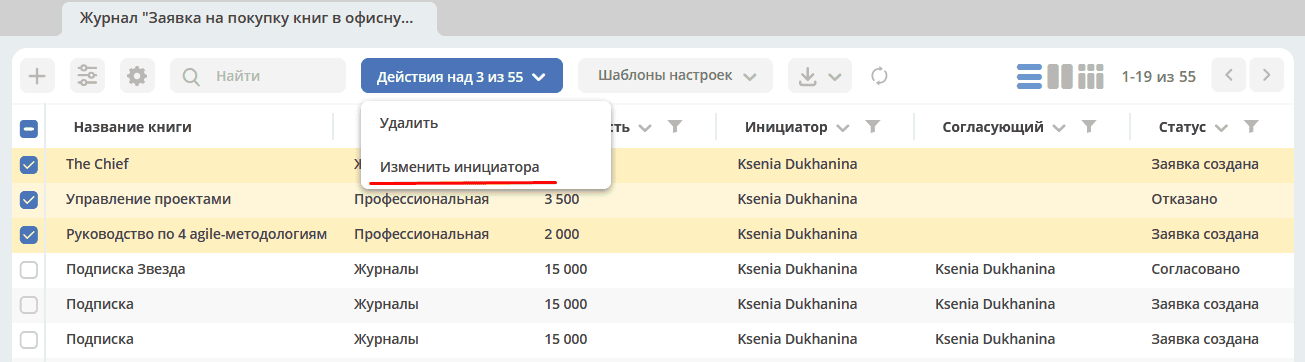
A form opens to specify the attribute values for the action execution, and the user clicks the button:
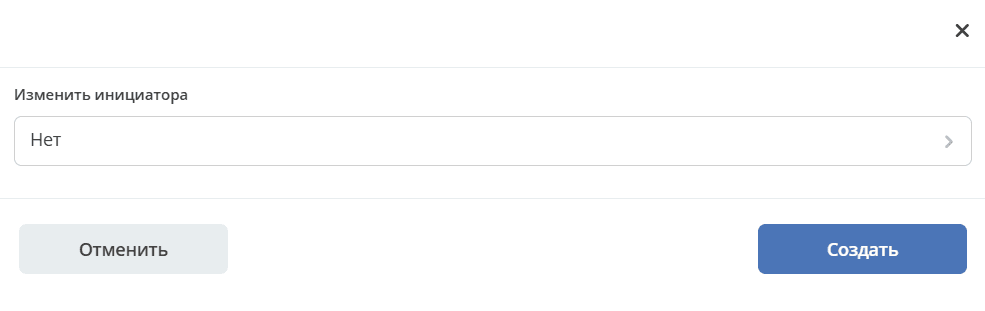
Example: Configuring the Change Status Action
Action config:
{
    "id": "change-status",
    "name": {
      "ru": "Изменить статус",
      "en": "Change status"
    },
    "confirm":{
      "title": {
      "ru": "Изменить",
      "en": "Change"
      },
    "message":{},
    "formRef":"uiserv/form@change-status-form",
    "formAttributes":{},
    "attributesMapping":{
      "record.attributes._status": "statuses"
      }
    }
    "type": "mutate",
    "config": {
      "record": {
        "id": "${recordRef}"
        "attributes": {}
        }
      }
    }
  }
The form presented to the user:
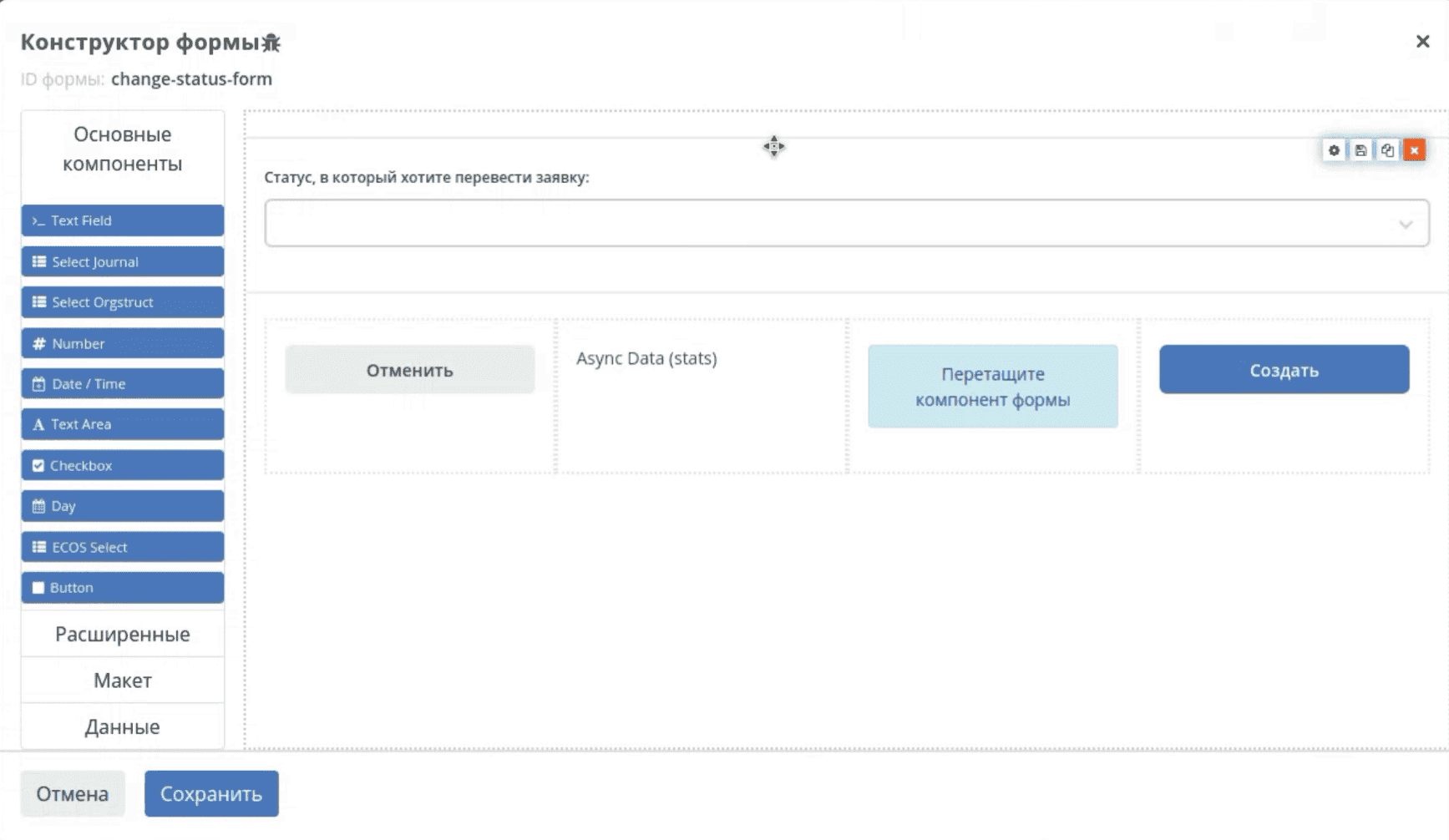
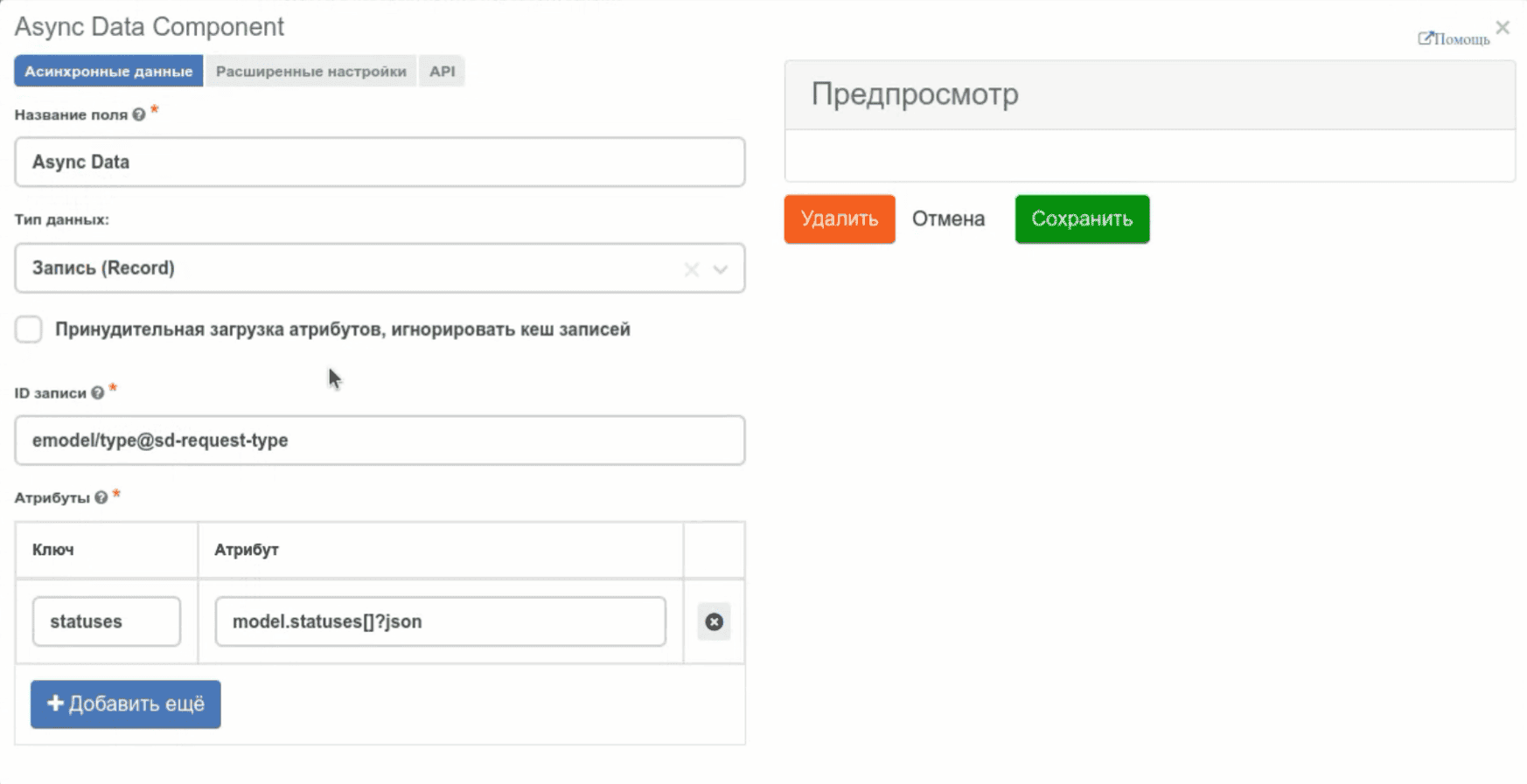
Statuses for the data type are added via the Async Data component:
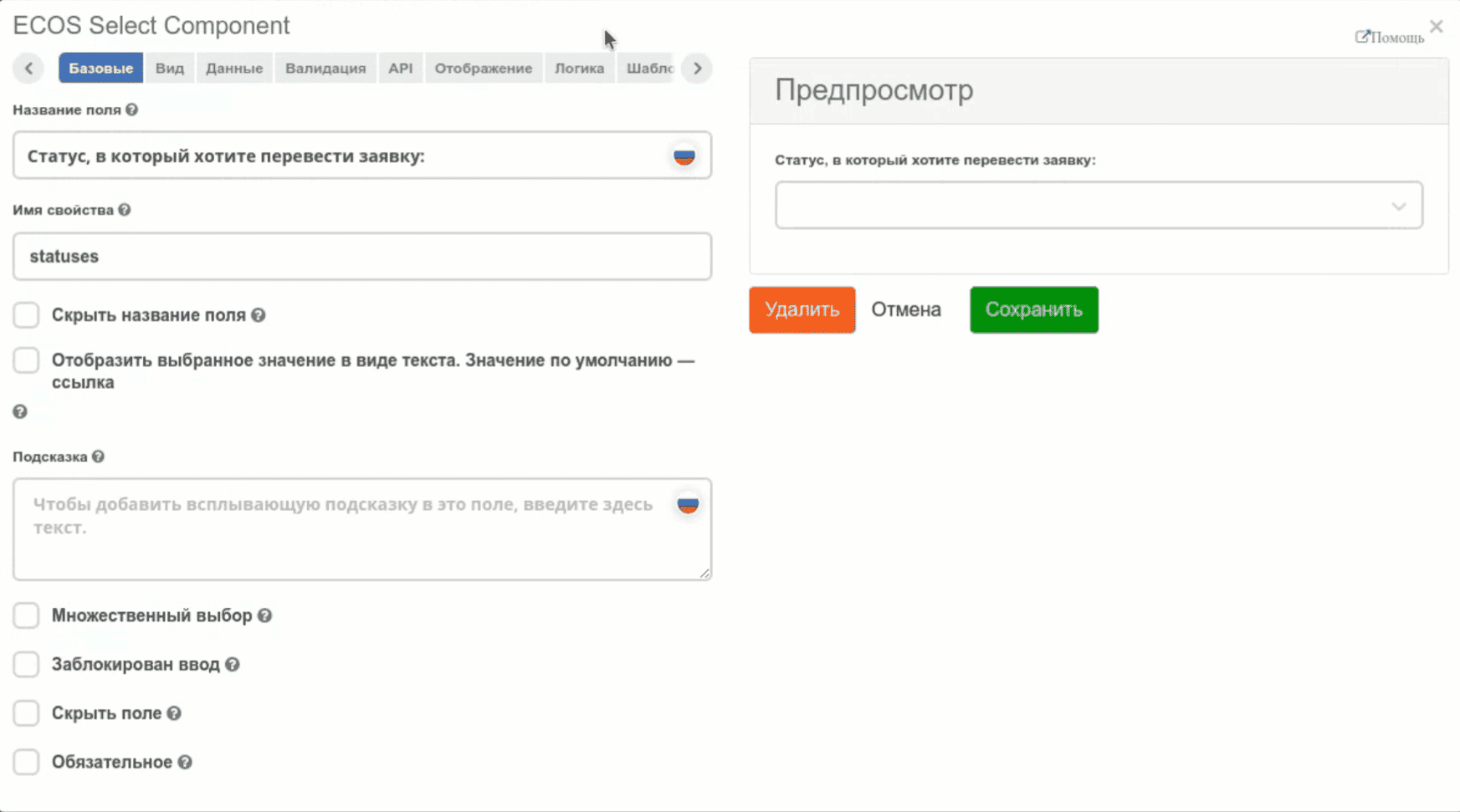
ECOS Select component settings:
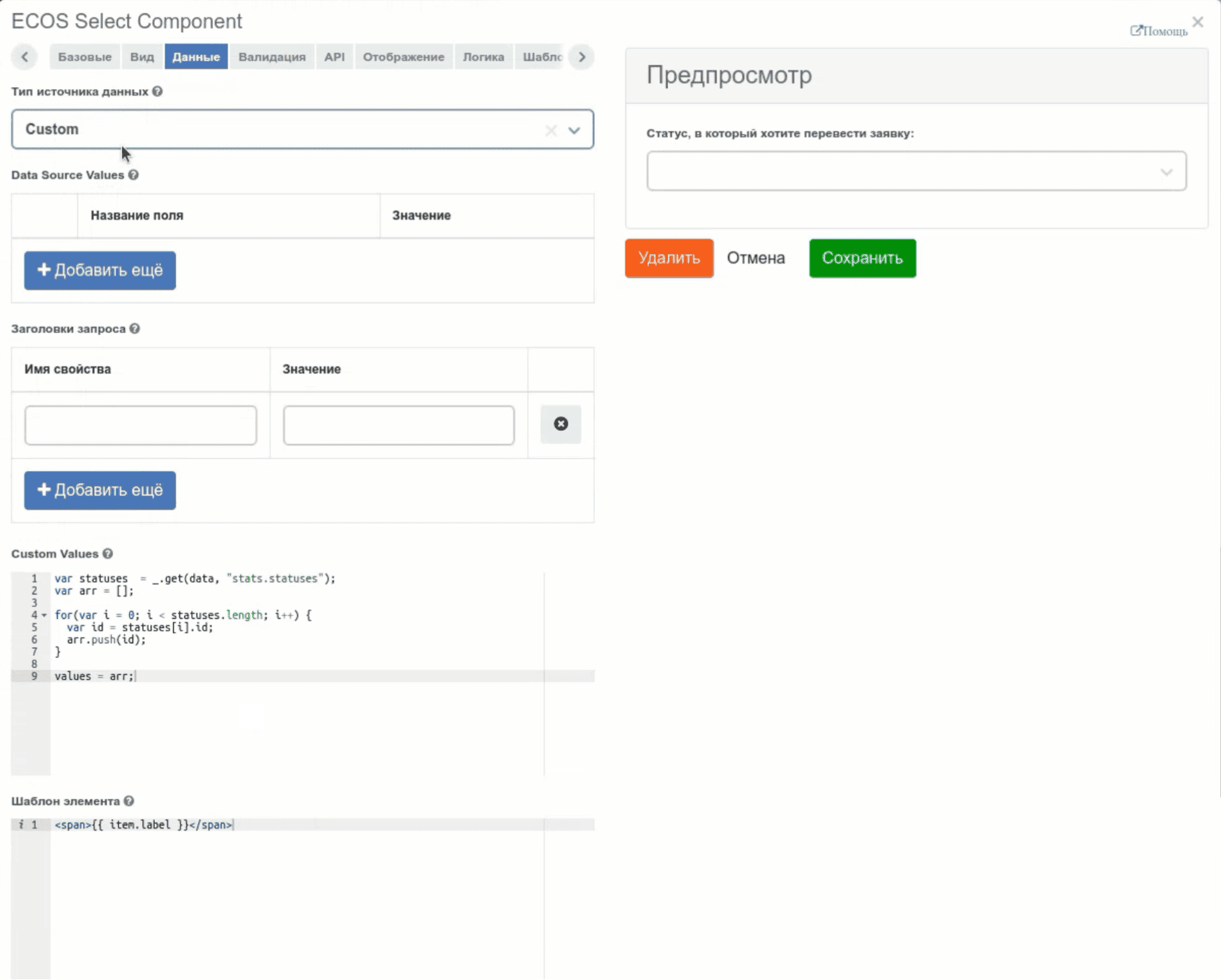
Script to iterate through the array to get the status id:
var statuses = _.get(data, "stats.statuses");
var arr = [];

for(var i = 0; i < statuses.length; i++) {
  var id statuses[i].id;
  arr.push(id);
}
values = arr;
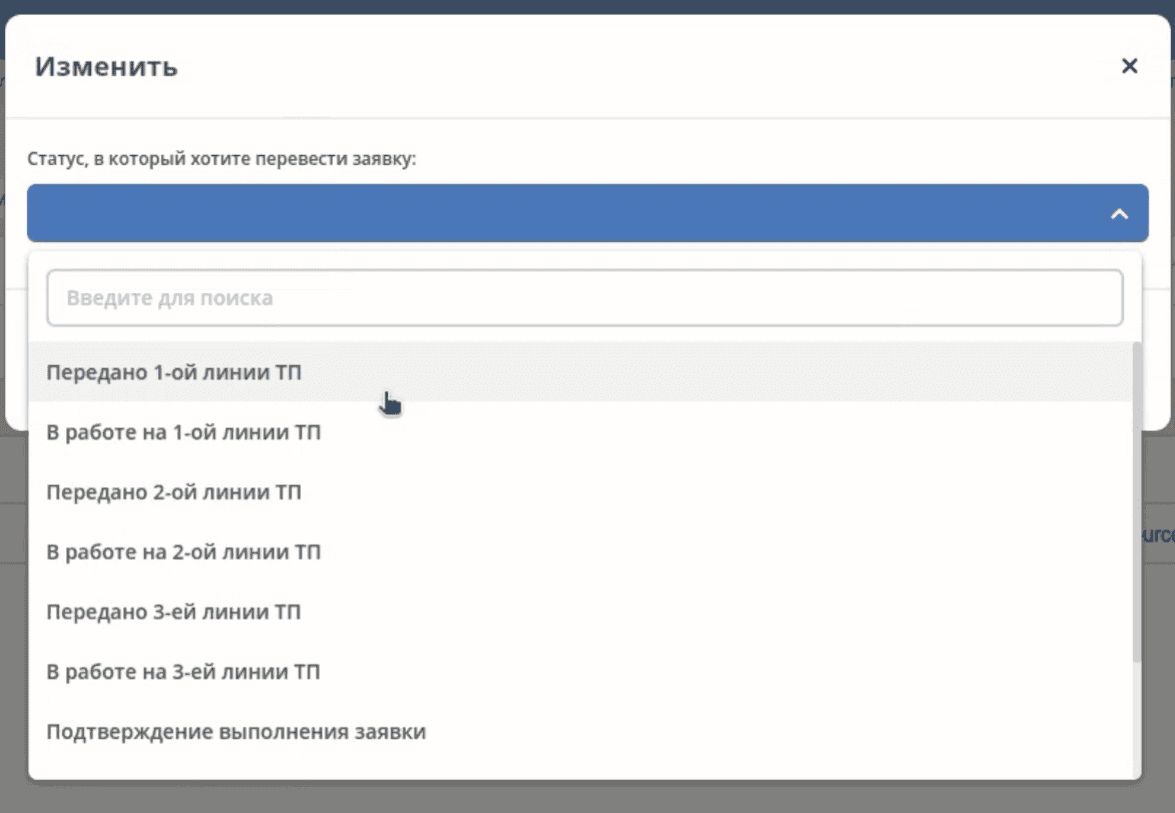
The obtained statuses in the form are localized:
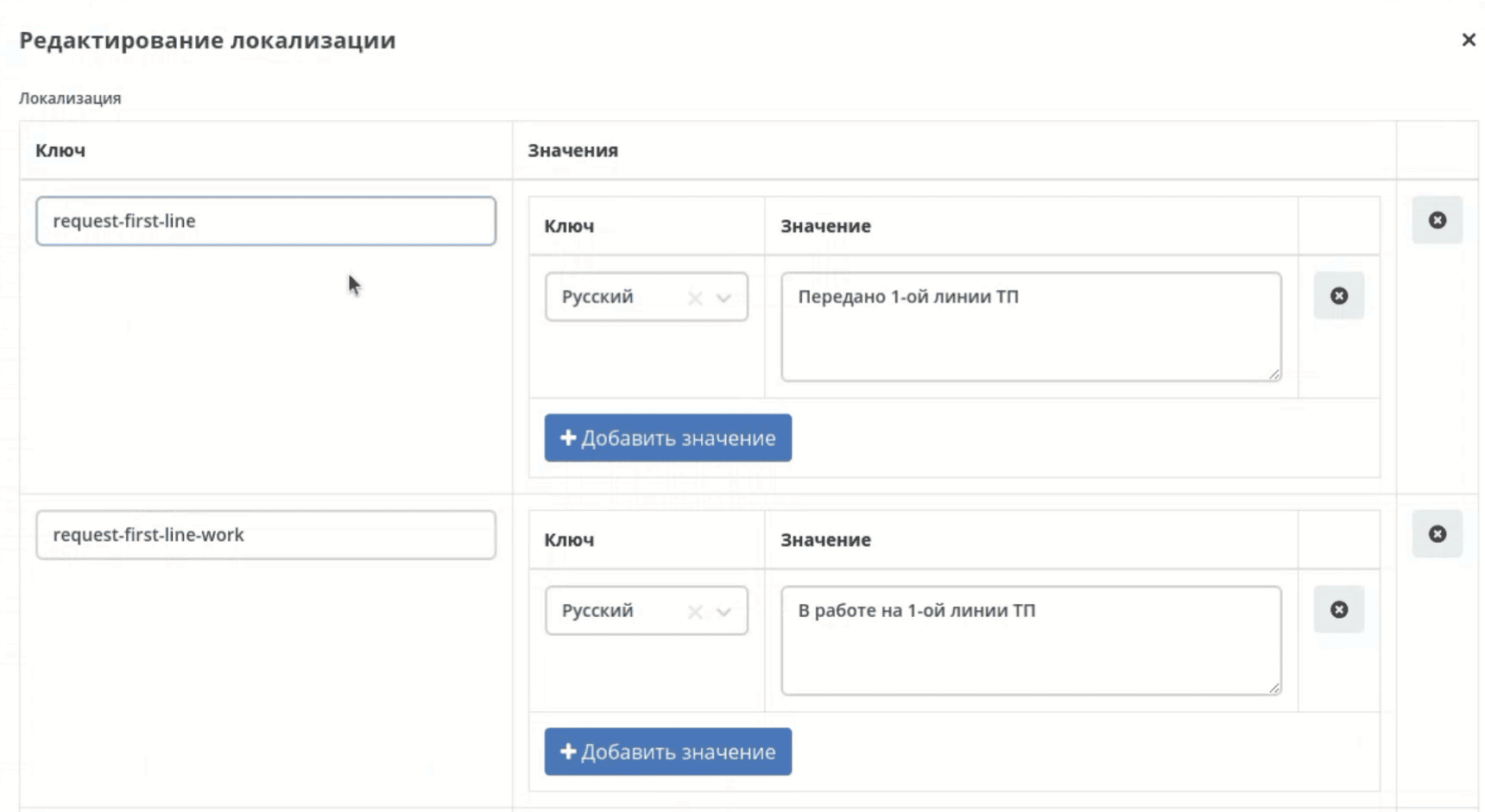
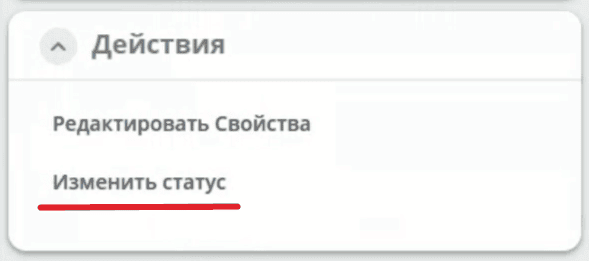
Action in the interface:
Example: Configuring the Bulk Action Export Data to File
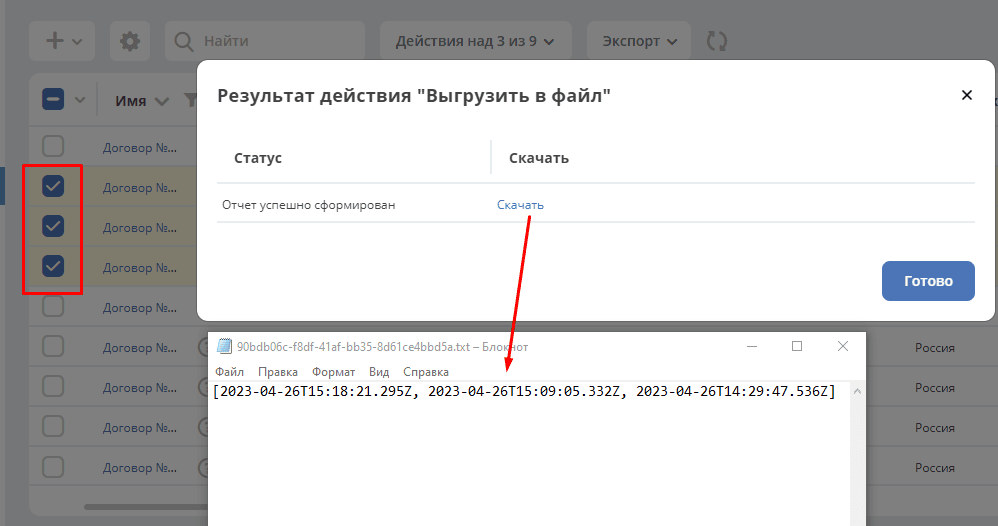
Example bulk action to export some data from selected records (in the example - _created) to a txt file with download capability.
Action config:
id: example-unload-to-file
type: mutate
name:
  ru: Выгрузить в файл
  en: Unload
confirm:
  title:
    ru: Подтвердите действие
    en: Confirm the action
  message:
    ru: Выгрузить в файл
    en: Unload
config:
  implSourceId: ЗДЕСЬ_ARTIFACTID_ВАШЕГО_ПРОЕКТА/example-unload
features:
  execForQuery: false
  execForRecord: true
  execForRecords: true
RecordsDAO for the action (the getId() method must return the value from implSourceId in the configuration):
import lombok.extern.slf4j.Slf4j;
import org.jetbrains.annotations.NotNull;
import org.jetbrains.annotations.Nullable;
import org.springframework.beans.factory.annotation.Autowired;
import org.springframework.stereotype.Component;
import ru.citeck.ecos.commons.data.DataValue;
import ru.citeck.ecos.records3.RecordsService;
import ru.citeck.ecos.records3.record.dao.mutate.ValueMutateDao;
import ru.citeck.ecos.webapp.api.content.EcosContentApi;
import ru.citeck.ecos.webapp.api.entity.EntityRef;

import java.util.*;

@Component
@Slf4j
public class ExampleUnloadToFileRecordsDao implements ValueMutateDao<DataValue> {

    private final RecordsService recordsService;
    private final EcosContentApi contentApi;

    @Autowired
    public ExampleUnloadToFileRecordsDao(RecordsService recordsService, EcosContentApi contentApi) {
        this.recordsService = recordsService;
        this.contentApi = contentApi;
    }

    @NotNull
    @Override
    public String getId() {
        return "example-unload";
    }

    @Nullable
    @Override
    public Object mutate(@NotNull DataValue selectedRecords) throws Exception {
        List<String> recordRefs = selectedRecords.get("records").asList(String.class);
        List<String> data = new ArrayList<>(Collections.emptyList());

        for (String record : recordRefs) {
            data.add(recordsService.getAtt(record,"_created").asText());
        }

        EntityRef tempRef = contentApi.uploadTempFile()
            .writeContent(writer -> {
                writer.writeText(data.toString());
                return null;
            });

        String url = recordsService.getAtt(tempRef, "_content.url").asText();

        return DataValue.createObj()
            .set("type", "link")
            .set("data", DataValue.createObj()
                .set("url", url)
            );
    }

}
In the interface, when the action is activated, the _created values from the selected records were obtained and written to a file available for download:
More about EcosContentApi
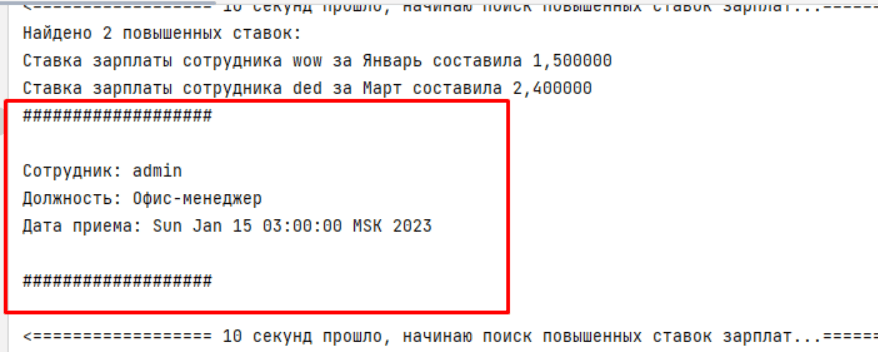
Example: Action to Output Data Information to Console
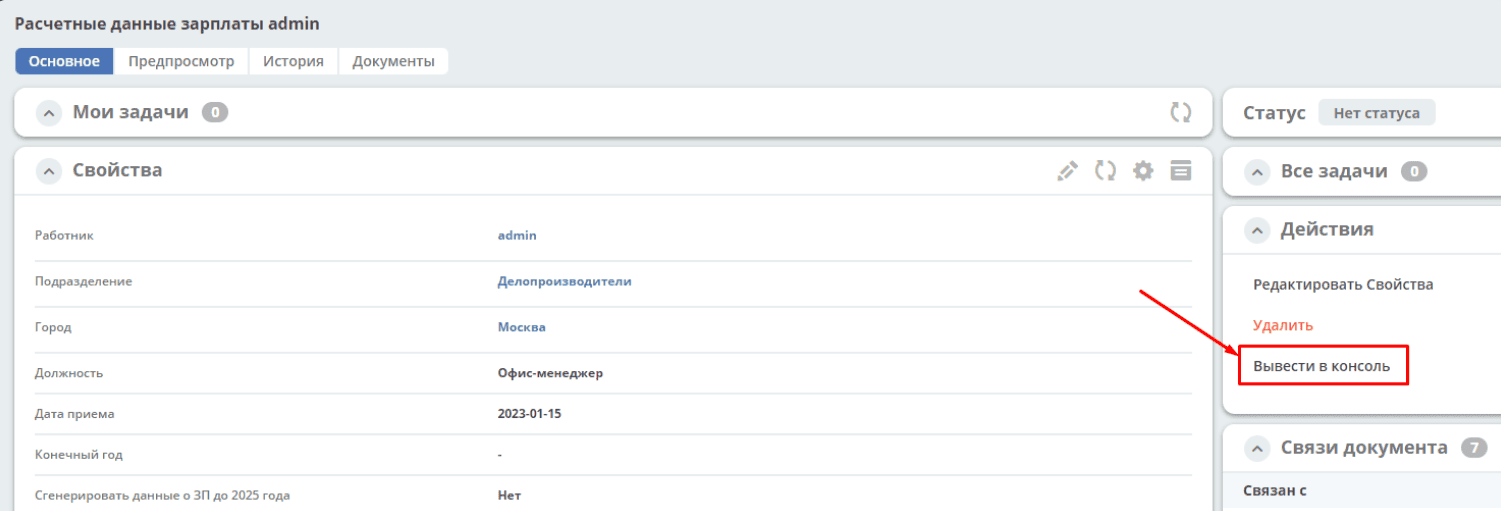
Action config:
{
  "id": "print-to-console",
  "name": {
    "ru": "Вывести в консоль",
    "en": "Print to console"
  },
  "confirm": {
    "title": {
      "ru": "Подтвердите действие",
      "en": "Confirm the action"
    },
    "message": {
      "ru": "Вывести в консоль",
      "en": "Print to console"
    },
    "formRef": "",
    "formAttributes": {},
    "attributesMapping": {}
  },
  "type": "mutate",
  "config": {
    "record": {
      "id": "minimal-webapp/print-to-console@",
      "attributes": {
        "employee": "${employee}",
        "position": "${position}",
        "start_date": "${start_date}"
      }
    }
  },
  "features": {
    "execForRecords": false,
    "execForQuery": false,
    "execForRecord": true
  }
}
DTO for the required dataset - SalaryDataDto.java
package ru.citeck.ecos.webapp.sample.minimal.dto;

import lombok.Data;

import java.util.Date;

@Data
public class SalaryDataDto {
    private String employee;
    private String position;
    private Date start_date;
}
And the DAO class that will process it all - JavaPrintToConsoleRecordsDao.java
package ru.citeck.ecos.webapp.sample.minimal.service.java.action;

import org.jetbrains.annotations.NotNull;
import org.jetbrains.annotations.Nullable;
import org.springframework.stereotype.Component;
import ru.citeck.ecos.records3.record.dao.mutate.ValueMutateDao;
import ru.citeck.ecos.webapp.sample.minimal.dto.SalaryDataDto;


@Component
public class JavaPrintToConsoleRecordsDao implements ValueMutateDao<SalaryDataDto> {

    @NotNull
    @Override
    public String getId() {
        return "print-to-console";
    }

    @Nullable
    @Override
    public Object mutate(@NotNull SalaryDataDto salaryDataRecord) {
        String salaryInfo = String.format("Сотрудник: %s%nДолжность: %s%nДата приема: %s%n",
                salaryDataRecord.getEmployee(), salaryDataRecord.getPosition(), salaryDataRecord.getStart_date());
        System.out.println("###################\n");
        System.out.println(salaryInfo);
        System.out.println("###################");
        return null;
    }

}
Please note, the connection between the config and the handler is established by specifying the handler ID in the config.
Example: Bulk Action with Data Export to File
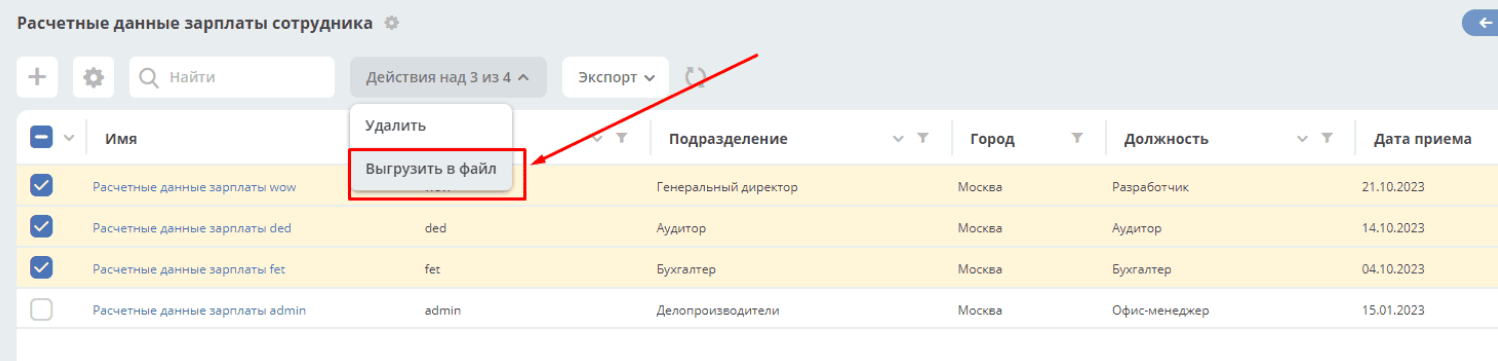
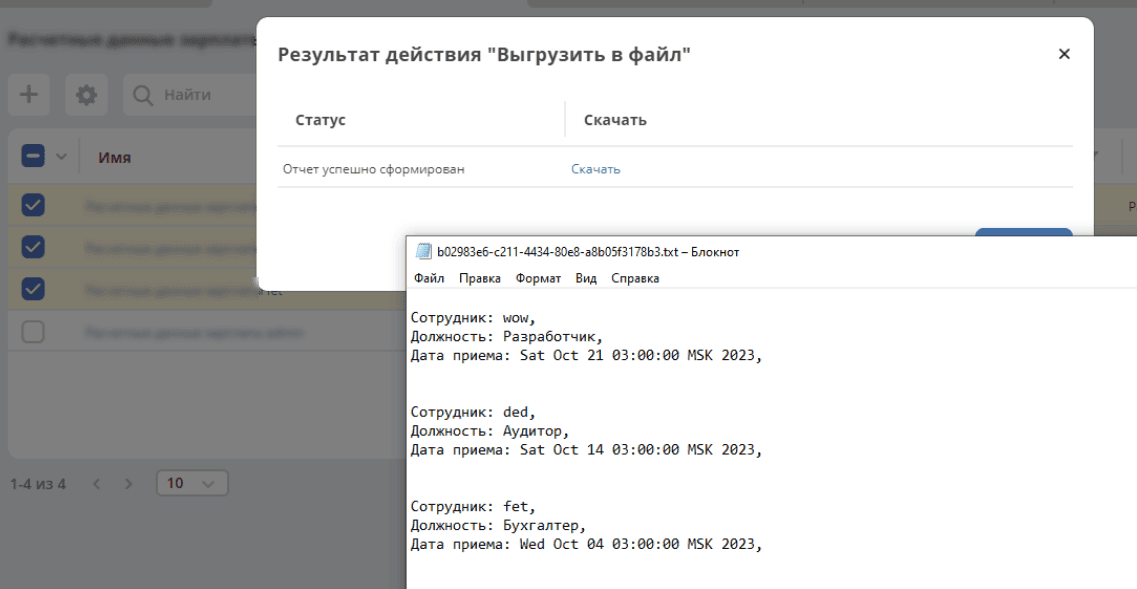
Action config:
{
  "id": "unload-salary-data-to-file",
  "name": {
    "ru": "Выгрузить в файл",
    "en": "Unload to file"
  },
  "confirm": {
    "title": {
      "ru": "Подтвердите действие",
      "en": "Confirm the action"
    },
    "message": {
      "ru": "Выгрузить в файл",
      "en": "Unload to file"
    },
    "formRef": "",
    "formAttributes": {},
    "attributesMapping": {}
  },
  "type": "mutate",
  "config": {
    "implSourceId": "minimal-webapp/unload-to-file"
  },
  "features": {
    "execForRecords": true,
    "execForQuery": false,
    "execForRecord": false
  }
}
DAO class - JavaUnloadToFileRecordsDao.java
package ru.citeck.ecos.webapp.sample.minimal.service.java.action;

import lombok.AllArgsConstructor;
import lombok.Data;
import lombok.NoArgsConstructor;
import org.jetbrains.annotations.NotNull;
import org.jetbrains.annotations.Nullable;
import org.springframework.beans.factory.annotation.Autowired;
import org.springframework.stereotype.Component;
import ru.citeck.ecos.commons.data.DataValue;
import ru.citeck.ecos.records3.RecordsService;
import ru.citeck.ecos.records3.record.dao.mutate.ValueMutateDao;
import ru.citeck.ecos.webapp.api.content.EcosContentApi;
import ru.citeck.ecos.webapp.api.entity.EntityRef;

import java.util.Date;
import java.util.List;


@Component
public class JavaUnloadToFileRecordsDao implements ValueMutateDao<DataValue> {
    private final RecordsService recordsService;
    private final EcosContentApi contentApi;

    @Autowired
    public JavaUnloadToFileRecordsDao(RecordsService recordsService, EcosContentApi contentApi) {
        this.recordsService = recordsService;
        this.contentApi = contentApi;
    }

    @NotNull
    @Override
    public String getId() {
        return "unload-to-file";
    }

    @Nullable
    @Override
    public Object mutate(@NotNull DataValue selectedRecords) {
        List<String> recordRefs = selectedRecords.get("records").asList(String.class);
        List<SalaryRecordData> salaryRecordsData = recordsService.getAtts(recordRefs, SalaryRecordData.class);

        String salaryDataAsPrettyString = formatSalaryDataList(salaryRecordsData);

        EntityRef tempRef = contentApi.uploadTempFile()
                .writeContentJ(writer -> {
                    writer.writeText(salaryDataAsPrettyString);
                });

        String url = recordsService.getAtt(tempRef, "_content.url").asText();

        return DataValue.createObj()
                .set("type", "link")
                .set("data", DataValue.createObj()
                        .set("url", url)
                );
    }

    public String formatSalaryDataList(List<SalaryRecordData> salaryRecordsData) {
        StringBuilder sb = new StringBuilder();
        for (SalaryRecordData record : salaryRecordsData) {
            sb.append("\nСотрудник: ").append(record.getEmployee()).append(",\n");
            sb.append("Должность: ").append(record.getPosition()).append(",\n");
            sb.append("Дата приема: ").append(record.getStart_date()).append(",\n\n");
        }
        sb.append("\n");
        return sb.toString();
    }

    @Data
    @NoArgsConstructor
    @AllArgsConstructor
    static class SalaryRecordData {
        private String employee;
        private String position;
        private Date start_date;
    }
}
task-outcome
type id: task-outcome
Description |
Configuration |
|---|---|
The action is used in conjunction with
tasks-actions.The action is related to the record’s business process.
|
label - task completion outcome title
outcome - task completion outcome identifier
formRef - reference to the task form (uiserv/eform@…)
taskRef - reference to the task (wftask@flowable$12345)
|
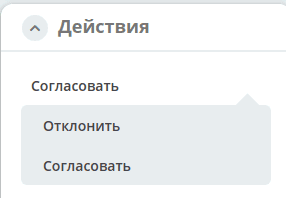
tasks-actions
type id: tasks-actions
Description |
Configuration |
|---|---|
Action to load task completion outcome options.
|
As output, for each task, a main action and
variants with type task-outcome are obtained, listing the completion outcomesOnly tasks that the current user can complete are displayed. I.e., the same as in the “My Tasks” widget.
Completion outcomes are loaded from the task form configuration.
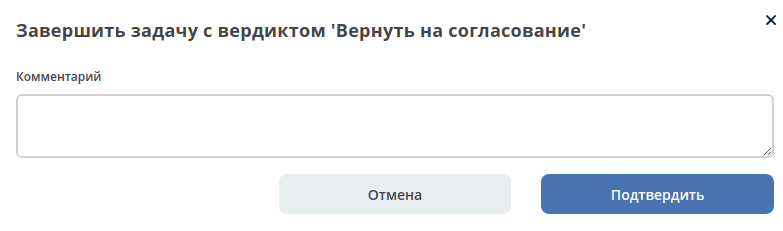
All buttons with the key outcome_* are found and converted into creation variants.
If the task has fields on the form, a popup form with these fields is shown:
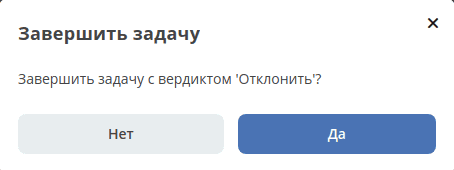
If the task has no fields on the form, the following window is shown:
If the form is empty and
hideConfirmEmptyForm=true is set in the configuration for tasks-actions, the window does not appear, the form is executed, the action completes, and a notification appears if successful.
When executing action variants, some configurations are passed to each variant:
i.e., the
config from tasks-actions is passed to task-outcome.However,
task-outcome can have its own config, which may override the passed settings. |
edit-password
type id: edit-password
Description |
Configuration |
|---|---|
Change password
|
open-submit-form
type id: open-submit-form
Description |
Configuration |
|---|---|
Call an edit form with an attempt to submit for review.
The action is related to the record’s business process.
|
If all fields are filled correctly, the form is submitted and closed.
Otherwise, a list of errors is displayed, and after fixing them, submission is done manually.
config.formId - optional parameter; if not specified, the default form is loaded.
|
user-event
type id: user-event
For generating custom events and the ability to react to them in BPMN, a new action type user-event has been added, which throws an ecos-event.
For example:
---
id: user-event-action1

name:
  ru: Пользовательское действие 1
  en: User event action 1

type: user-event

config:
  record: ${?id}
  eventData:
    priority: 1
    counterpartInitiator: ${counterparty.initiator}
    counterpartyRef: ${counterparty?id}
    house:
      kitchen: red
      livingRoom: blue
As a result, an ecos event will be generated in the system:
Type. Always equals the action id. In this case user-event-action1
Record, on which the event occurred. What is specified in record, ${?id} means that it refers to the current document from which the action is called. If record is not specified, the event is global (not tied to any specific record)
Event payload. Everything specified in eventData. At the first level of attributes, data can be passed as entityRef, for this you can use the syntax ${some_attribute?id}.
Enterprise Actions
transform
type id: transform
Description |
Configuration |
|---|---|
Transformation of content according to specified rules and its download or upload to an attribute of type “content”
|
input: Object // source of content. By default - the main content of the current document;
transformations: Object[] // description of transformations;
output: Object // target for the transformation result. By default - a temporary file whose content is downloaded immediately.
More about possible settings for input, transformations and output can be read here
Example:
1. Сконвертировать содержимое в PDF и скачать:
|
Example: Configuring the Download with Barcode Action
Action config:
{
  "id": "test-action-transform",
  "name": {
    "ru": "Скачать с штрих-код",
    "en": "Download with barcode"
  },
  "type": "transform",
  "config": {
    "transformations": [
      {
        "type": "convert",
        "config": {
          "toMimeType": "application/pdf"
        }
      },
      {
        "type": "barcode",
        "config": {
          "entityRef": "${?id}",
          "layout": "BOTTOM_RIGHT",
          "pages": "ALL"
        }
      }
    ]
  }
}
layout - selection of barcode position with possible values: TOP_LEFT, TOP_CENTER, TOP_RIGHT, BOTTOM_LEFT, BOTTOM_CENTER, BOTTOM_RIGHT
Before adding the action to the data type, it is necessary to:
add the Has Barcode aspect to the data type;
add the numbering template to the data type.
Action Extensions
Adding New Action Instances
To add new action instances, they must be described in json format and added to the microservice at the path eapps/artifacts/ui/actions
Example description:
{
   "id": "confirm-list-html",
   "key": "card-template.confirm-list.html",
   "name": "Скачать лист согласования",
   "type": "download-card-template",
   "config": {
       "templateType": "confirm-list",
       "format": "html"
   }
}
For testing, this configuration can be uploaded manually in the actions journal.
Adding New Action Types
Currently, all types are described in the base ecos-ui project (there are plans to support action extensions without changes to ecos-ui).
Describe a new action:
export const DownloadAction = {
 execute: ({ record, action }) => {
   const config = action.config || {};

   let url = config.url || getDownloadContentUrl(record.id);
   url = url.replace('${recordRef}', record.id); // eslint-disable-line no-template-curly-in-string

   const name = config.filename || 'file';

   const a = document.createElement('A', { target: '_blank' });

   a.href = url;
   a.download = name;
   document.body.appendChild(a);
   a.click();
   document.body.removeChild(a);

   return false;
 },

 getDefaultModel: () => {
   return {
     name: 'grid.inline-tools.download',
     type: 'download',
     icon: 'icon-download'
   };
 },

 canBeExecuted: ({ record }) => {
   return record.att('.has(n:"_content")') !== false;
 }
};
Register a new type:
import Registry from './RecordActionExecutorsRegistry';
import { DownloadAction } from './DefaultActions';

Registry.addExecutors({
 download: DownloadAction,
});
Action List Settings
Configuring Actions for Cards
Configuring actions for cards is done in the data types journal, which is located in the system journals:
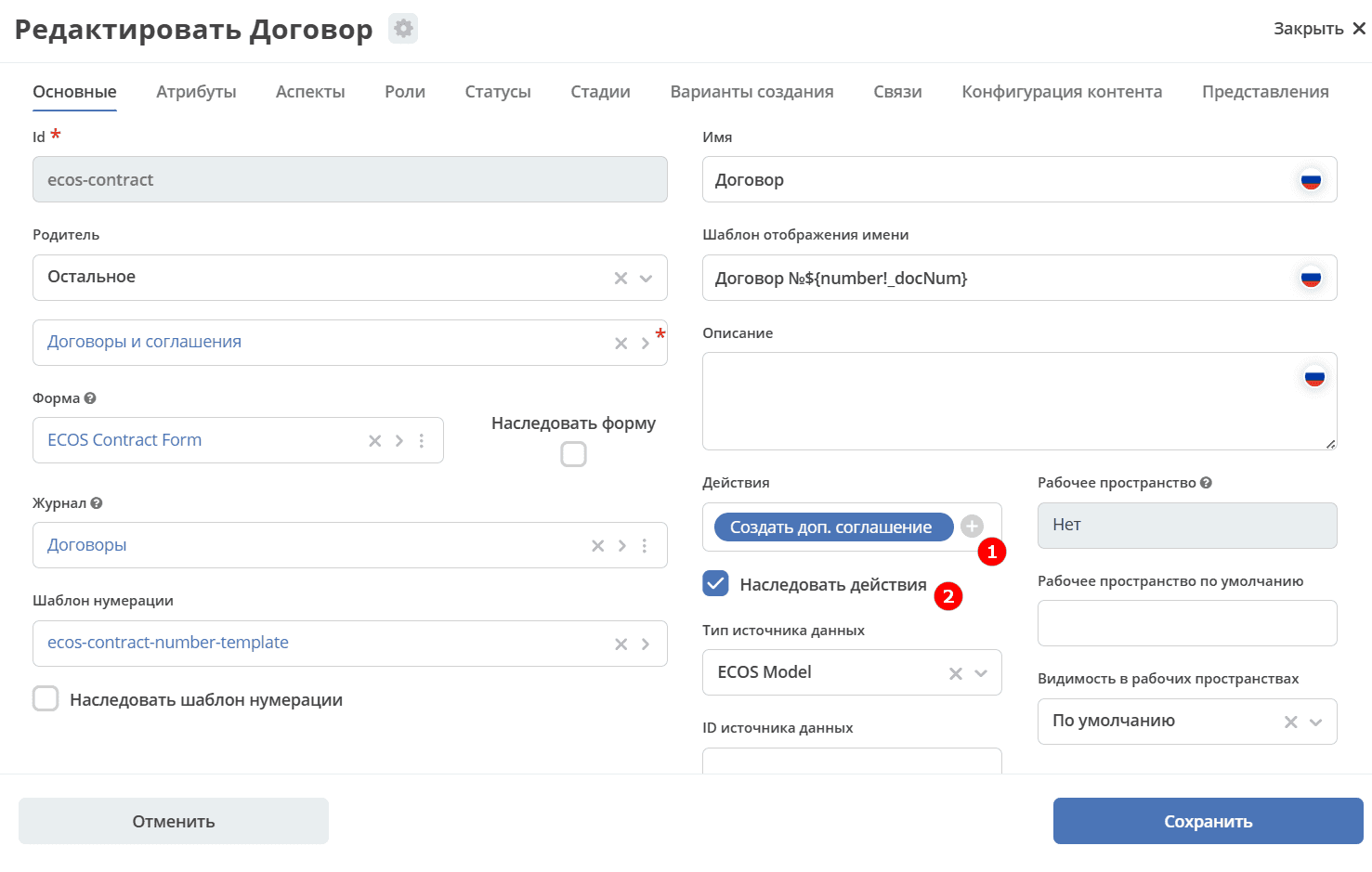
1 - select the list of actions for the type.
2 - if the checkbox is checked, then actions are inherited from the parent.
Example in the data type config: :
"actions": [
  "uiserv/action@create-supplementary-agreement"
],
Configuring Actions in Journals
Configuring actions for journals is done in the UI Configuration - Journals section, which is located in the system journals:
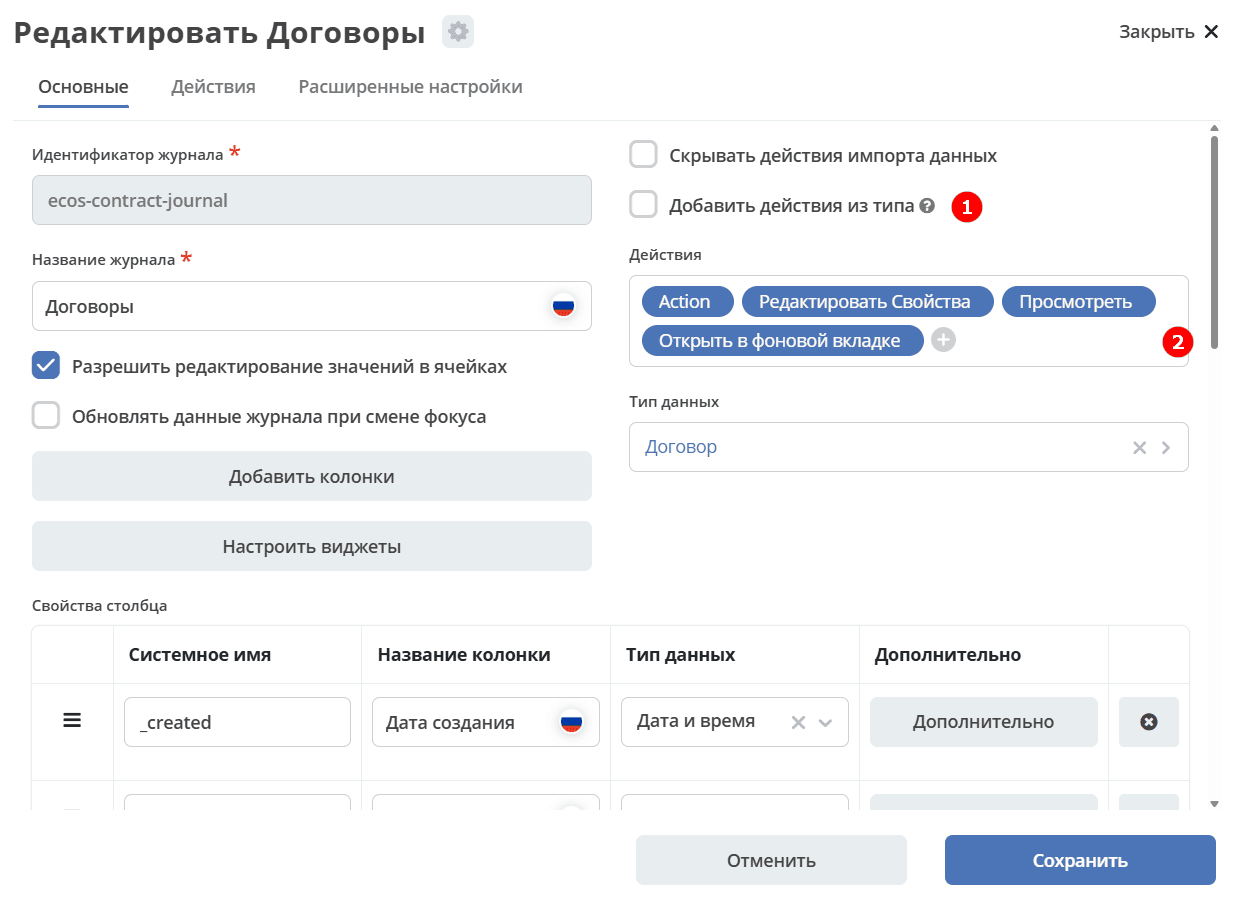
1 - Add actions from type:
empty (null) - if actions and actionsDef are empty, then add actions from the type;
true - always add actions from the type;
false - never add from the type.
2 - action selection
Example in the journal config: :
  "actions": [
  "uiserv/action@download-zip",
  "uiserv/action@edit",
  "uiserv/action@view-dashboard",
  "uiserv/action@view-dashboard-in-background"
],
Configuring an action that is active for records with a specific content mimetype:
{
   "id": "edit-in-onlyoffice",
   "key": "edit.onlyoffice",
   "name": "Редактировать Документ",
   "type": "open-url", // тип действия должен соответствовать типу на UI
   "config": {
       "url": "/share/page/onlyoffice-edit?nodeRef=${recordRef}&new="
   },
   "evaluator": {
       "type": "predicate", // Тип evaluator'а для фильтрации действий
       "config": {
           "predicate": {
               "t": "in",
               "att": "_content.mimetype?str", // атрибут, который мы проверяем
               "val": [ //значения, на которые мы проверяем
                   "application/vnd.openxmlformats-officedocument.wordprocessingml.document",
                   "application/vnd.openxmlformats-officedocument.spreadsheetml.sheet",
                   "application/vnd.openxmlformats-officedocument.presentationml.presentation",
                   "text/plain",
                   "text/csv"
               ]
           }
       }
   }
}
This config can simply be placed in the eapps/artifacts/ui/actions folder for microservices.
Technical Information
Auxiliary Parameters
Parameter |
Description |
|---|---|
actionRecord |
In any form that is called from an action, the
actionRecord property is set in the options object, indicating the identifier of the record for which the action is being performed.This value is read-only. It is not necessary to specify
config.options.actionRecord in the action, as any user-defined value will be overwritten. |
Expected Action Result Format
Result type boolean or object (array - deprecated - processing is supported)
If object, execution details are displayed depending on the result type. For bulk actions, a modal window appears immediately upon launch, and if the result is boolean, it automatically closes.
link
Displayed execution result - link to download the report
{
  "type": "link",
  "data": {
  "url": "..."
  }
}
results
Table of records with the result of action execution
{
  "type": "results",
  "data": {
  "results": [
    {
      "recordRef": "emodel/someType@a2fb0374-d69c-4861-8d03-4a30e395fb2d",
      "disp": "название записи"
      "status": "OK",
      "message": "Все хорошо"
    }
  ]
  }
}
error
Error output. Automatic creation is possible.
{
  "type": "error",
  "data": {
  "message": "..."
  }
}
Note
In the ID column of the type, use formatting for the type - Heading 3 (instead of Normal text) - this way it will be included in the list of available actions and will allow for anchor linking
If the configuration description is large, use the Expand panel (+)