Best practice
This section contains recommendations for configuring and using the key components of the ECOS platform: data types, forms, and notification templates. Following these practices helps build solutions that are easy to maintain and scale.
Data Types
When creating a data type, the following rule should be followed for selecting the parent type:
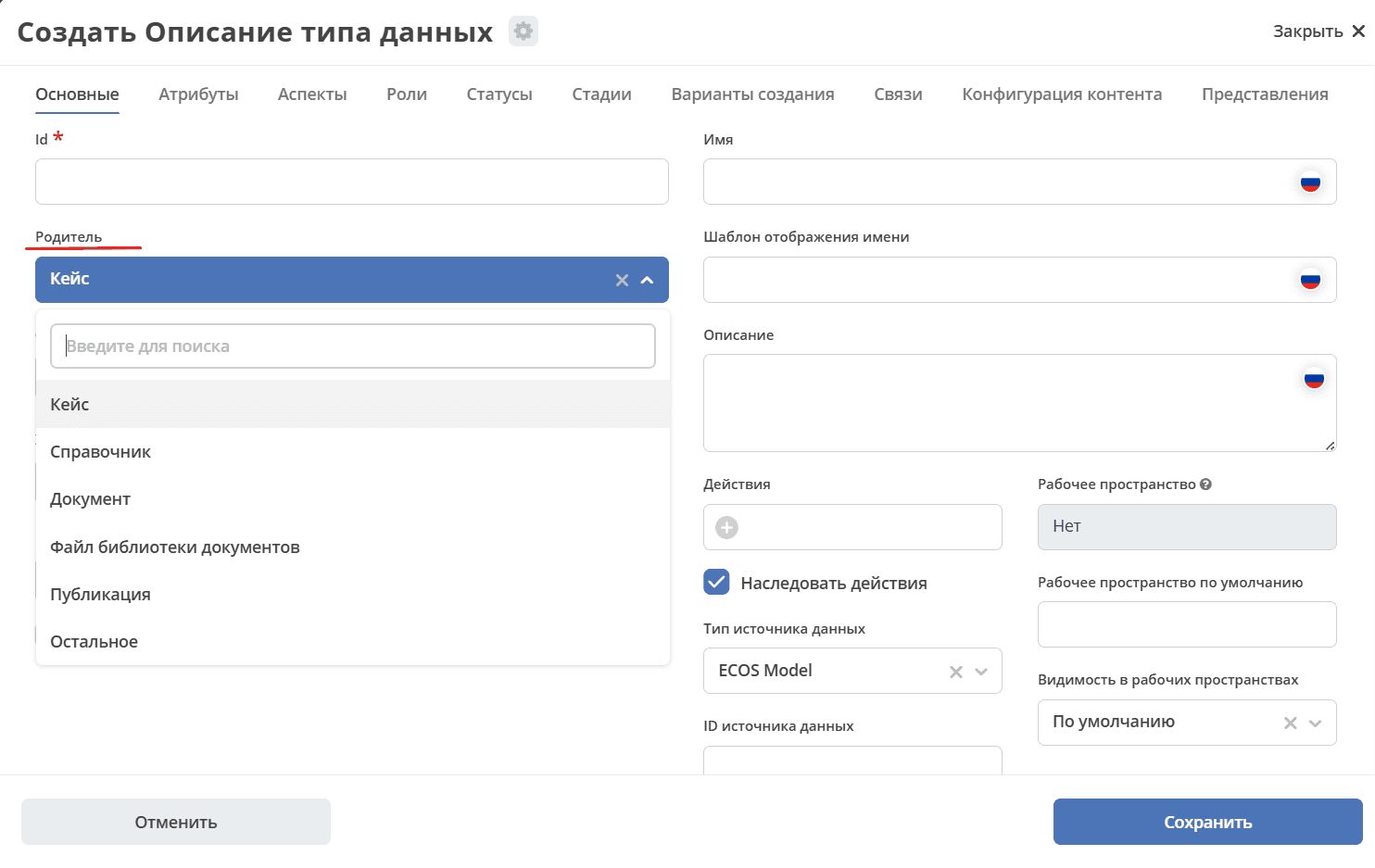
Case - a type for storing a record whose status changes during the lifecycle automatically as part of a business process, or manually (for example, when using a Kanban board). An indicator that a type will be a case is the need to attach a process to it and specify general information, attributes, roles, statuses, and a rights matrix during creation.
Reference - a type for storing sets of business data that will be used as static data for documents, not directly involved in business processes. An indicator that a type will be a reference is specifying only general information and a list of attributes during its creation.
Document - TBD
Document Library File - TBD
Publication - TBD
Other - other previously created data types.
Details about data types
Forms
Details about forms
Attributes
Auto-fill from a Related Entity (Dual-Layer Default Pattern)
This pattern is used when you need to automatically populate an attribute value from a related object (for example, from a project into a release), while still allowing the user to change it manually.
Task:
A child type (e.g., Release) should inherit a default field value from the parent entity (e.g., a linked Project), but the user must be able to override the value when needed.
Solution — two layers:
Layer |
Mechanism |
When it triggers |
|---|---|---|
1. Data type level |
Calculated attribute of type Attribute, storage method On empty |
On record creation: if the field is empty, the value is pulled from the related object’s attribute |
2. Form level |
Form component with the “Current user by default” checkbox |
Fallback: if the related object’s attribute is also empty, the current user is substituted |
Calculated attribute configuration (layer 1):
Go to the data type → Attributes tab → Calculated Attributes section and add an attribute with the following parameters:
Type |
|
Value |
Path to the related entity’s attribute, e.g.: |
Storage method |
|
Tip
The Attribute type supports deep nesting via dot notation. For example, if the “Release” type has a project association (a reference to a “Project”), and the “Project” has a responsible attribute, the path will be: project.responsible?id
For more details on nested attribute syntax, see Calculated attributes.
Form configuration (layer 2, fallback):
If an additional fallback is needed (for example, to substitute the current user when the related object’s attribute is also empty), configure the form:
Open the data type form in the form editor.
Find the component of the required field (e.g., “Responsible”).
Go to the “Custom” tab of the component.
Check the “Current user by default” checkbox.
Save the component and the form.
Note
The form layer only works when the creation form is opened in a browser and does not affect programmatic mutations via the Records API. For a reliable fallback, it is better to rely on the data type layer.
Example: Responsible in Release from Project
Scenario: the “Release” type is linked to the “Project” type via the project attribute. When creating a release, the “Responsible” field should be automatically populated with the value of the responsible field from the linked project.
Calculated attribute in the “Release” type:
# В YAML-определении типа данных (секция computedAtts)
- id: responsible
  type: ATTRIBUTE
  config:
    attribute: "project.responsible?id"
  storingType: ON_EMPTY
Order of default value application:
Создание записи
     │
     ▼
[Слой 1] Вычисляемый атрибут (On empty)
     │  project.responsible?id → значение из проекта
     │
     ▼ (если атрибут проекта пуст)
[Слой 2] Форма: «Текущий пользователь по умолчанию»
     │
     ▼
Поле заполнено / пользователь может изменить вручную
Pattern benefits:
The value is populated automatically — the user does not need to enter it manually in most cases.
The value remains editable — the field is not “frozen”, the user can change it when needed.
The
On emptystorage method guarantees that a value once set will not be overwritten on subsequent changes to the record.The layers are independent: the data type layer always works (including programmatic mutations), while the form layer only works in the UI.
See also: Calculated attributes | Data types
Notification Template
Details about notification templates