Semantic Search and Document Indexing
Note
Available in the Enterprise edition only.
Semantic search allows finding relevant documents by the meaning of a query, not just by exact word matches.
Use Cases
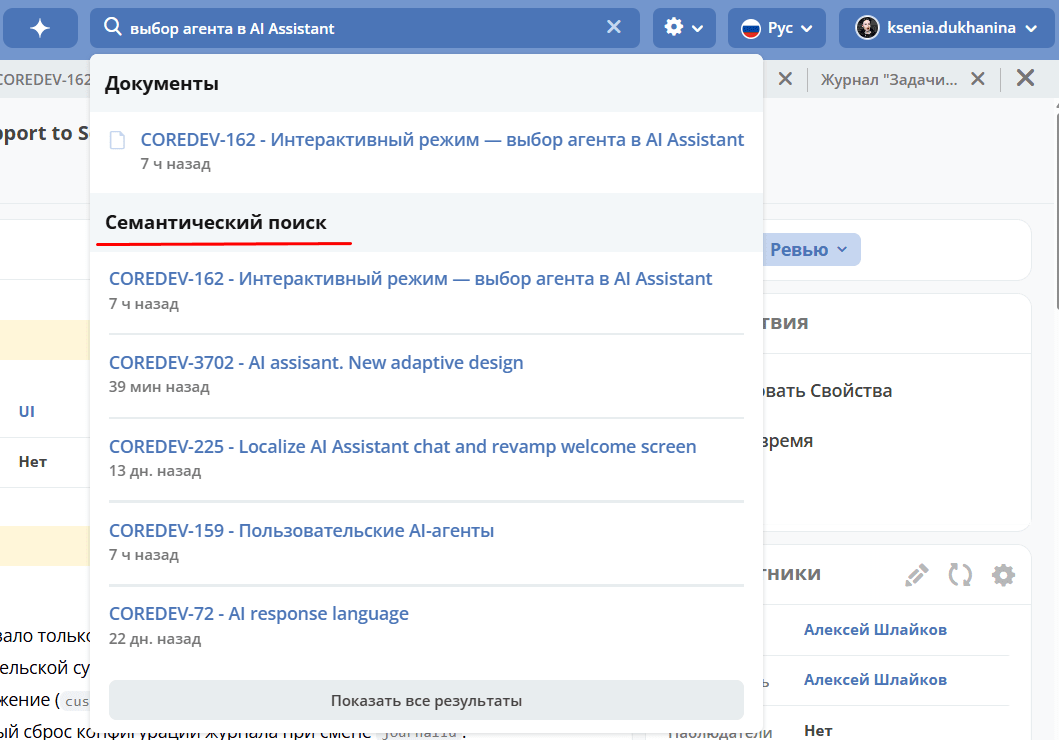
Header search (live search). When typing in the platform’s header search bar, in addition to standard results (documents, people, workspaces), a «Semantic Search» section appears with contextually relevant documents. For example, a query like «payment terms for client» returns contracts and commercial proposals containing payment information, even if they do not contain the exact phrase entered.
Journal search. Semantic search is also available on the global search page — results are displayed in a separate SEMANTIC group alongside the DOCUMENTS, PEOPLE, and WORKSPACES groups.
Access control. Users only see documents in search results that they have access to. If a user is not a member of a workspace, documents from that workspace are not displayed.
Поиск по коду и документации (для разработчиков). Через AI‑ассистент можно искать по содержимому GitLab‑репозиториев — исходному коду, README, конфигурациям. Это работает через MCP‑протокол и не требует от разработчика знания конкретных файлов или путей.
Indexing happens automatically: when a document is created or modified, it appears in the search index within seconds; when deleted, it is automatically removed from the index.
Semantic search configuration is described in the RAG Configuration section.