Intelligent Assistant
The built-in AI assistant of the Citeck platform automates business processes, simplifies document management, and helps manage data.
Note
The Assistant is available in the Citeck Enterprise version under the following conditions:
License: presence of the
aiflag in the licenseUser rights: the user must be in the
GROUP_ai-feature-allowedgroup or have administrator/system rightsMicroservice: the
ecos-aimicroservice is connected and configured (see configuration)
User Interface
Main UI Features
Two operating modes: switching between universal and contextual assistant
Autocomplete with @: quick addition of records to the chat context
Context tags: visual representation of the added context
Hotkeys
Cmd+I(Mac) /Alt+I(Windows/Linux) - open/close AI assistant
Enter- send message
Shift+Enter- new line
Escape- close chat
@- invoke autocomplete to add context
Settings
Universal Assistant
Universal AI assistant with automatic intent detection and context-dependent tool selection.
- Supported tasks:
Artifact Assistant - creation, editing, and deployment of supported artifacts.
Business application generation - creating full-featured applications with data types and processes from a text description.
Script Writing Assistant - creating and editing scripts for various Citeck contexts.
Document analysis - information extraction and answering questions about documents.
Document comparison - analysis of differences between document versions.
Email writing assistant - composing business letters for leads, clients, and partners.
Customer 360 - comprehensive analysis of customers, deals, orders, and relationships.
Artifact Assistant
Data Types
Generation of data types based on text description.
Editing an existing data type. To do this, navigate to the data type card and add @record to the chat context.
Deployment of the data type in the system.
Questions and analysis regarding attributes, structure, and functionality of data types. For example: Tell me about the data type @record? What attributes and logic does it have?
Requests:
Create a data type for approving a vacation request with the manager
Add a “number of vacation days” field, let it be calculated automatically
What attributes are in the data type @record? How is the number of vacation days attribute calculated?
Business Application Generation
Creating full-featured business applications from a text description with automatic generation of all necessary components.
Application generation - creating full-featured business applications from a text description
Data types - automatic creation of data types with attributes, roles, and statuses
BPMN processes - generation of business processes for logic automation
Related entities - support for multiple related data types in a single application
Clarifying questions - interactive dialogue for collecting missing information
Deployment - automatic deployment of created artifacts in the system
Workflow:
Describe business requirements in natural language
AI will analyze the request and ask clarifying questions if necessary
The system will suggest an application structure with data types and processes
Confirm or request changes
AI will automatically create and deploy all components in the system
Requests:
Create an application for managing vacation requests
I need a conference room booking system
Create an application for approving business trips with the manager and accounting
Create an equipment tracking system with reservation capability
Form Generation
New artifact type: the AI assistant can now generate and edit Citeck forms based on a text description
Dialog mode: Form generation with draft preview, the ability to refine and confirm before deployment
Validation: Automatic verification of the form structure before deployment
Business application integration: Form generation as part of the business application generation pipeline
Smart Context and Agent Mode for Artifacts
Agent Mode (Plan-and-Execute)
Complex requests: the AI assistant automatically determines the complexity of the request and switches to agent mode for multi-artifact tasks
Planning: Automatic generation of a plan with the ability to review and approve before execution
DAG execution: Step-by-step plan execution considering dependencies between steps (data type generation, forms, BPMN, search, analysis, validation, deployment)
User control (HITL): Plan approval, modification, skipping, and repeating steps via action buttons
Error recovery: Automatic retry with feedback and manual control upon failures
Smart Record Context Connection
Automatic detection: The AI assistant automatically finds and connects relevant artifacts from the workspace based on the user’s request, without explicit @-mention
Confirmation on ambiguity: When confidence is low, the system prompts the user to confirm the artifact selection
Script Writing Assistant
Specialized assistant for creating and editing scripts in Citeck.
How to Use
Open any script editor (BPMN Script Task, computed attribute, etc.)
Click the AI assistant button in the lower right corner of the editor
In the input field that appears, describe what the script should do, or select a quick action
The assistant will generate code with a detailed explanation of the logic
Supported contexts:
BPMN Script Task — scripts within business processes
Gateway / Sequence Flow Condition — process routing conditions
Computed Attribute — computed attributes of data types
Computed Role — dynamic determination of role participants
UI Action Script — client-side action scripts
Journal Formatter — journal cell formatting
Capabilities:
Script generation based on text description
Editing and improving existing scripts
Quick actions: code explanation, error fixing, optimization
Generation of computed attributes and journal formatters
API validation - verification that only available APIs for the context are used
Context-dependent generation - consideration of data type metadata, attributes, roles, and statuses
Requests:
Write a script for a BPMN task that sends a notification to the manager
Create a computed attribute for calculating the order amount
Explain what this script does
Fix errors in the script
Optimize this script
Document Analysis and Comparison
Document analysis based on their attributes and content
Version comparison of documents, highlighting changes and legal aspects
Answering questions about documents
Ability to specify multiple documents of the same data type in the context
Requests (document analysis):
Analyze @record for compliance with Russian legislation
Briefly tell me what this contract is about?
Are there any clauses that violate the rights of the parties?
Suggest improvements
Requests (document comparison):
What is the difference between the attributes of contract @record and @contract No. 4? Create a summary table with the differences
Requests (version comparison):
What changes were made in the latest version of the contract @record?
Compare version 1.0 and 2.5 in @record. What were the differences?
Email Writing Assistant
Composing business letters for various types of recipients with personalization based on interaction history.
Composing business letters for any entity in the system - for leads, clients, and employees
Personalization of letters based on interaction history and context
Professional signature with current user data
Ready-to-send letters with the ability to edit and send from the system
Requests:
Help me write a letter to the lead @record
Compose a response to the client regarding our proposal
Need to write a business letter to a partner
Change the letter style to a more friendly one
Write a letter to inform the client about the status of their support ticket @record
Customer 360
Comprehensive analysis of clients and counterparties with a complete picture of interactions and business relationships.
Comprehensive client analysis - complete picture of interactions with counterparties
Deal analysis - statuses, amounts, success rates, development trends
Order overview - frequency, volumes, product preferences
Payment history - analysis of payment discipline and amounts
Relationship assessment - health of business relationships and growth opportunities
Support ticket analysis - SLA control and problem identification
Requests:
Tell me about the client @record
What deals do we have with this counterparty?
Show all orders for client @record
What payments were made by this client?
History of interactions with the client
Complete information about the client
Analyze the client’s support tickets, are there any SLA issues?
BPMN Assistant
Specialized assistant for working with business processes in the BPMN editor.
BPMN generation of processes from text description
BPMN editing using AI
Contextual help based on the current process and data type
AI Task with direct LLM calls - AI tasks within BPMN processes can make direct calls to an LLM via BpmnAiService
Question-and-answer mode - the BPMN assistant supports free-form user questions
Requests:
Create a vacation approval process with the manager based on the data type
When generating a BPMN process, the AI assistant considers the selected data type in the BPMN editor to specify roles, statuses, and the semantic load of process elements.
Video: BPMN AI Task
Video: Implementing Spam Check via BPMN AI Task
Contextual Work
The more detailed you formulate your question/generation requirements, the more accurate the response you will receive.
Adding Context
Use the @ symbol to add additional context to requests:
@record - add data of the currently open record
@document_name - find and add a specific document by name or number.
Note
The @ search is performed only among records of the same data type as the currently open document. For example, if a Contract is open — other contracts can be searched via @contract No.230.
Try creating a equipment purchase request process using the intelligent assistant.
Video: Example of Creating an Equipment Purchase Request
Text Editing
The text editing assistant has 2 functions:
editing any attribute of a document;
интеграция с редактором Lexical.
The assistant allows writing new articles, editing them, changing current text, improving task descriptions, improving headlines, and more for working with text.
Editing Document Text Attributes
For example, let’s improve a task headline (1).
Invoke the assistant (2) and ask it to generate a more understandable headline. The result will be provided as a diff-view (visual differences between two data sets) (3). When clicking the Apply Changes (4) button, an update request will be sent to change the headline.

Integration with the Lexical Editor
The assistant can be invoked from the Lexical editor. The editor is used, for example, in the “Properties”, “Comments”, “Activities” widgets, when editing publications, and knowledge base articles.
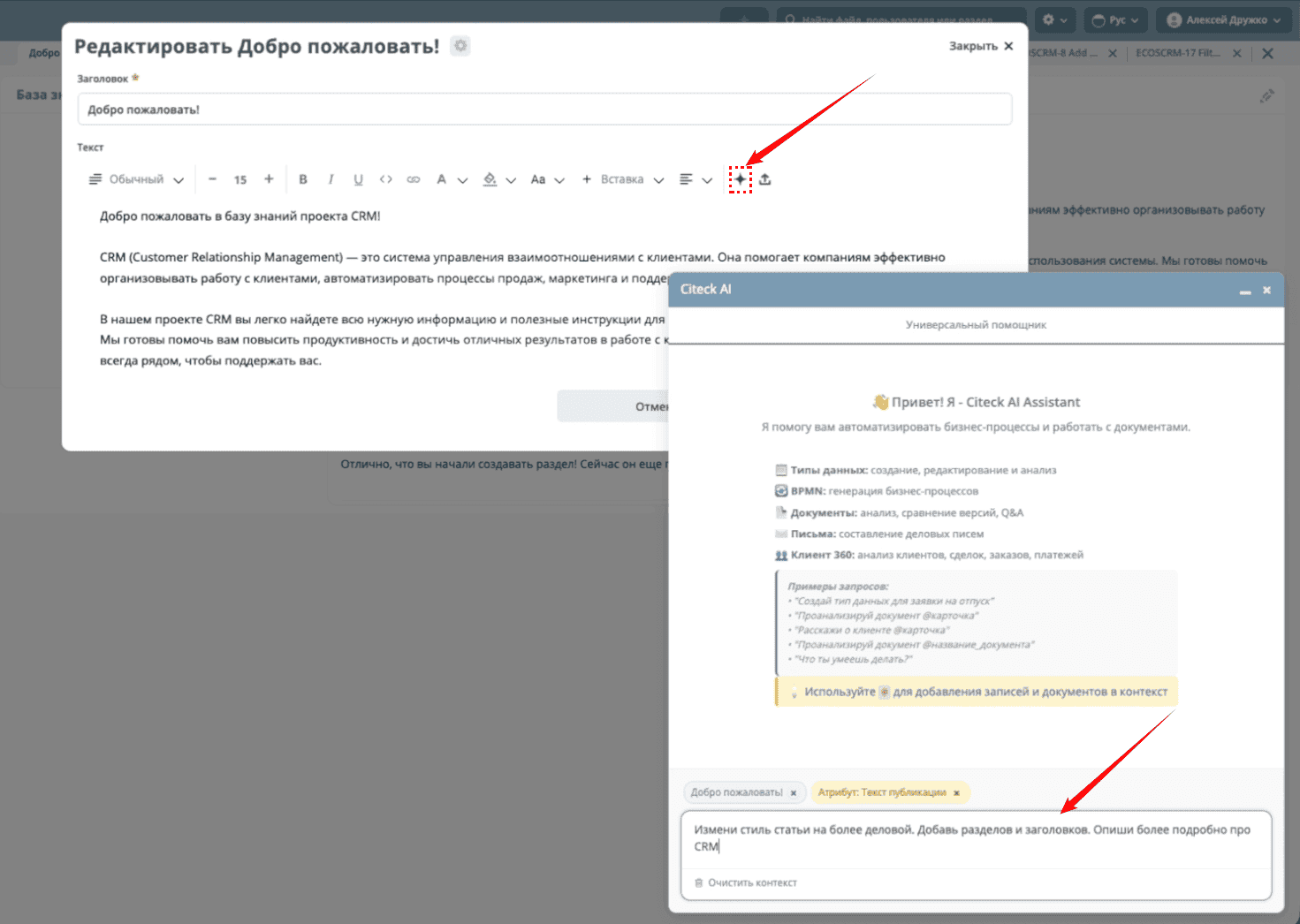
In the editor, you need to invoke the assistant and ask it, for example, to change the article’s style, add or change something:
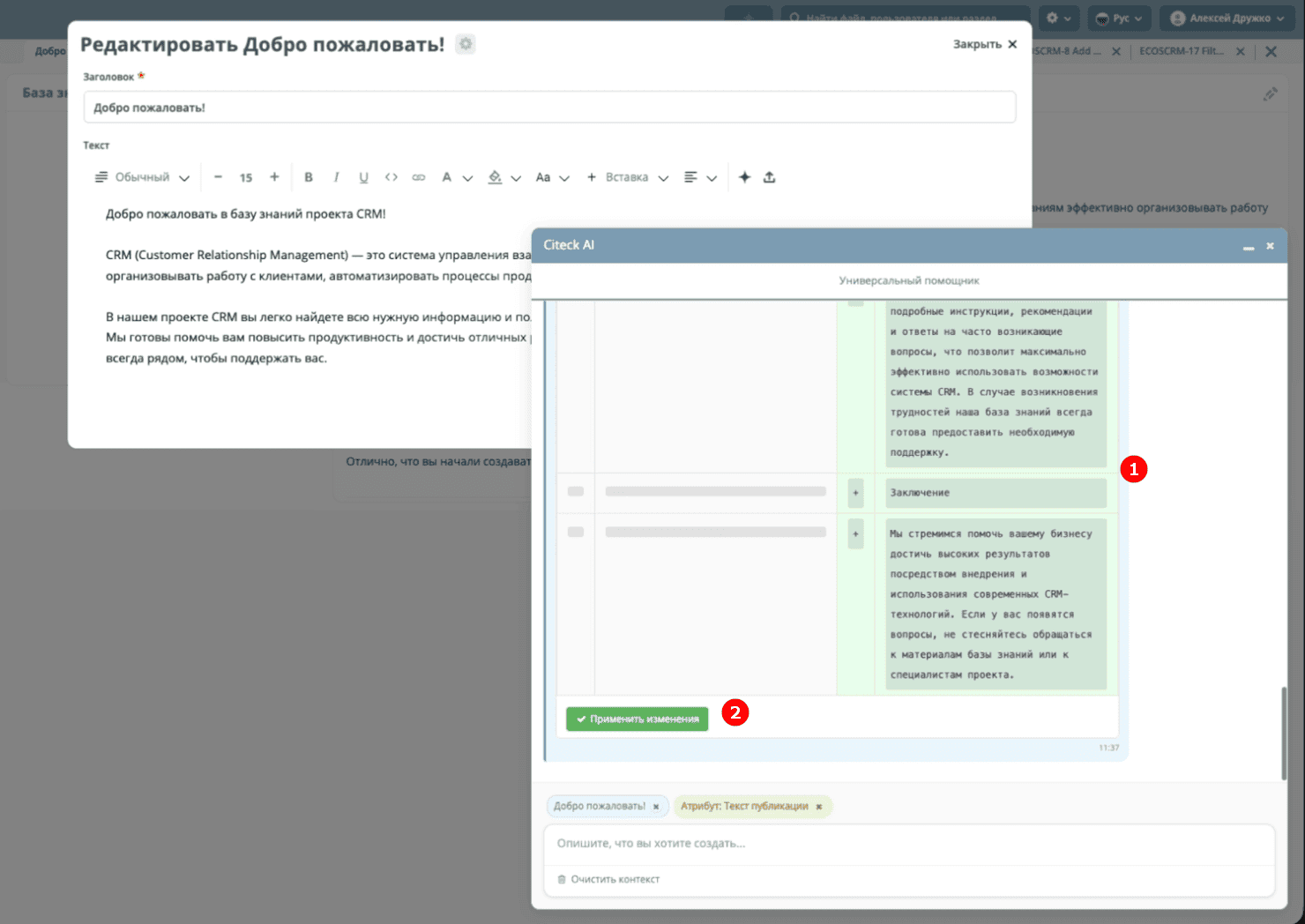
The result will also be provided as a diff-view (1), which shows what specifically was changed. In this mode, when clicking the Apply Changes (2) button, the text is immediately inserted into the current editor so it can be further edited, modified, and then saved.
Targeted Text Editing
You can select a paragraph and invoke the assistant specifically for that paragraph:
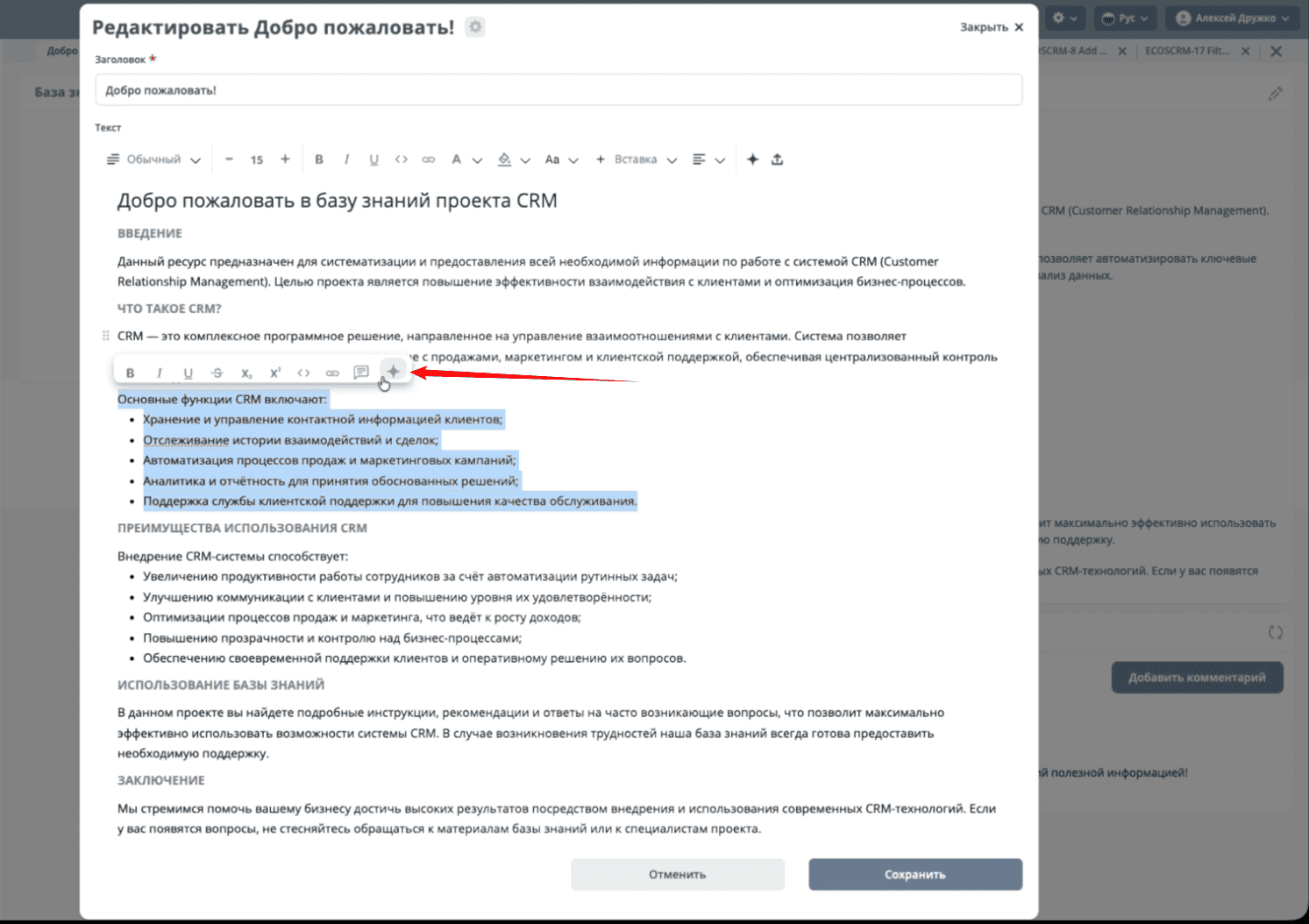
In this case, only the selected text will be changed. For example, let’s ask to add emojis to the text we selected:

The result will also be provided as a diff-view (1), which shows what specifically was changed, then apply the changes (2) and save the article.

Knowledge Base Search (RAG)
New context source - the AI assistant finds relevant information in connected knowledge repositories using vector search
ragSearch tool - search for relevant documents with filtering by Citeck types and repositories (includeRepoIds / excludeRepoIds)
ragGetDocument tool - retrieval of the full document content by identifier
sourceId protection - full content retrieval is only allowed for documents found via a preceding search within the same request
Citeck Documentation Search
Dedicated source - a separate search in the Citeck documentation repository, isolated from the general knowledge base search
SEARCH_DOCUMENTATION agent step - a new plan step for requests that require referring to official documentation
Content cleanup - automatic processing of documentation content before passing it to the LLM