Bulk Mailing
Note
Added in version 2.7.0 of the ecos-notifications microservice
1. General Information
Bulk mailing allows sending notifications to users by configuring messages through the system administrator.
This functionality can be used for system notifications about maintenance, informational messages, or any other mailings.
Features:
sending notifications to a large number of users by splitting recipients into batches;
adding recipients to copy (cc), blind copy (bcc);
delayed sending;
obtaining recipients from different sources, editing recipients before sending;
setting notification text directly;
loading notification text from prepared templates with subsequent adjustment;
sending notifications using a template with a base record selection;
viewing the mailing status.
Note
The bulk mailing functionality includes the capability to send notifications via different providers - email, mobile push, SMS, etc.
Currently, only email sending is implemented. In the future, to support other providers, it will be necessary to implement obtaining different sending addresses depending on the notification type.
The absence of a connection to the SMTP server does not block the microservice operation.
All emails that need to be sent are stored in the database, and as soon as the connection is restored, they will be sent to the recipients.
2. Creating a Bulk Mailing
Bulk mailings are located in the administrator tools, in the “Notification Configuration” block, the “Bulk Mailing” journal.
2.1 Form
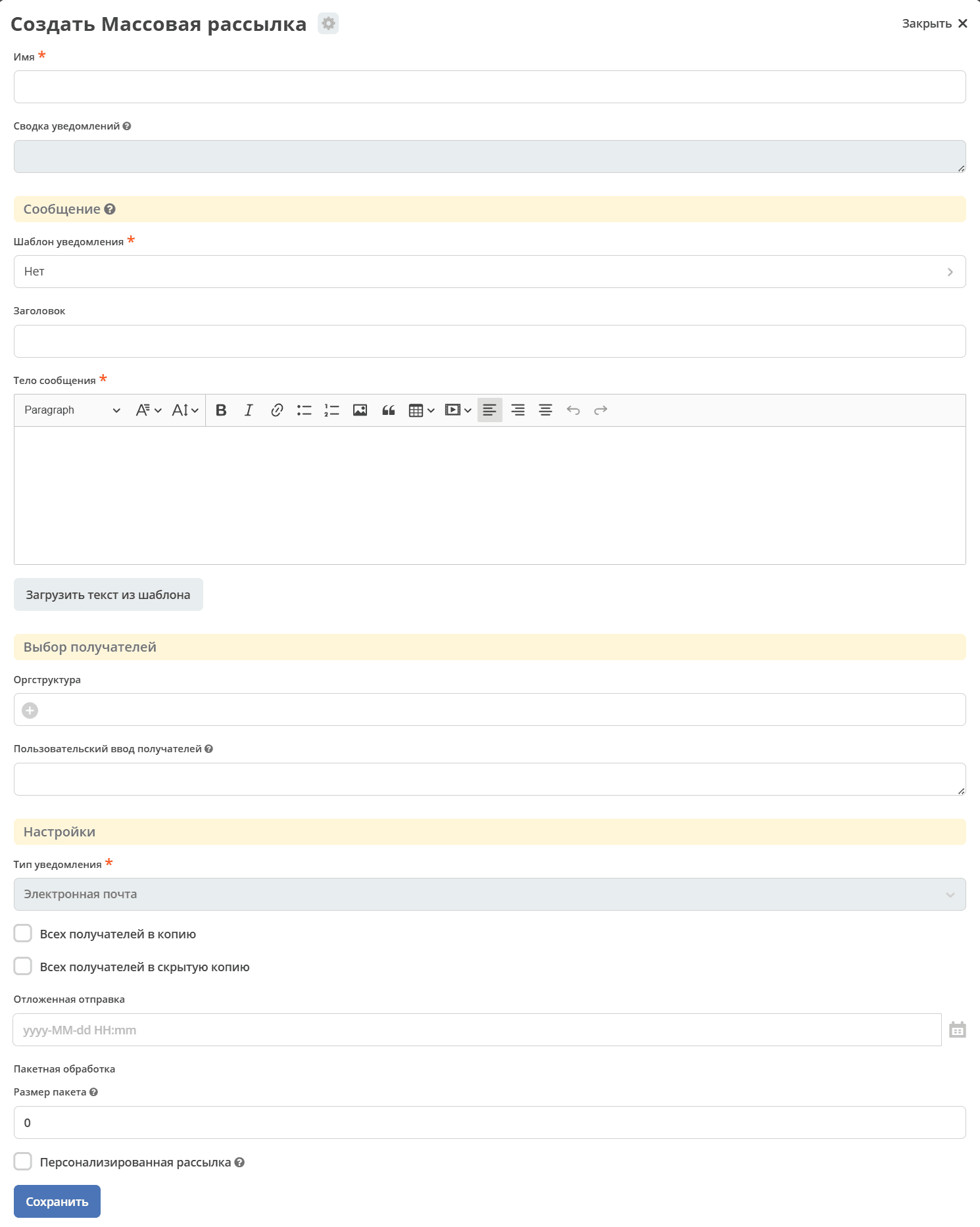
2.2 Field Descriptions
- Name:
Bulk mailing name
- Notifications Summary:
Summary of the number of notifications in different statuses related to the current mailing.
- Notification Template:
Sending a notification using the selected notification template.
- Notification Record:
If a
notification templateis selected, a base recordRef can be chosen to calculate the notification template model.- Subject:
Directly setting the notification subject.
- Message Body:
Directly setting the message body using the richText editor.
Note
Using the Load text from template button, you can load the subject and message body from a prepared template.
- Org Structure:
Selecting message recipients from the org structure component. It is possible to select specific users or a group.
- Manual Recipient Input:
Entering recipients by specifying a direct address (currently only email) or a user’s userName. Separators are
,,;,space,newline - \n. For example, this field can be used to paste a list of recipients copied from Excel.- Notification Type:
Selecting the notification type - email, mobile push, SMS, etc. Currently, only email is implemented.
- Language:
Notification language for the selected
notification template- All recipients to copy (cc):
If selected, all recipients will be added to copy (
cc)- All recipients to blind copy (bcc):
If selected, all recipients will be added to blind copy (
bcc)- Delayed Sending:
Selecting the time for delayed sending. If empty, sending will occur immediately after the action 3.2.2 Send Messages
- Batch Size:
The batch size when splitting the mailing by recipients.
For example, if the size is 0, one message will be sent. If there are 10 recipients and the size is 2, 5 messages will be sent.
This option can be useful if the mail server cannot handle sending a message to a large number of recipients in a single message.- Personalized Mailing:
Sending a personalized message to each recipient
2.3 Batch Mailing Examples
Examples of batch mailing processing logic are described below for a more detailed understanding.
Assume there are 1,000 recipients in the mailing, and the notification type is email, then:
With the default mailing, without additional settings, one message will be sent with 1,000 addresses in the to field.
If Personalized Mailing is selected, 1,000 messages will be sent, each with one address in the to field. If All recipients to copy (cc) or All recipients to blind copy (bcc) is also set, then one address will be added to cc or bcc respectively, while the to field will be empty.
If Batch Size is set to 50, 20 messages will be sent, each with 50 addresses in the to field. If All recipients to copy (cc) or All recipients to blind copy (bcc) is also set, then 50 addresses will be added to cc or bcc respectively, while the to field will be empty.
Some mail servers handle a large number of emails in a single message poorly. Batch processing can solve this problem.
For example, a typical task - Send an informational message to a large number of users, while users should not see other recipients - is solved by setting the batch size and the All recipients to blind copy (bcc) flag.
3. Bulk Mailing Lifecycle
After creation, the bulk mailing transitions to the “New” status, where recipients can be formed, adjusted, and sending can be scheduled.
3.1 Statuses
Statuses are set in the order of description priority:
- New:
Bulk mailing has been created.
- Sending Attempts in Progress:
Set if at least one message encountered an error during sending and retry attempts are being made.
- Error:
Set if at least one message encountered an error during sending, and all retry attempts or the message’s time to live have been exhausted.
- Awaiting Sending:
Set if at least one message of the bulk mailing is in the “Awaiting Sending” status.
- Sent:
Set if none of the cases described above are found and at least one message is in the “Sent” status.
3.2 Actions
3.2.1 Form Recipients
The recipients selected on the bulk mailing form serve as a draft for forming the final list of recipients.
By default, the form allows selecting recipients from the org structure component and manual input (see 2.2 Field Descriptions).
Additionally, there is a built-in capability to obtain additional recipients from a custom source (see 4. Additional Sources for Forming Recipients).
When the “Form Recipients” action is performed, recipients are collected from various sources and unique recipients are formed by address. As a result, you can view and adjust the list of formed recipients in the “Recipients” journal:
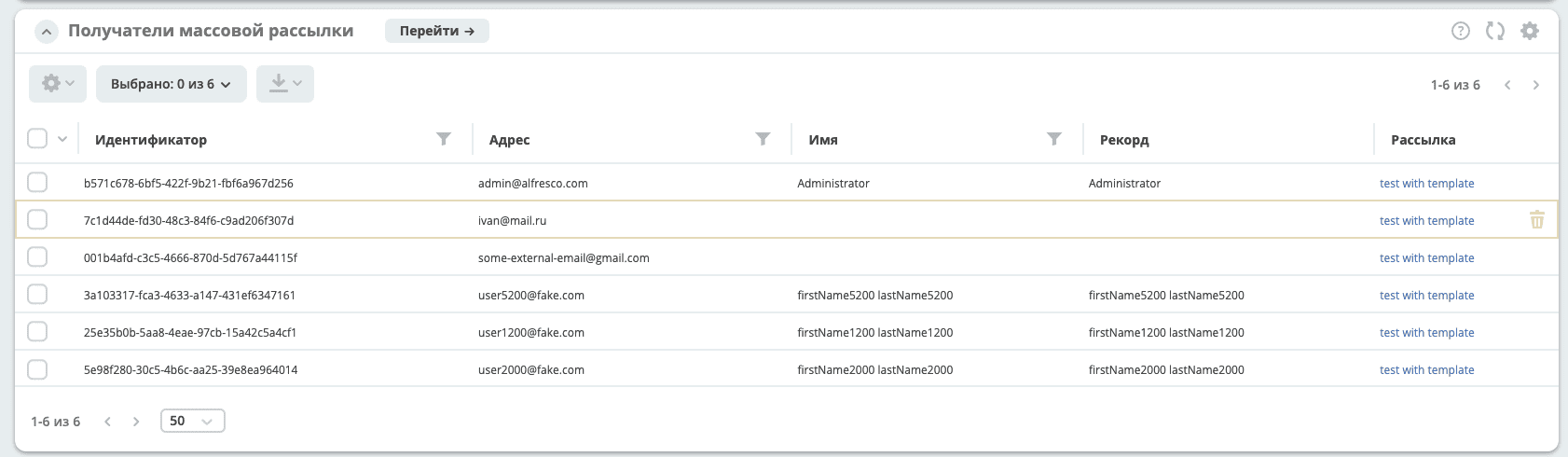
The recipients journal supports deletion and simple text search using OR.
Note
Each time the “Form Recipients” action is run, the old recipients are deleted and new ones are formed.
3.2.2 Send Messages
When the “Send Messages” action is performed, messages are sent according to the specified settings to the recipients from the formed list - the “Recipients” journal.
As a result of the action, notifications will be formed in the “Notifications” journal (see Notification Description), where you can view information about the formed messages and their status.
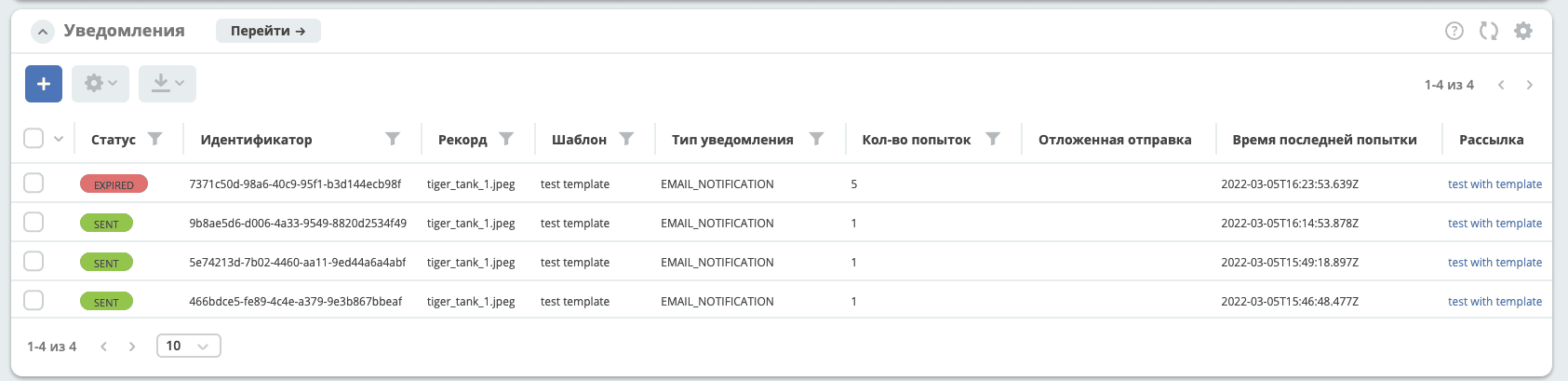
Users with the attribute ecos:isPersonDisabled = true are filtered out, and email messages are not sent to them. Relevant for versions: ecos-com:4.9.15, ecos-com:4.11.4 and ecos-com:4.15.0+
4. Additional Sources for Forming Recipients
Obtaining additional recipients is done through a records dao, which, upon a queryOne request for the attribute recipients[]?json, should return a list of objects in the format:
data class RecipientInfo(

    @AttName("address")
    var address: String? = "",


    @AttName(".disp")
    var disp: String? = "",

    @AttName("record")
    var record: RecordRef? = RecordRef.EMPTY

)
val query = RecordsQuery.Builder()
            .withQuery(bulkMail.recipientsData.custom)
            .withSourceId(provider)
            .withMaxItems(1)
            .build()

recordsService.queryOne(query, "recipients[]?json").asList(RecipientInfo::class.java)
The enumeration of records sources is set via ecos config with the id - bulk-mail-custom-recipients-providers.
id: bulk-mail-custom-recipients-providers
value:
    - notifications/custom-fixed-recipients
    - notifications/custom-mail-recipients
The specified source can be passed the necessary information in the query to calculate recipients. The information passed in the query is taken from bulkMailRecord.recipientsData.custom, where custom is ObjectData.
For example, the custom object can be filled on the overridden bulk mail form, inside the recipientsData container, by creating a nested container custom. Thus, everything filled inside custom will be passed in the query object to the records source.
As a result, when forming recipients, the records api method queryOne will be called with the passed query for each source specified in the config bulk-mail-custom-recipients-providers.