Senders
Note
Added in version 2.9.0 of the ecos-notifications microservice
1. General Information
Sender — a mechanism for routing and processing notifications before their delivery. Each notification is processed by exactly one sender.
Main purposes of the mechanism:
Routing — direct a notification to the appropriate delivery channel or external system
Blocking — prevent notification sending under certain conditions
Custom processing — intercept a notification and execute arbitrary logic (via a command sender)
Sender selection algorithm:
All active senders from the “Senders” journal with a notification type matching the notification’s type are taken.
Senders are sorted by the Order field (ascending).
For each sender, the application conditions are checked:
Template list (if set) — the notification template must be in the list.
Predicate (if set) — the condition is evaluated based on the notification template model attributes.
The first matching sender processes the notification and returns a status.
If the sender returned
SKIPPED, proceed to the next one. IfSENTorBLOCKED— processing is complete.
Note
Processing a notification by multiple senders simultaneously is not supported. One sender — one notification.
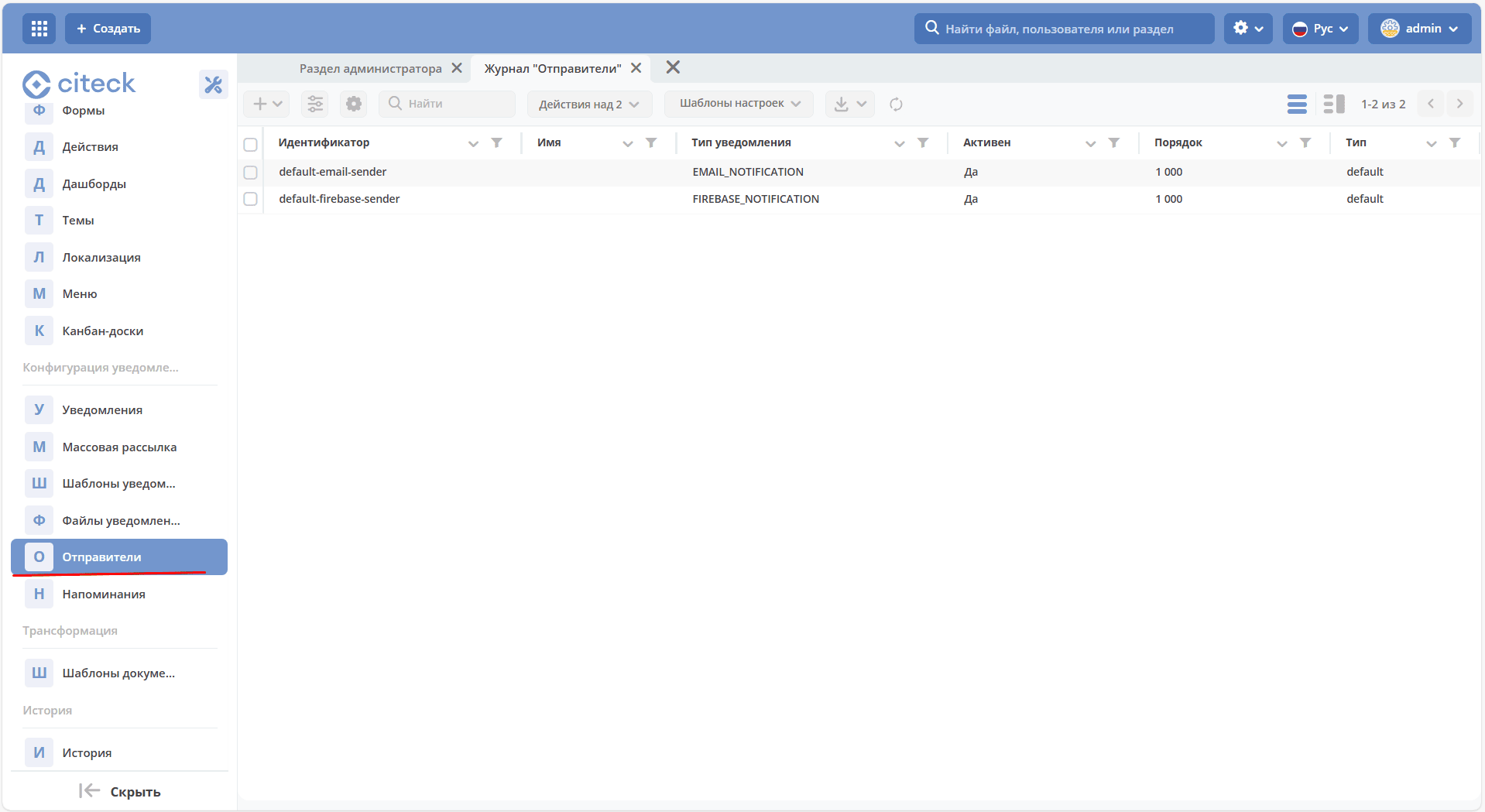
The “Senders” journal is available in the admin section, “Notification Configuration” menu:
2. Sender Fields
Field |
Description |
|---|---|
Id |
Unique sender identifier. |
Name |
Human-readable name. |
Order |
Numeric priority. Senders are iterated in ascending order. Built-in default senders have order 1000. |
Notification type |
The type for which the sender is applied: |
Templates |
The list of templates for which the sender is applied. If the list is empty — the sender is applied to notifications for any template. |
Conditions |
Predicate in JSON format. Evaluated based on notification template model attributes. If not set — the sender has no additional restrictions. For more details on the predicate format, see Predicate Language. |
Type |
Sender type: |
Configuration |
A JSON object with parameters depending on the sender type. |
Example blocking condition by process type (attribute value from the template model):
{
  "t": "eq",
  "a": "process-definition",
  "v": "flowable$confirm"
}
3. Sender Types
3.1 Type default
A sender of type default has no configuration parameters — all sending logic is implemented inside the ecos-notifications microservice.
The “Senders” journal contains two system senders with order 1000 by default:
Id |
Notification type |
Description |
|---|---|---|
|
|
Sending emails via the configured SMTP server. |
|
|
Sending push notifications via Firebase. |
For the default-email-sender sender, optional email signing via an EDS certificate is available. For more details, see Sending Emails Signed with an Electronic Digital Signature (EDS).
3.2 Type command
A sender of type command delegates notification processing to an arbitrary microservice via the commands mechanism (ecos-commands). This allows implementing any logic: blocking, redirection, integration with external systems.
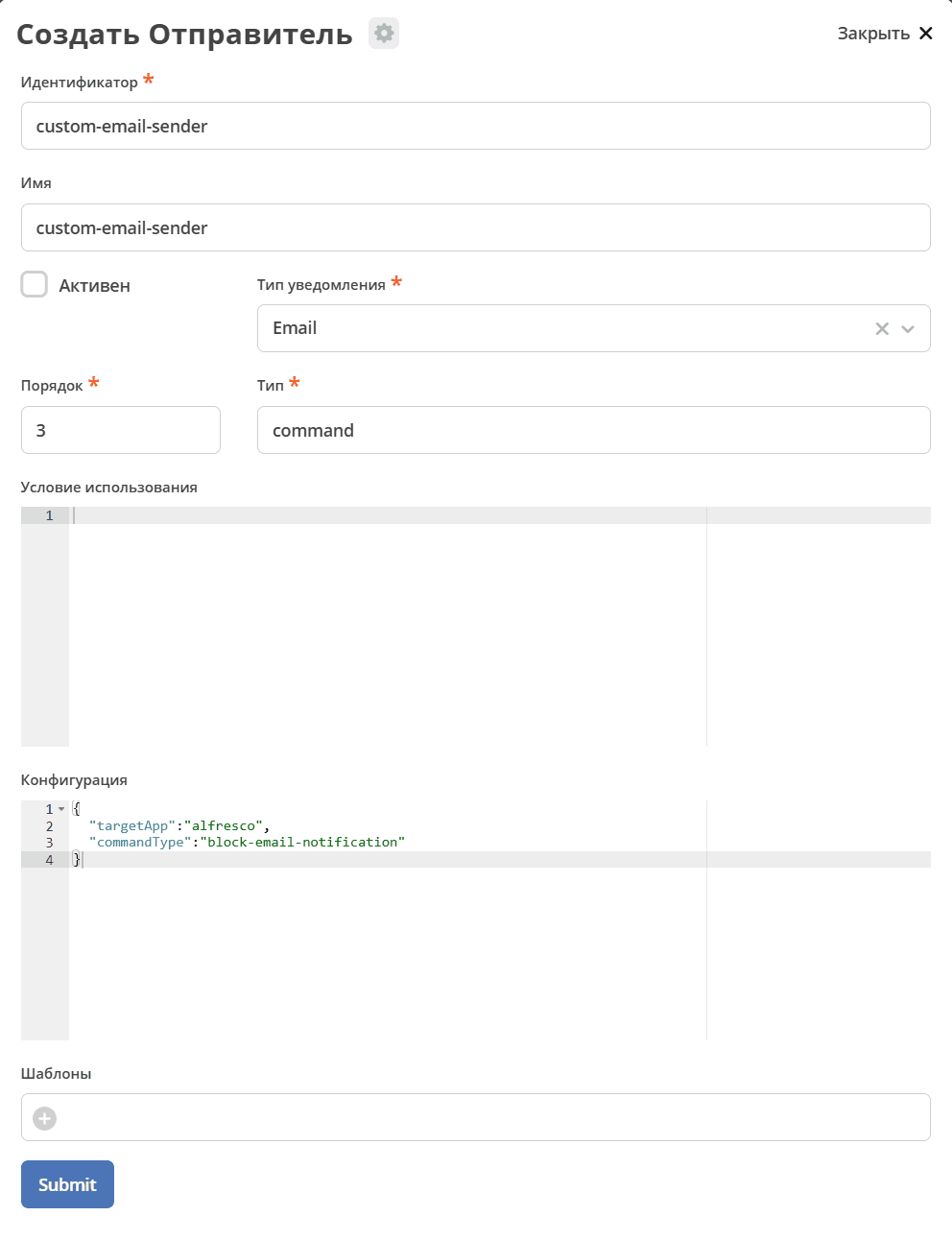
Configuration:
{
  "targetApp": "your-microservice-app-name",
  "commandType": "your-command-type"
}
Parameter |
Description |
|---|---|
|
The name of the microservice application that will handle the command (e.g., |
|
The string command type. Must match the |
Handler implementation in the microservice:
Step 1. Create a command class replicating the structure of SendNotificationCommand (ru.citeck.ecos.notifications.lib.command.SendNotificationCommand).
Annotate it with @CommandType:
@CommandType("your-command-type")
class YourNotificationCommand(
    val id: String,
    val record: EntityRef,
    val title: String,
    val body: String,
    val templateRef: EntityRef,
    val type: NotificationType,
    val lang: String,
    val recipients: Set<String>,
    val from: String,
    val cc: Set<String>,
    val bcc: Set<String>,
    val model: Map<String, Any>
)
Step 2. Implement a command handler returning NotificationSenderSendStatus (ru.citeck.ecos.notifications.lib.NotificationSenderSendStatus):
@Component
class YourNotificationCommandExecutor :
    CommandExecutor<YourNotificationCommand> {

    override fun execute(command: YourNotificationCommand): NotificationSenderSendStatus {
        // Ваша логика: отправить, заблокировать или пропустить
        return NotificationSenderSendStatus.SENT
    }
}
Step 3. Create a sender in the “Senders” journal with type command and the specified targetApp / commandType.
4. Notification Processing Statuses
After receiving a notification, the sender must return one of the statuses from the ru.citeck.ecos.notifications.lib.NotificationSenderSendStatus enumeration:
Status |
Description |
|---|---|
|
Notification successfully sent. No further processing required.
The status in the notification journal will change to
SENT. |
|
Notification sending is blocked. No further processing required.
The status in the notification journal will change to
BLOCKED. |
|
The notification was not processed by the current sender. The platform will proceed to the next sender in priority order. |
5. Typical Scenarios
5.1 Conditional Notification Blocking
The most common use case: prevent notification sending under certain conditions (e.g., for a specific process or template).
To implement:
Create a journal/registry of blocking conditions (e.g., as a separate data type in ecos-model).
Implement a command sender that checks notification parameters against the blocking conditions.
If the condition matches — return
BLOCKED, otherwise —SKIPPED(so the notification is passed to the default sender).
override fun execute(command: YourNotificationCommand): NotificationSenderSendStatus {
    val isBlocked = blockingRulesService.matches(command)
    return if (isBlocked) NotificationSenderSendStatus.BLOCKED
           else NotificationSenderSendStatus.SKIPPED
}
5.2 Sending Notifications to an External System
If the notification must be delivered not via email but to an external system (e.g., Telegram, a corporate messenger), implement a command sender with the appropriate commandType that performs an HTTP call or publishes to a queue. Return SENT so the email sender does not process the notification again.
5.3 Conditional Routing
Multiple command senders with different conditions (predicates) and different commandType values allow routing notifications to different channels depending on model attributes. The order of senders determines priority: the first match processes the notification. Default senders with order 1000 serve as a fallback.