External Tasks
External Tasks are an integration mechanism that allows service tasks of a business process to be executed in external applications. The process engine creates task instances and publishes them to topics, while external workers fetch, process, and complete the tasks via API. This ensures worker independence from the engine, scalability, and support for heterogeneous technology stacks.
This section describes the external task pattern, Spring Boot Starter configuration for the external task client, topic subscription, handler configuration, and error handling.
External Task Pattern
The execution flow of external tasks can be conceptually divided into three stages, as shown in the following figure:
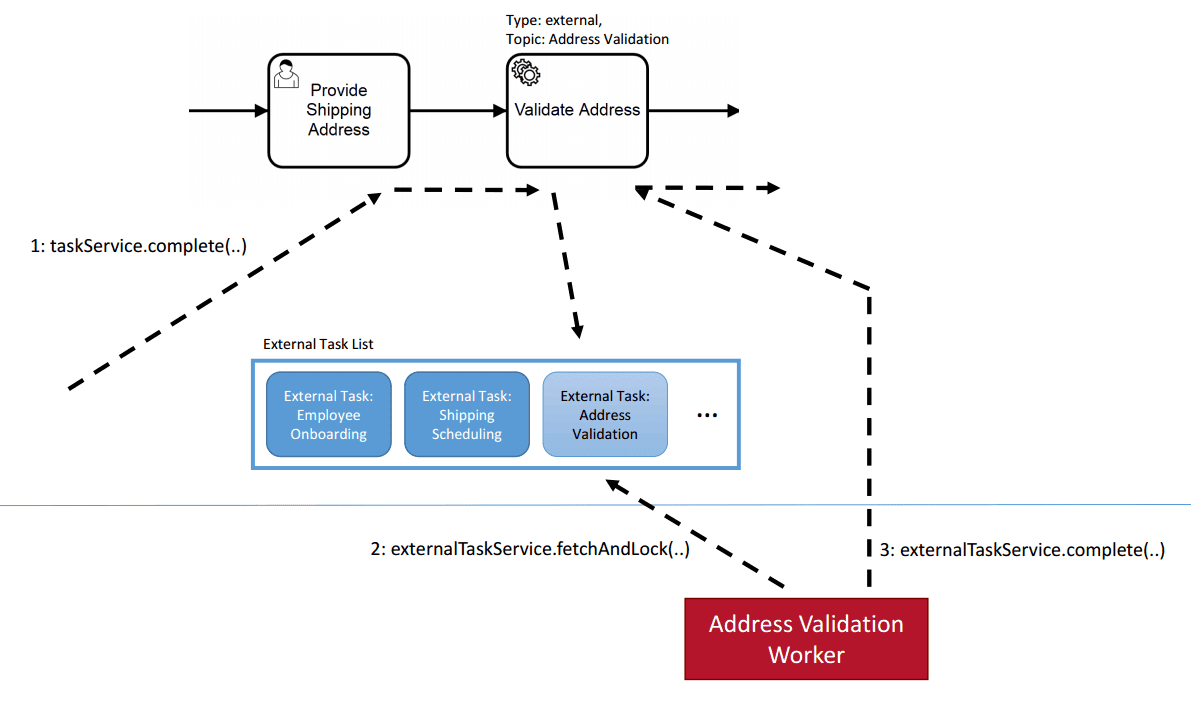
Process Engine: Creating an external task instance
External Worker: Fetching and locking external tasks
External Worker & Process Engine: Completing an external task instance
When the process engine encounters a service task configured for external processing, it creates an external task instance and adds it to the list of external tasks (step 1). The task instance receives a topic that identifies the nature of the task to be performed. At some point in the future, an external worker can fetch and lock tasks for a specific set of topics (step 2). To prevent multiple workers from fetching the same task simultaneously, the task has a timestamp-based lock that is set when the task is fetched. Only when the lock expires can another worker fetch the task again. When the external worker has completed the required task, it can signal the process engine to continue process execution after the service task (step 3).
Note
Analogy with User Tasks
External tasks are conceptually very similar to user tasks. When you first try to understand the external task pattern, it can be helpful to think of it by analogy with user tasks:
User tasks are created by the process engine and added to the task list. The process engine then waits for a human user to request the list, claim the task, and then complete it.
External tasks are similar: An external task is created and then added to a topic. An external application then polls the topic and locks the task. After locking the task, the application can work on it and complete it.
The essence of this pattern is that the entities performing the actual work are independent of the process engine and receive tasks for processing by polling the process engine API. This provides the following advantages:
1. Crossing System Boundaries: Внешний обработчик не обязательно должен работать в том же Java-процессе, на той же машине, в том же кластере или даже на том же континенте, что и движок процесса. Все, что требуется - доступ к API движка процесса (через REST или Java). Благодаря polling-pattern, обработчику не нужно предоставлять какой-либо интерфейс для доступа к движку процесса.
1. Crossing Technology Boundaries: Внешний обработчик не обязательно должен быть реализован на Java. Вместо этого можно использовать любую технологию, которая наиболее подходит для выполнения необходимой задачи и может быть использована для доступа к API движка процесса (через REST или Java).
1. Specialized Workers: Внешний обработчик не обязательно должен быть приложением общего назначения. Каждый экземпляр внешнего обработчика получает имя топика, определяющее характер выполняемого задания. Обработчики могут опрашивать задания только для тех топиков, над которыми они могут работать.
1. Fine-Grained Scaling: При высокой нагрузке, сосредоточенной на обработке сервисных задач, количество внешних обработчиков для соответствующих топиков может быть масштабировано независимо от движка процесса.
1. Independent Maintenance: Обработчики можно разворачивать независимо от движка процесса без нарушения работы. Например, если обработчик для определенного топика имеет простой (например, из-за обновления), это не оказывает немедленного воздействия на движок процесса. Выполнение внешних заданий для таких рабочих происходит плавно: Они сохраняются в списке внешних задач до тех пор, пока внешний обработчик не возобновит работу.
Spring Boot Starter for External Task Client
Ecos Spring Boot Starter External Task Client makes it easy to add a worker for external tasks to a Spring Boot application. To do this, you need to add the dependency:
<dependency>
    <groupId>ru.citeck.ecos.bpmn</groupId>
    <artifactId>ecos-bpmn-external-task-client-springboot-starter</artifactId>
    <version>2.1.0</version>
</dependency>
Note
In the current implementation of the starter, the Spring Boot application must be in the same environment as Citeck.
To use workers from external environments, you can use standard clients.
Subscribing to Topics
The interface that allows implementing custom business logic and interacting with the Engine is called ExternalTaskHandler. A subscription is identified by a topic name and configured with a reference to a ExternalTaskHandler bean.
You can subscribe the client to the topic name processPayment by defining a bean with the return type ExternalTaskHandler and adding an annotation to this bean:
@ExternalTaskSubscription("processPayment")
The annotation requires at least a topic name.
The annotation requires at least a topic name. However, you can apply more configuration parameters, either by referencing the topic name in the spring-boot configuration file, such as application.yml:
ecos.bpm.client:
    subscriptions:
        processPayment:
            process-definition-key: payment_process
            include-extension-properties: true
            variable-names: defaultFlow
Or by defining configuration attributes through the annotation:
@ExternalTaskSubscription(
    topicName = "processPayment",
    processDefinitionKey = "payment_process",
    includeExtensionProperties = true,
    variableNames = ["defaultFlow"]
)
The full list of attributes can be found in the Javadocs..
Note
Properties defined in the application.yml file always override the corresponding attribute defined programmatically through the annotation.
Handler Configuration Example
You can configure the handler as follows:
@Component
@ExternalTaskSubscription("processPayment")
class PaymentProcessorWorker : ExternalTaskHandler {

    override fun execute(externalTask: ExternalTask, externalTaskService: ExternalTaskService) {
        // you business logic here
        externalTaskService.complete(externalTask);
    }

}
If you want to define multiple handler beans in a single configuration class, you can do so as follows:
@Configuration
class PaymentWorker {

    @Bean
    @ExternalTaskSubscription("processPayment")
    fun processPayment(externalTask: ExternalTask, externalTaskService: ExternalTaskService) {
        // you business logic here
        externalTaskService.complete(externalTask);
    }

    @Bean
    @ExternalTaskSubscription("cancelPayment")
    fun processPayment2(externalTask: ExternalTask, externalTaskService: ExternalTaskService) {
        // you business logic here
        externalTaskService.complete(externalTask);
    }

}
Error Handling and Task Completion
The ExternalTaskService interface is used to manipulate the task.
To successfully complete a task, you need to call the complete method:
@Component
@ExternalTaskSubscription("processPayment")
class PaymentProcessorWorker : ExternalTaskHandler {

    override fun execute(externalTask: ExternalTask, externalTaskService: ExternalTaskService) {
        // you business logic here
        externalTaskService.complete(externalTask);
    }

}
But the happy path is not always possible; proper error handling for external tasks is very important to ensure the reliability and stability of process execution.
Business Error Handling
During the execution of an external task, a business error may occur that should be handled in the process via an error event.
To throw a business error, you need to use the handleBpmnError method:
@Component
@ExternalTaskSubscription("processPayment")
class PaymentProcessorWorker : ExternalTaskHandler {

    override fun execute(externalTask: ExternalTask, externalTaskService: ExternalTaskService) {
        // you business logic here
        externalTaskService.handleBpmnError(externalTask, "error-code", "error-message");
    }

}
Technical Error Handling
If a technical error occurs during processing, you can implement a task retry mechanism using the handleFailure method.
For convenience, you can use the annotation ru.citeck.ecos.bpmn.externaltask.impl.retry.ExternalTaskRetry:
@Component
@ExternalTaskSubscription("processPayment")
class PaymentProcessorWorker(
    private val paymentService: PaymentService
) : ExternalTaskHandler {

    @ExternalTaskRetry(
        retries = 3,
        retryTimeout = 10_000,
        incrementRetryTimeout = true
    )
    override fun execute(task: ExternalTask, taskService: ExternalTaskService) {
        // you business logic here
        paymentService.processPayment(task)

        // complete, if successful
        taskService.complete(task)
    }
}
Or implement a task retry mechanism manually, with your own retry logic:
@Component
@ExternalTaskSubscription("processPayment")
class PaymentProcessorWorker(
    private val paymentService: PaymentService
) : ExternalTaskHandler {

    companion object {
        private val log = KotlinLogging.logger {}

        private const val ONE_MINUTE = 1000L * 60
        private const val MAX_RETRIES = 5
    }

    override fun execute(task: ExternalTask, taskService: ExternalTaskService) {
        try {
            // you business logic here
            paymentService.processPayment(task)

            // complete, if successful
            taskService.complete(task)
        } catch (e: Exception) {
            log.error("Error processing external task: ${task.id}", e)

            val retries = getRetries(task)
            val timeout = getNextTimeout(retries)
            taskService.handleFailure(
                task, e.message,
                ExceptionUtils.getStackTrace(e),
                retries, timeout
            )
        }
    }

    private fun getRetries(task: ExternalTask): Int {
        var retries = task.retries
        retries = if (retries == null) {
            MAX_RETRIES
        } else {
            retries - 1
        }
        return retries
    }

    private fun getNextTimeout(retries: Int): Long {
        // increasing interval: 1 additional minute delay after each retry
        return ONE_MINUTE * (MAX_RETRIES - retries)
    }

}
If the number of task processing attempts is exhausted, an incident will be created and the task will be marked as failed, requiring manual incident resolution in the administrative interface.
Combined Error Handling
In some cases, it is possible that both a business error and a technical error may occur during the processing of an external task. In such cases, it is possible to use @ExternalTaskRetry and handleBpmnError together:
@Component
@ExternalTaskSubscription("processPayment")
class PaymentProcessorWorker(
    private val paymentService: PaymentService
) : ExternalTaskHandler {

    @ExternalTaskRetry
    override fun execute(task: ExternalTask, taskService: ExternalTaskService) {
        // you business logic here
        val processResult = paymentService.processPayment(task)
        if (processResult == "DENIED") {
            taskService.handleBpmnError(task, "paymentDenied", "Payment was denied")
            return
        }

        // complete, if successful
        taskService.complete(task)
    }
}
In this case, if a technical error occurs during task processing, for example, an Exception occurs when executing the paymentService.processPayment method due to network problems, the task will be retried according to the @ExternalTaskRetry settings. After successful payment processing, if the payment was declined, a business error will be thrown; otherwise, the task will be completed successfully.
You can also implement a case where, after several unsuccessful attempts to process a task due to a technical error, you need to throw a business error:
@Component
@ExternalTaskSubscription("processPayment")
class PaymentProcessorWorker(
    private val paymentService: PaymentService
) : ExternalTaskHandler {

    companion object {
        private  const val ATTEMPT_THRESHOLD = 1
    }

    @ExternalTaskRetry
    override fun execute(task: ExternalTask, taskService: ExternalTaskService) {
        try {
            // you business logic here
            val processResult = paymentService.processPayment(task)

            // complete, if successful
            taskService.complete(task)
        } catch (e: Exception) {
            val retries = externalTask.retries
            if (retries >= ATTEMPT_THRESHOLD) {
                // If the number of retries is greater than the threshold, then throw an BPMN error
                externalTaskService.handleBpmnError(externalTask, "paymentDenied", ExceptionUtils.getStackTrace(e))
            } else {
                // Otherwise throw root exception. Its will be handled by @ExternalTaskRetry
                throw e
            }
        }
    }
}
Note
When working with external tasks and modeling the process, it is necessary to consider that external tasks are executed asynchronously, and error handling is the responsibility of the external worker.
If you use recordsService mutation when processing an external task, you must consider that the external task processing code runs without a transaction. You can mark the method with the annotation ru.citeck.ecos.webapp.lib.spring.context.txn.RunInTransaction to execute the code within a transaction.
More detailed documentation on external tasks can be found at the following links: