Saving a document as a draft
If the ability to create and edit records without sending them through the process is required, Citeck has a system flag “Draft” for this purpose.
Note
The system flag “Draft” is not related to statuses when configuring the type.
To create a record in the “Draft” state on a form, you need to add a button with the Submit action and write draft (without quotes) in the “Save state” field.
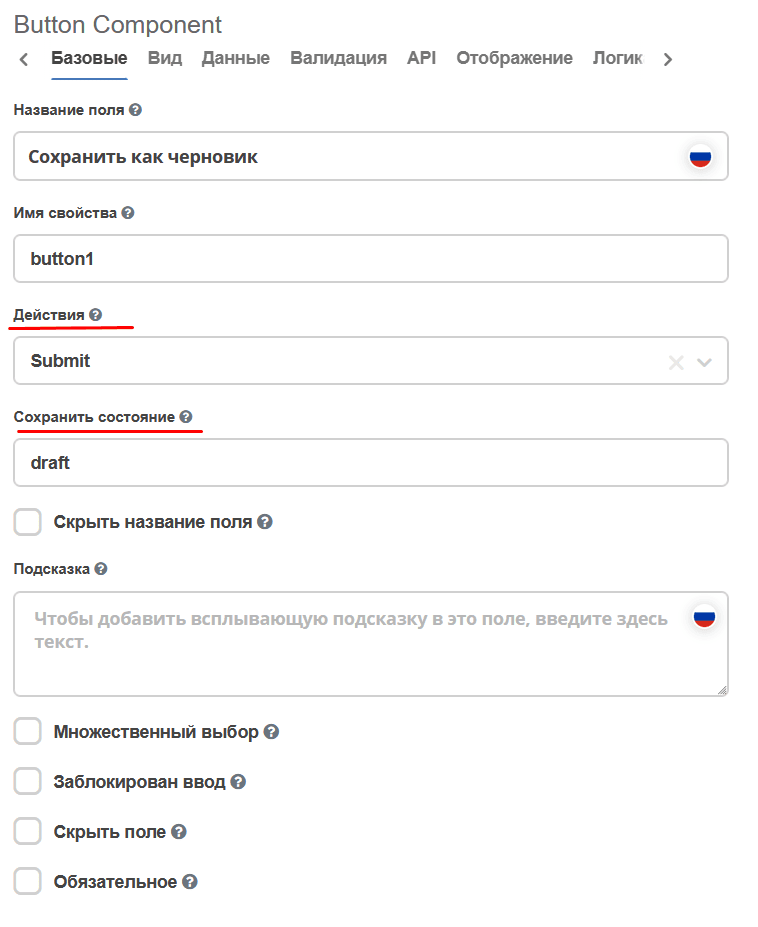
After this configuration, when this button is clicked on the form, validation of required fields will be disabled and the system will allow creating a record. Subsequently, it can be edited without starting the business process.
To make the record active and start the process, use a button with the Submit action without the “Save state” setting filled in.
If you need to create a record with the “Draft” flag programmatically, you should specify the _state attribute as draft during mutation. When you need to exit the “Draft” state, send a mutation with the _state attribute set to an empty string - “”.
To get the current value of the “Draft” flag, you can use the _isDraft?bool attribute.